
LowRezMC - Minecraft Skins & Skin History
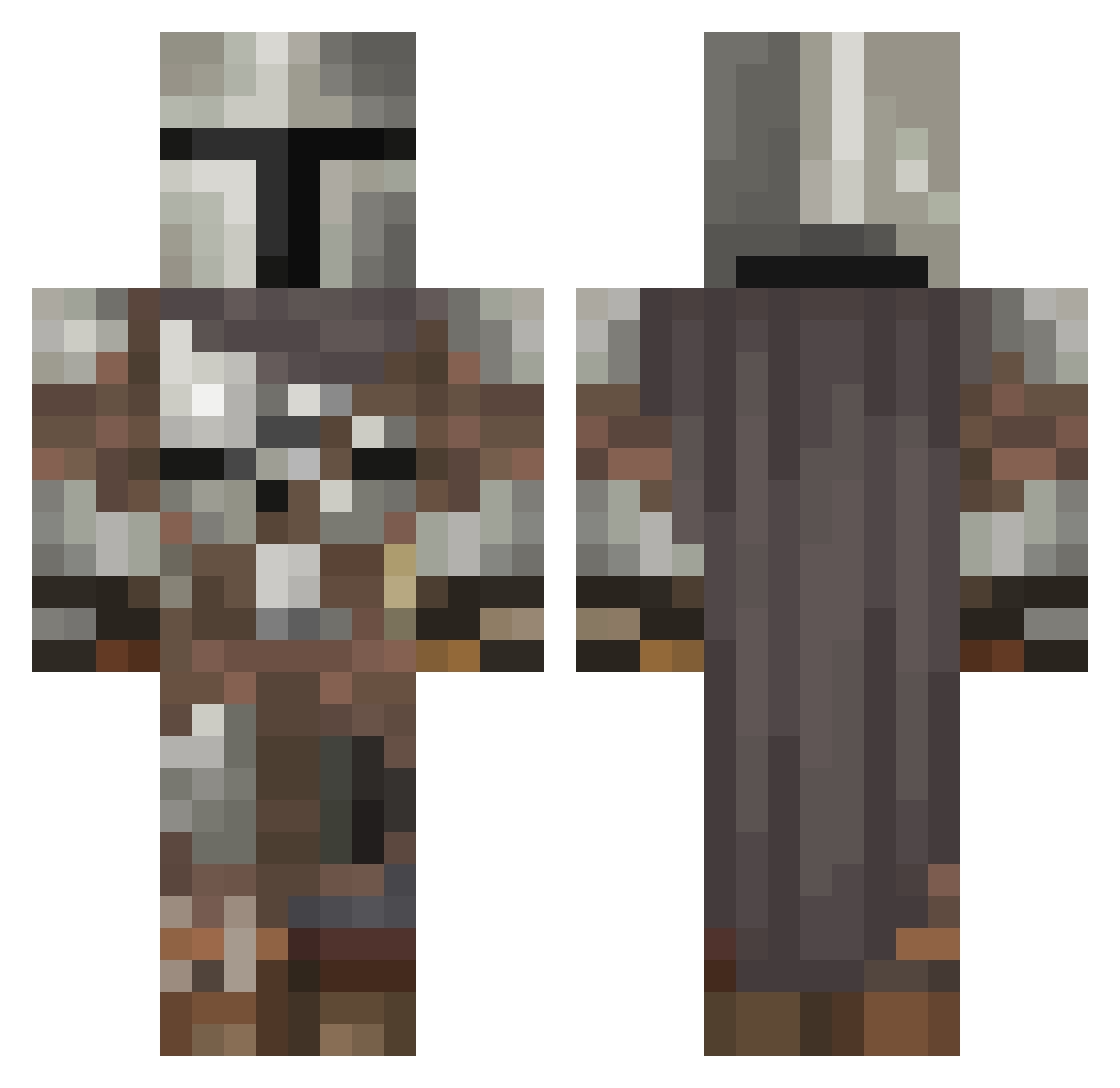
Current Minecraft skin of the player LowRezMC, loaded from the official Mojang API. Rotate the 3D model with your mouse or finger, then download the skin as a PNG file and use it in Minecraft: Bedrock Edition or Java Edition for free. When LowRezMC changes their skin, this page updates automatically and the old skin stays in the history below.
Other players with this skin (605)
LowRezMC was the 603rd player we have seen with this skin, first spotted on 09.11.2026. The same skin was seen on these players. Open a nickname to see their current skin and skin history.
 manglex1 Comfort_Misha hannahfaith1321 nunyacain POGGERS2021 Vip118 __Forever__ BailsZA kidgaming Xbox_isfor_Noobs SirMelteed SwiftyPlays08 bytor180 Joshi121 Sishi_1235 Firepaw202 ItchyMatt17 Babysmurf15 Sherman2903 KutzKastle BrokenBucket248 Goblinbuzz wangiano neptune123098 TheBull777 Atticus0703 OGDinfarerbok Peki12 Deltapocalypse hemenway55 BrennenBS JohngiYT BartlettPear wxiy RaffaS Sblurr Fazersuklaa96 Rinigusi wipsowipso DreiDcut Diogenes7920 MorganTex mojibi2000 zqnce88 ChunkyMunky13 Nuttock CLEPERMAN DBassett ColeW81 Deadlyboi leonking11223344 PERCS147 HisDudeness40 mihnea200 boggie1120 Thornes_03 The_Sig PapaPaedro NinjasStoleMyTV rsample29
More The Mandalorian Minecraft skins
See all 645 The Mandalorian skins
How to install the LowRezMC skin
- Press the Download button above to save the skin as a PNG file.
- Minecraft: Bedrock Edition (PE): open the Dressing Room from the main menu (or tap your character → Edit Character), go to Classic Skins → Owned, press the + (new skin) button, choose the downloaded PNG and pick the Classic (Steve) model. Works on PC and mobile; consoles cannot import custom skins.
- Minecraft: Java Edition: open the Minecraft Launcher, go to the Skins tab, click New Skin, load the PNG, pick the Classic (Steve) model and press Save & Use. You can also upload it at minecraft.net → Profile → Change Skin.
The skin does not show up after import - what should I do?
Restart Minecraft and open the Dressing Room again - imported skins sometimes appear only after a restart. Also make sure you selected the imported skin and picked the Classic (Steve) model.
Which model should I choose, Classic or Slim?
This skin is designed for the Classic (Steve) model. If you pick the wrong model, the arms of the skin will look stretched or squeezed.
Is the skin of LowRezMC free to download?
Yes. Press Download, save the PNG file and use it in Minecraft: Bedrock Edition or Java Edition - no payment or registration needed. The skin also works on multiplayer servers and Realms.
More skins
Looking for more? Go back to all Minecraft skins and check the top skins of the week, month and all time, or find any player's skin by nickname.