
LoneWolf1584 - Minecraft Skins & Skin History
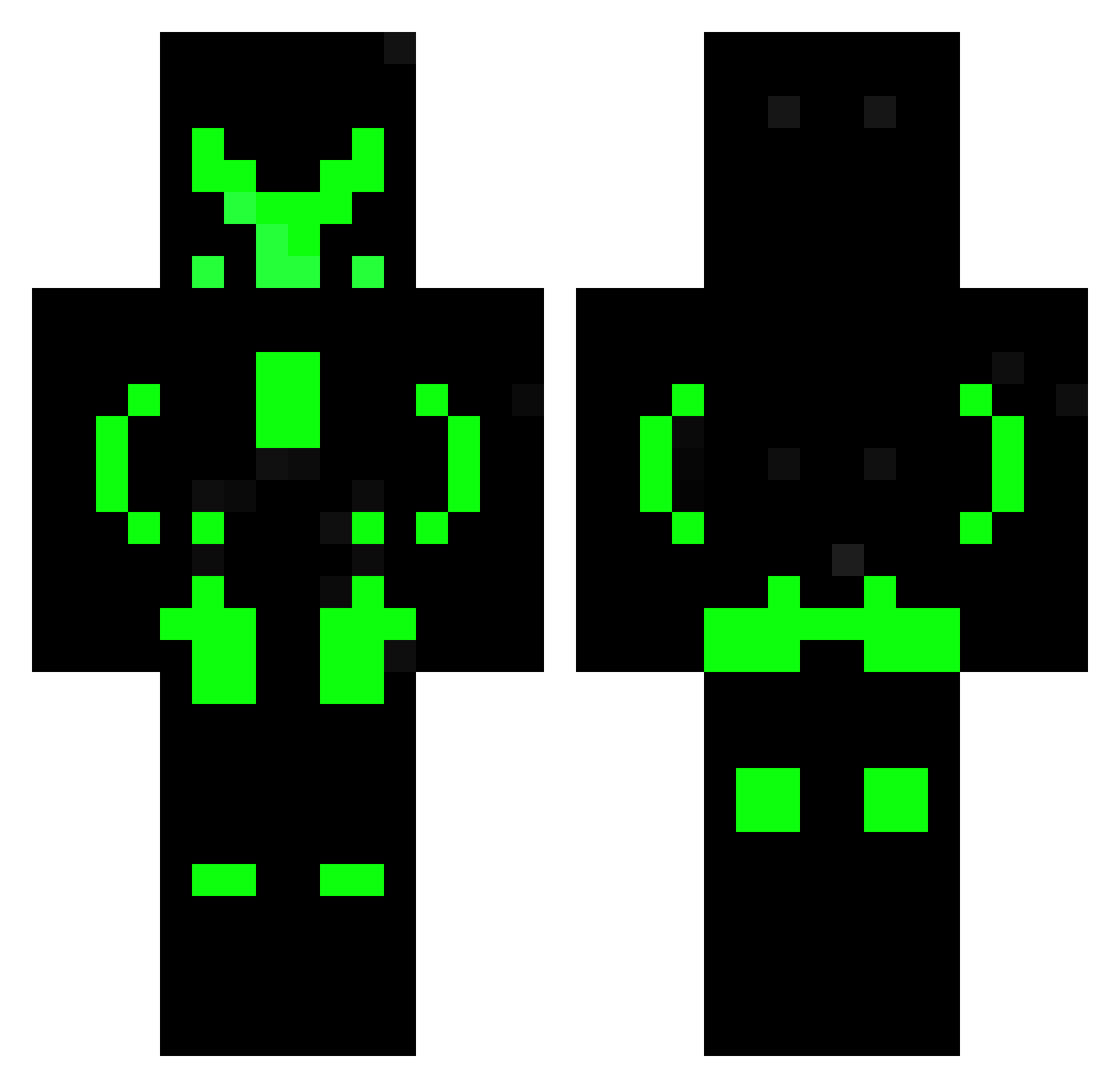
Current Minecraft skin of the player LoneWolf1584, loaded from the official Mojang API. Rotate the 3D model with your mouse or finger, then download the skin as a PNG file and use it in Minecraft: Bedrock Edition or Java Edition for free. When LoneWolf1584 changes their skin, this page updates automatically and the old skin stays in the history below.
Other players with this skin (603)
LoneWolf1584 was the 43rd player we have seen with this skin, first spotted on 31.07.2026. The same skin was seen on these players. Open a nickname to see their current skin and skin history.
 le_gamer25 Golagope YunusemregTR12 ZeroARK Jannoloro DerWahreOli Szymon474 Oguzhan_33 HairyPlum Kevin77bumblebee Duplexier Netwxrkz Jul3s64 knick0907 Flashkiller996 FaKiKa21 Apollyon25 D3XU5 Tobb123 Fazqtuh gymnastics141210 Slim_Caustic gcms_alt DavideCreations Pake_Seta thelegendy101 gustik25 JL_Watson_ Lee_JaeWony Oshisuma KEREMabe Casey_b24 SiBum BrawlNazar Demeteruss TG09game dedly_greguy ExaLeon Trickshot_TorCP DarekJavier11 Kuren1216 Tobinator__009 Zeratok xn27 kratschi__jr SrMackenzie sesila Daro_Dragon tymofis Fkserpente
 MArGOSnipeR Kanskje taironi NarutoBR GaiusNerfherder Arkam_Knight124 RamirezKun
 DavizinhoTC Vortex_323 RweiQAQ
More Neon Armor Minecraft skins
How to install the LoneWolf1584 skin
- Press the Download button above to save the skin as a PNG file.
- Minecraft: Bedrock Edition (PE): open the Dressing Room from the main menu (or tap your character → Edit Character), go to Classic Skins → Owned, press the + (new skin) button, choose the downloaded PNG and pick the Classic (Steve) model. Works on PC and mobile; consoles cannot import custom skins.
- Minecraft: Java Edition: open the Minecraft Launcher, go to the Skins tab, click New Skin, load the PNG, pick the Classic (Steve) model and press Save & Use. You can also upload it at minecraft.net → Profile → Change Skin.
The skin does not show up after import - what should I do?
Restart Minecraft and open the Dressing Room again - imported skins sometimes appear only after a restart. Also make sure you selected the imported skin and picked the Classic (Steve) model.
Which model should I choose, Classic or Slim?
This skin is designed for the Classic (Steve) model. If you pick the wrong model, the arms of the skin will look stretched or squeezed.
Is the skin of LoneWolf1584 free to download?
Yes. Press Download, save the PNG file and use it in Minecraft: Bedrock Edition or Java Edition - no payment or registration needed. The skin also works on multiplayer servers and Realms.
More skins
Looking for more? Go back to all Minecraft skins and check the top skins of the week, month and all time, or find any player's skin by nickname.