
Lolekk12333 - Minecraft Skins & Skin History
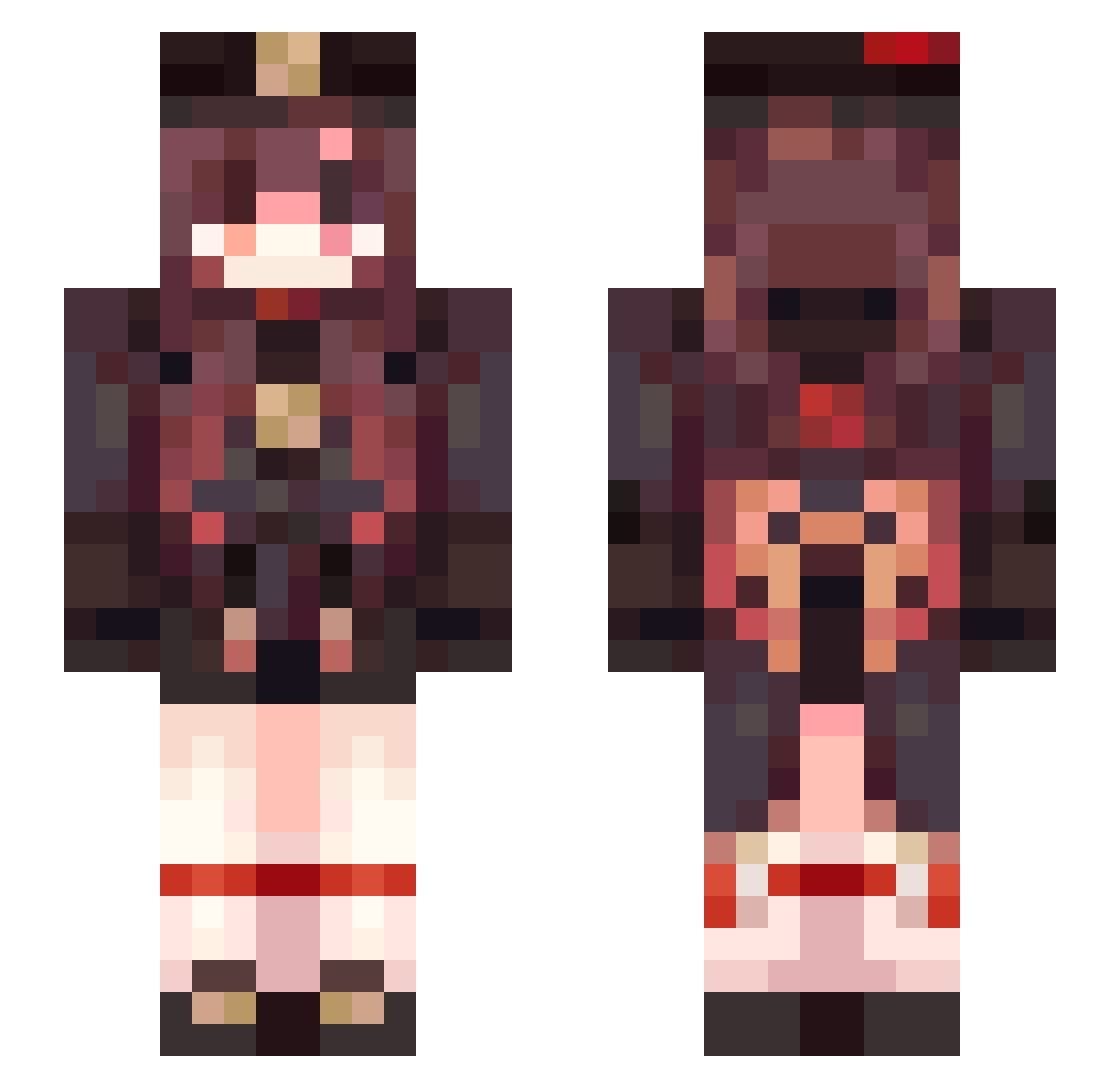
Current Minecraft skin of the player Lolekk12333, loaded from the official Mojang API. Rotate the 3D model with your mouse or finger, then download the skin as a PNG file and use it in Minecraft: Bedrock Edition or Java Edition for free. When Lolekk12333 changes their skin, this page updates automatically and the old skin stays in the history below.
Other players with this skin (74)
Lolekk12333 was the 28th player we have seen with this skin, first spotted on 04.09.2026. The same skin was seen on these players. Open a nickname to see their current skin and skin history.
 dialy_ samwu2004 Pepsicola_M bub_paws Sinnered Dogo1985 Wo_qubaigei TenneUWU ouoline FOOLISHER Perjaka lMCI xAstriiq ziggusun_99 InfinitYLeo WindowsXD_
 popartyaner LuluWithAnnie _LubiePierogi_ Znus mojon67 Benoit110602 Fearofhardship w_isp oOne_Pieceo hao0523 layttikk jb0930 Revitalise reflate BobNL
 zankota NELVANY Tendoug Elsiryn maomi_xia IVE_Heya typergeo salmonfins xiaolin_naizi kochamkotki123 Dcano3550 Daymilk gia_mc Onellama Meogy Guadita12 reh1996 hunteeeLEGIT Mr_Pedzlowski A61 RenMaIe crimscn_ TibberAgotti elme04 PuthySquirt hyunwol12 Cesar_fac notinventivee w1ngrnan
More Hu Tao Minecraft skins
How to install the Lolekk12333 skin
- Press the Download button above to save the skin as a PNG file.
- Minecraft: Bedrock Edition (PE): open the Dressing Room from the main menu (or tap your character → Edit Character), go to Classic Skins → Owned, press the + (new skin) button, choose the downloaded PNG and pick the Slim (Alex) model. Works on PC and mobile; consoles cannot import custom skins.
- Minecraft: Java Edition: open the Minecraft Launcher, go to the Skins tab, click New Skin, load the PNG, pick the Slim (Alex) model and press Save & Use. You can also upload it at minecraft.net → Profile → Change Skin.
The skin does not show up after import - what should I do?
Restart Minecraft and open the Dressing Room again - imported skins sometimes appear only after a restart. Also make sure you selected the imported skin and picked the Slim (Alex) model.
Which model should I choose, Classic or Slim?
This skin is designed for the Slim (Alex) model. If you pick the wrong model, the arms of the skin will look stretched or squeezed.
Is the skin of Lolekk12333 free to download?
Yes. Press Download, save the PNG file and use it in Minecraft: Bedrock Edition or Java Edition - no payment or registration needed. The skin also works on multiplayer servers and Realms.
More skins
Looking for more? Go back to all Minecraft skins and check the top skins of the week, month and all time, or find any player's skin by nickname.