
LoafSan - Minecraft Skins & Skin History
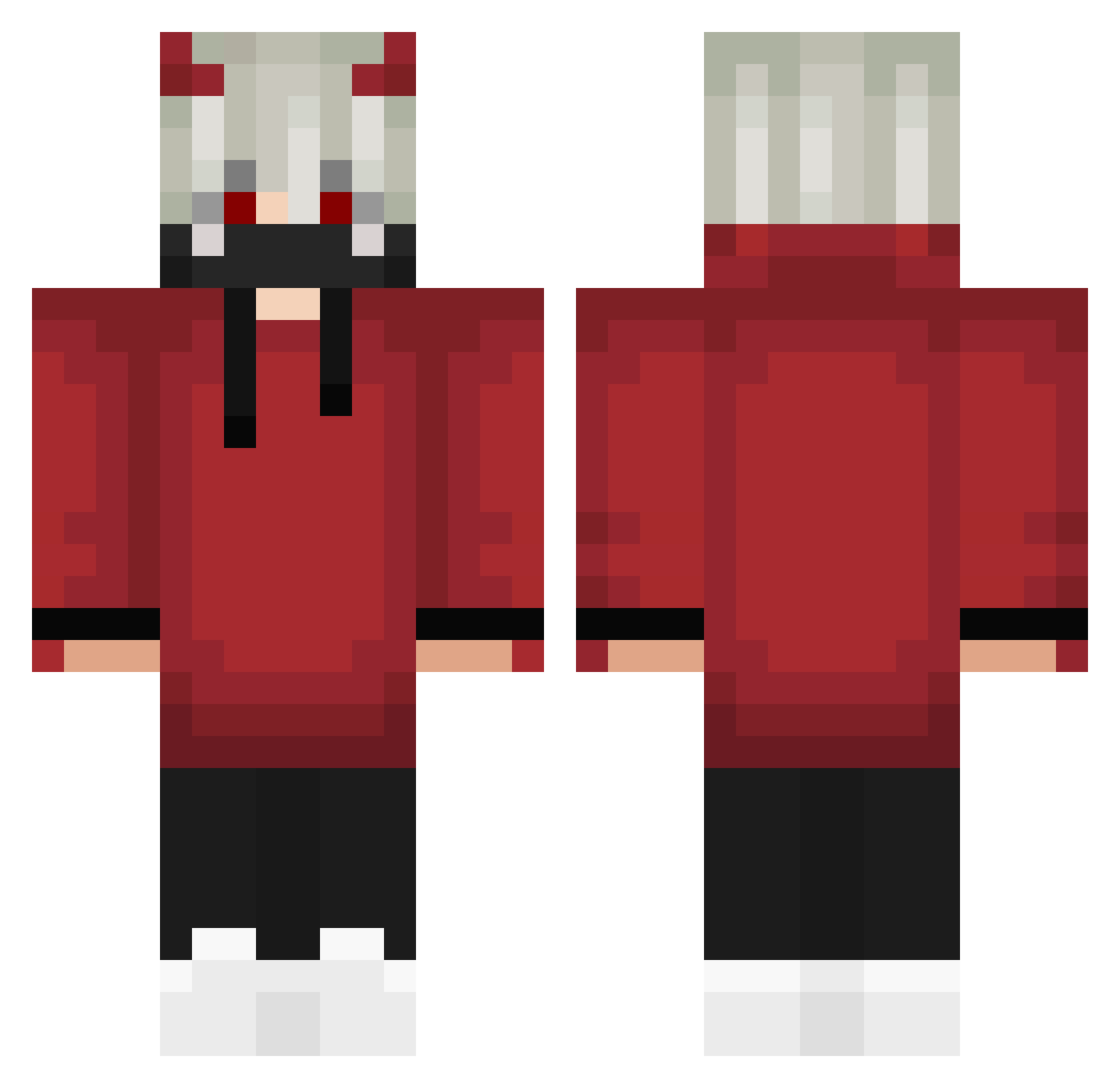
Current Minecraft skin of the player LoafSan, loaded from the official Mojang API. Rotate the 3D model with your mouse or finger, then download the skin as a PNG file and use it in Minecraft: Bedrock Edition or Java Edition for free. When LoafSan changes their skin, this page updates automatically and the old skin stays in the history below.
Other players with this skin (301)
LoafSan was the 23rd player we have seen with this skin, first spotted on 31.07.2026. The same skin was seen on these players. Open a nickname to see their current skin and skin history.
 wvwwwvwwwwwwwwww spiderslayer500 Flyiler UndoneCookie90 drwam12345 _ByCreo kohekohe5525 toku12345678 ARDARYHME Jonesdaniel Natsuo_H CeresHoshi DevilAngel69 OnlyChill PixelatedXfinity ActualDart65493 joaoeuteamo Emirhan1905 KURO112 AeterneVictrix Ecfera karasu14 rx22 Ulan2137
 TEENS76 Keroplays
 Tramscraft SnowDrop000 NurilDzn64 zebradust Dings_Bums NotRealBixi KuRobin920 muravita4019 NotMrGamerXD_ maimai_27 Atombeast1 Simp_Wilson yotugi25 FateOfDarkHollow MoiSoba Lovingprincewolf FunGirl0909 Potiay ARGENTE_007 Shiro_Sensei21 Kiss_My_FaZe Mctoddiynho Gibba848 jesus_crazy_deus SHRKYTL zhuchen333 wFnDevil meltykiss2022 LucasBacer kayo00w2012 FreezePlay0 SendWind epic_erim abssaisse
More Devil Minecraft skins
How to install the LoafSan skin
- Press the Download button above to save the skin as a PNG file.
- Minecraft: Bedrock Edition (PE): open the Dressing Room from the main menu (or tap your character → Edit Character), go to Classic Skins → Owned, press the + (new skin) button, choose the downloaded PNG and pick the Classic (Steve) model. Works on PC and mobile; consoles cannot import custom skins.
- Minecraft: Java Edition: open the Minecraft Launcher, go to the Skins tab, click New Skin, load the PNG, pick the Classic (Steve) model and press Save & Use. You can also upload it at minecraft.net → Profile → Change Skin.
The skin does not show up after import - what should I do?
Restart Minecraft and open the Dressing Room again - imported skins sometimes appear only after a restart. Also make sure you selected the imported skin and picked the Classic (Steve) model.
Which model should I choose, Classic or Slim?
This skin is designed for the Classic (Steve) model. If you pick the wrong model, the arms of the skin will look stretched or squeezed.
Is the skin of LoafSan free to download?
Yes. Press Download, save the PNG file and use it in Minecraft: Bedrock Edition or Java Edition - no payment or registration needed. The skin also works on multiplayer servers and Realms.
More skins
Looking for more? Go back to all Minecraft skins and check the top skins of the week, month and all time, or find any player's skin by nickname.