
Kynor - Minecraft Skins & Skin History
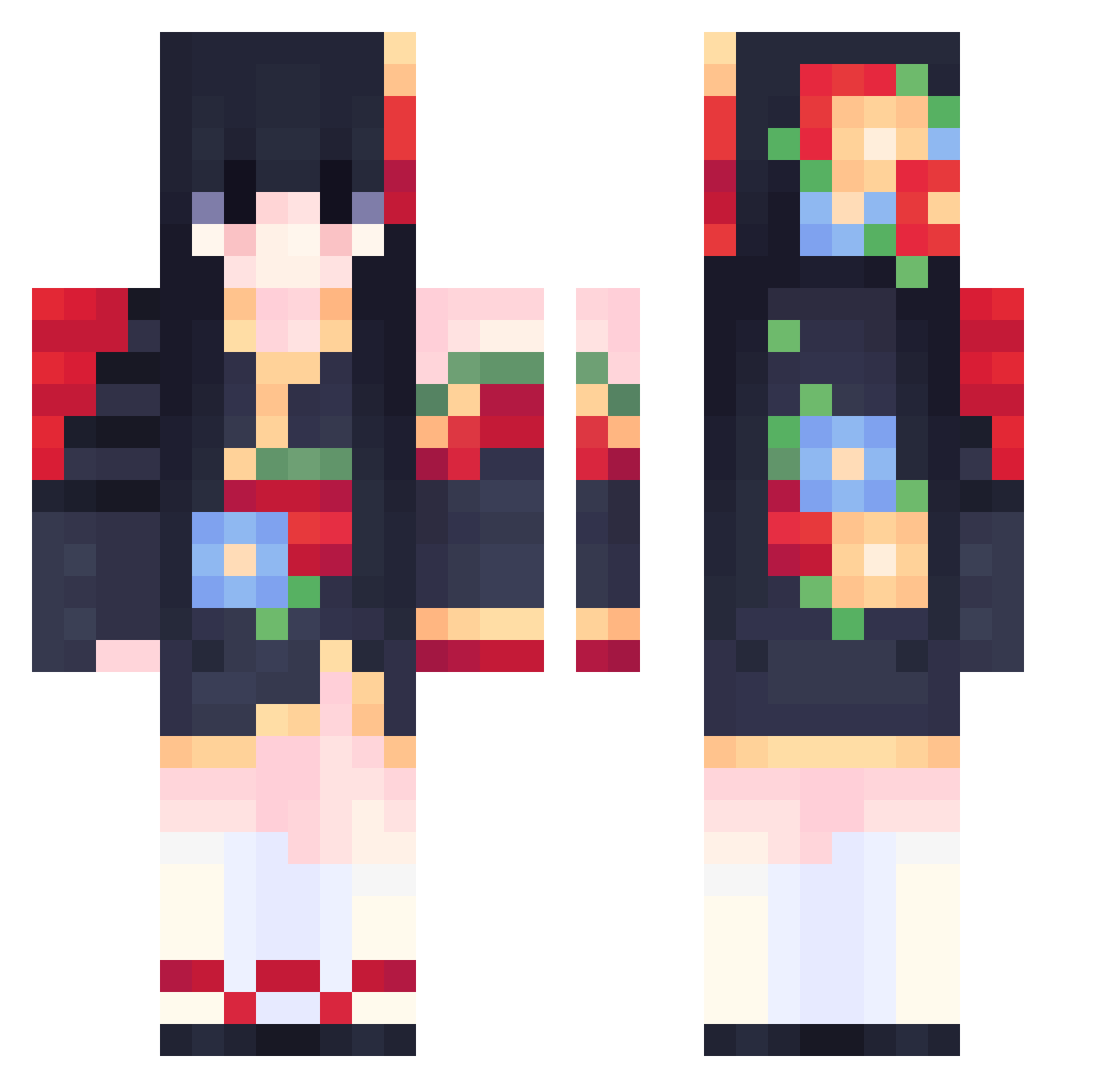
Current Minecraft skin of the player Kynor, loaded from the official Mojang API. Rotate the 3D model with your mouse or finger, then download the skin as a PNG file and use it in Minecraft: Bedrock Edition or Java Edition for free. When Kynor changes their skin, this page updates automatically and the old skin stays in the history below.
Other players with this skin (556)
Kynor was the 194th player we have seen with this skin, first spotted on 28.08.2026. The same skin was seen on these players. Open a nickname to see their current skin and skin history.
 Blackanana zjfDaDa Ely_mikan LORDTarnished beliinda Netzach_A starlight0409 GRORIGIN Raulmix
 FoolFallen dudbsk123 goul03 Nalyze Azouix Mariie2801 Ella_813 XUNBING fa_mulan07 Doomcookie25 SandJoay FireFly_Julius zcael Okkny Equinoxflower1 Dark1_1Light
 SkullBlood22 VibeVee 19Snow09 Jedicore007 han1278 IyuMashiro ForeverDuan dazayu MurGamer12 MlAMlAU Kartelisa ananescene YameHui Astericia 1i60 iSvqz Sintrex_HD UniDEVV Sweets_s Chernobyl00 ScarletElytra Aleans serong_ CiihCraft kawakaze321 MIngzhiii Bunniss Mikoodle Ivyisnoob cassoucsl9 seennguyen sa_ei Sweets86
 vkziz bada_0138
More Floral Minecraft skins
How to install the Kynor skin
- Press the Download button above to save the skin as a PNG file.
- Minecraft: Bedrock Edition (PE): open the Dressing Room from the main menu (or tap your character → Edit Character), go to Classic Skins → Owned, press the + (new skin) button, choose the downloaded PNG and pick the Classic (Steve) model. Works on PC and mobile; consoles cannot import custom skins.
- Minecraft: Java Edition: open the Minecraft Launcher, go to the Skins tab, click New Skin, load the PNG, pick the Classic (Steve) model and press Save & Use. You can also upload it at minecraft.net → Profile → Change Skin.
The skin does not show up after import - what should I do?
Restart Minecraft and open the Dressing Room again - imported skins sometimes appear only after a restart. Also make sure you selected the imported skin and picked the Classic (Steve) model.
Which model should I choose, Classic or Slim?
This skin is designed for the Classic (Steve) model. If you pick the wrong model, the arms of the skin will look stretched or squeezed.
Is the skin of Kynor free to download?
Yes. Press Download, save the PNG file and use it in Minecraft: Bedrock Edition or Java Edition - no payment or registration needed. The skin also works on multiplayer servers and Realms.
More skins
Looking for more? Go back to all Minecraft skins and check the top skins of the week, month and all time, or find any player's skin by nickname.