
Kojanu - Minecraft Skins & Skin History
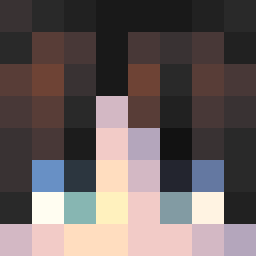
Current Minecraft skin of the player Kojanu, loaded from the official Mojang API. Rotate the 3D model with your mouse or finger, then download the skin as a PNG file and use it in Minecraft: Bedrock Edition or Java Edition for free. When Kojanu changes their skin, this page updates automatically and the old skin stays in the history below.

Other players with this skin (14054)
Kojanu was the 4903rd player we have seen with this skin, first spotted on 04.09.2026. The same skin was seen on these players. Open a nickname to see their current skin and skin history.
 Vitia makeahole TheE tanayama__ FR4NKL1N_ Micht ThotLife 307h Brulonco HefBundey aristides nemuyaki Caufell LinaNINA OrangeSUS123 Philipp159 Demonmcc Krampy Darius_NS Ramns freezerbrid3 Jade7DC LinaTristesse Decuss lunadial11 Wringed Kampfpiglin elif_61 rbrhks1021 boyswilson HerrWufff dzfire SirMaster45 babisse Steffocx Alguiencomunista pokeyuan27 Hoyun0703 iikeacpvp EF4
 na_tarczy FredPinball Muqremin MNQIUC Hinson1arctic1 Lob_22 SirGame Mattizinho FeskSim yeon091300 Error8800 yewoom
 Jaykzerr
 NoodN4tion 55TF777 arijles Shamalo julie_Is_baka WailBail SWIRUJ
Previous skins of Kojanu
Skins that Kojanu wore before, newest first. Click a skin to open its page and download it.
How to install the Kojanu skin
- Press the Download button above to save the skin as a PNG file.
- Minecraft: Bedrock Edition (PE): open the Dressing Room from the main menu (or tap your character → Edit Character), go to Classic Skins → Owned, press the + (new skin) button, choose the downloaded PNG and pick the Classic (Steve) model. Works on PC and mobile; consoles cannot import custom skins.
- Minecraft: Java Edition: open the Minecraft Launcher, go to the Skins tab, click New Skin, load the PNG, pick the Classic (Steve) model and press Save & Use. You can also upload it at minecraft.net → Profile → Change Skin.
The skin does not show up after import - what should I do?
Restart Minecraft and open the Dressing Room again - imported skins sometimes appear only after a restart. Also make sure you selected the imported skin and picked the Classic (Steve) model.
Which model should I choose, Classic or Slim?
This skin is designed for the Classic (Steve) model. If you pick the wrong model, the arms of the skin will look stretched or squeezed.
Is the skin of Kojanu free to download?
Yes. Press Download, save the PNG file and use it in Minecraft: Bedrock Edition or Java Edition - no payment or registration needed. The skin also works on multiplayer servers and Realms.
More skins
Looking for more? Go back to all Minecraft skins and check the top skins of the week, month and all time, or find any player's skin by nickname.