
KoEoVoIoN - Minecraft Skins & Skin History
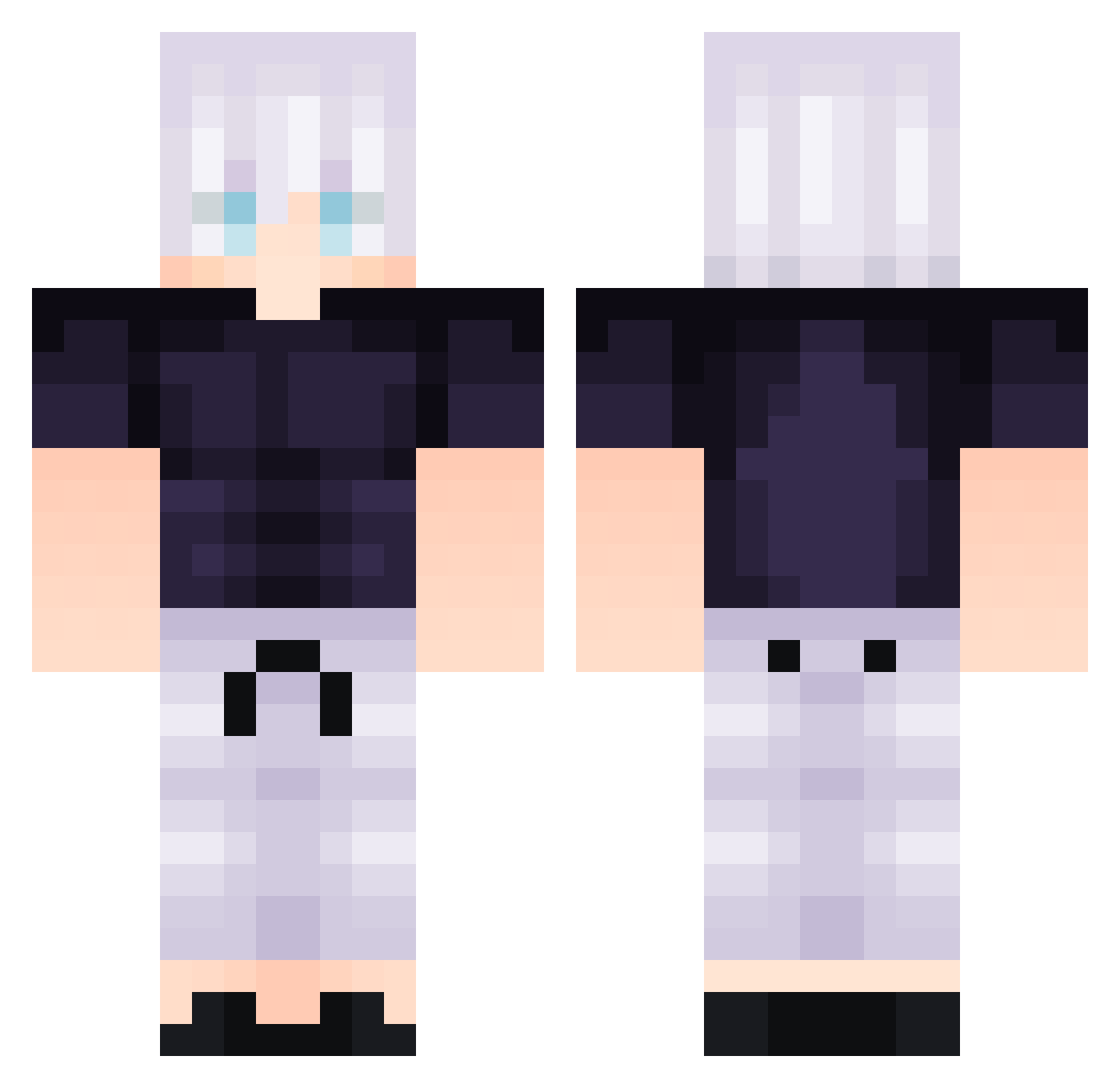
Current Minecraft skin of the player KoEoVoIoN, loaded from the official Mojang API. Rotate the 3D model with your mouse or finger, then download the skin as a PNG file and use it in Minecraft: Bedrock Edition or Java Edition for free. When KoEoVoIoN changes their skin, this page updates automatically and the old skin stays in the history below.
Other players with this skin (292)
KoEoVoIoN was the 143rd player we have seen with this skin, first spotted on 13.09.2026. The same skin was seen on these players. Open a nickname to see their current skin and skin history.
 purehatredbilly taldoLuigi Pastaguin KingOfDPirates Cz_Eddie 9uunee DraaXYT LazyWeeb rbiug Doctorlyyeti IanLin1114 whddms FuzedCraft leovincenity jose_sKin OvertakerCO hipelux Hichham MentalInsanity XeqZapt King_wrestler26 Tr0janTroy ToanHac nagiDMC iTemponix Fancyswipe
 benshka MonkeyDnono kuteky ad0lfcritler chazMcDazy 2inha dhtmdrjs1234 Constant_ice Niwigax CuCUTEST Mika_1337
 EnzoVLMR galaxy345
 Loafyyy_ Aaron_Lim Xenatea Alviin16 LOU8LOU SnoopKala420 Hatsu_7 TheOwll1 NASDAQSniper Brumeuxxy jharem Turtle_Knight04 Naiisuu GAAMERFLEET avix___ ItzAylex Skypoggers Gtx6 toruusaa BroEng168 Maxomino999
More Satoru Gojo Minecraft skins
See all 1317 Satoru Gojo skins
How to install the KoEoVoIoN skin
- Press the Download button above to save the skin as a PNG file.
- Minecraft: Bedrock Edition (PE): open the Dressing Room from the main menu (or tap your character → Edit Character), go to Classic Skins → Owned, press the + (new skin) button, choose the downloaded PNG and pick the Classic (Steve) model. Works on PC and mobile; consoles cannot import custom skins.
- Minecraft: Java Edition: open the Minecraft Launcher, go to the Skins tab, click New Skin, load the PNG, pick the Classic (Steve) model and press Save & Use. You can also upload it at minecraft.net → Profile → Change Skin.
The skin does not show up after import - what should I do?
Restart Minecraft and open the Dressing Room again - imported skins sometimes appear only after a restart. Also make sure you selected the imported skin and picked the Classic (Steve) model.
Which model should I choose, Classic or Slim?
This skin is designed for the Classic (Steve) model. If you pick the wrong model, the arms of the skin will look stretched or squeezed.
Is the skin of KoEoVoIoN free to download?
Yes. Press Download, save the PNG file and use it in Minecraft: Bedrock Edition or Java Edition - no payment or registration needed. The skin also works on multiplayer servers and Realms.
More skins
Looking for more? Go back to all Minecraft skins and check the top skins of the week, month and all time, or find any player's skin by nickname.