
Kira33 - Minecraft Skins & Skin History
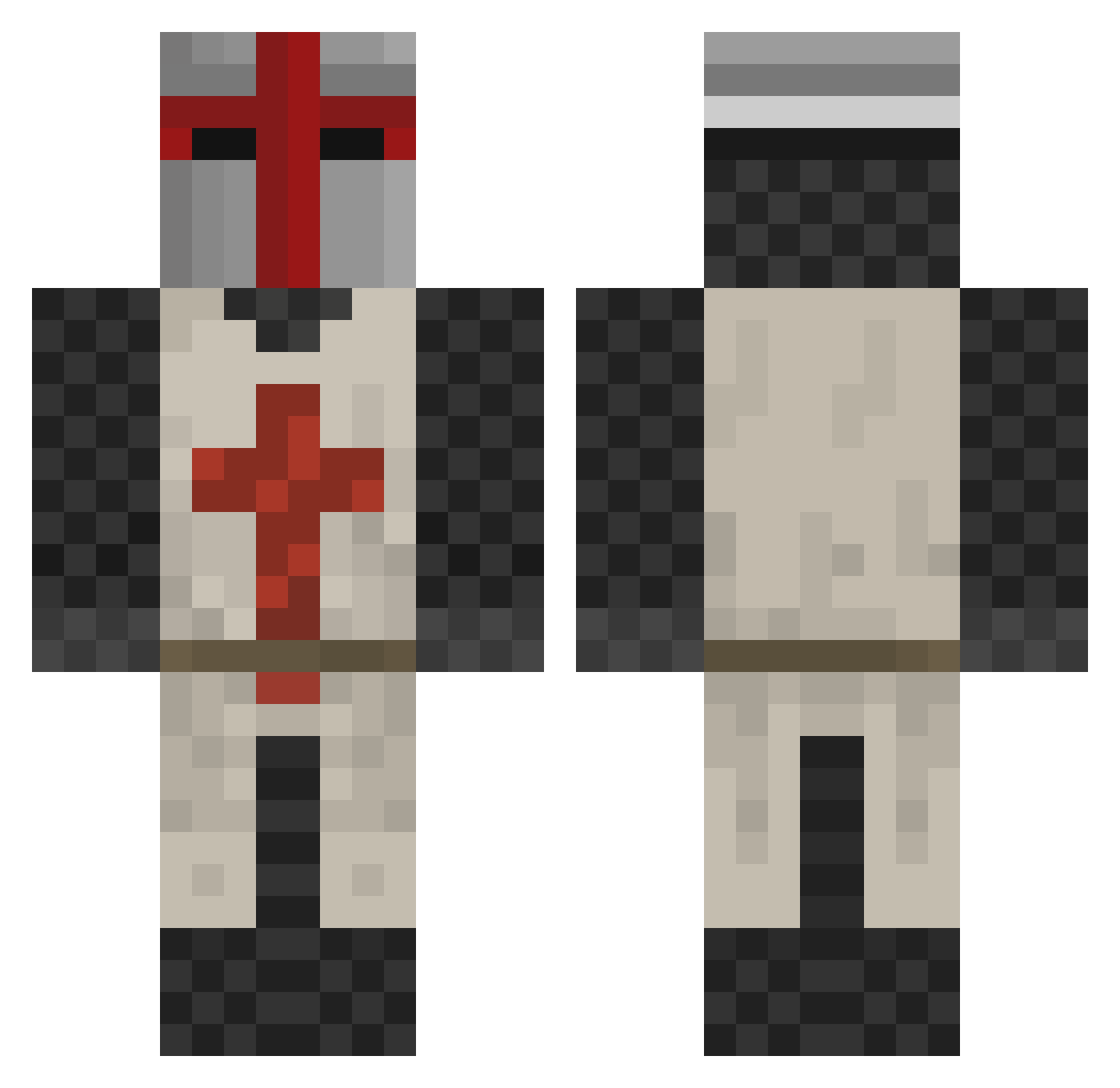
Current Minecraft skin of the player Kira33, loaded from the official Mojang API. Rotate the 3D model with your mouse or finger, then download the skin as a PNG file and use it in Minecraft: Bedrock Edition or Java Edition for free. When Kira33 changes their skin, this page updates automatically and the old skin stays in the history below.
Other players with this skin (413)
Kira33 was the 75th player we have seen with this skin, first spotted on 14.08.2026. The same skin was seen on these players. Open a nickname to see their current skin and skin history.
 WetLemon1 jacobiter59 Ucada Blakiki01 Jinxs Duddegard boxofknight leuchturm1 devedwards Revilo16 solbil11 sykon99 anokai Pajjen12 Willhelmus Leichee Texas_has_downs Cr3do TheGobbster dziewudek CartmanM NtKPDX siethin SamieZaurus Hulubaloo hkk232 Hendrik_Wizard johnson2020 Perturbator Valis67 wizardsun21 rickolassmith crazyjam37 mangomanjo KungRUguy genryan Pegasus81 GWinUS RonvdB Wait_pull Desmond_Clarke vold911 Triode MrKhicken Willianderma csmith1738 DJCal1998 Ekryze FishTank1991 The_Lizeryn_King HAWK1124 topo123 drrusski Sentinel_TS Smileycraft969 DerDawn JustinRader101 ColonelKinkers johnquester don_willard
More Crusader Minecraft skins
How to install the Kira33 skin
- Press the Download button above to save the skin as a PNG file.
- Minecraft: Bedrock Edition (PE): open the Dressing Room from the main menu (or tap your character → Edit Character), go to Classic Skins → Owned, press the + (new skin) button, choose the downloaded PNG and pick the Classic (Steve) model. Works on PC and mobile; consoles cannot import custom skins.
- Minecraft: Java Edition: open the Minecraft Launcher, go to the Skins tab, click New Skin, load the PNG, pick the Classic (Steve) model and press Save & Use. You can also upload it at minecraft.net → Profile → Change Skin.
The skin does not show up after import - what should I do?
Restart Minecraft and open the Dressing Room again - imported skins sometimes appear only after a restart. Also make sure you selected the imported skin and picked the Classic (Steve) model.
Which model should I choose, Classic or Slim?
This skin is designed for the Classic (Steve) model. If you pick the wrong model, the arms of the skin will look stretched or squeezed.
Is the skin of Kira33 free to download?
Yes. Press Download, save the PNG file and use it in Minecraft: Bedrock Edition or Java Edition - no payment or registration needed. The skin also works on multiplayer servers and Realms.
More skins
Looking for more? Go back to all Minecraft skins and check the top skins of the week, month and all time, or find any player's skin by nickname.