
KingTheFnsKid - Minecraft Skins & Skin History
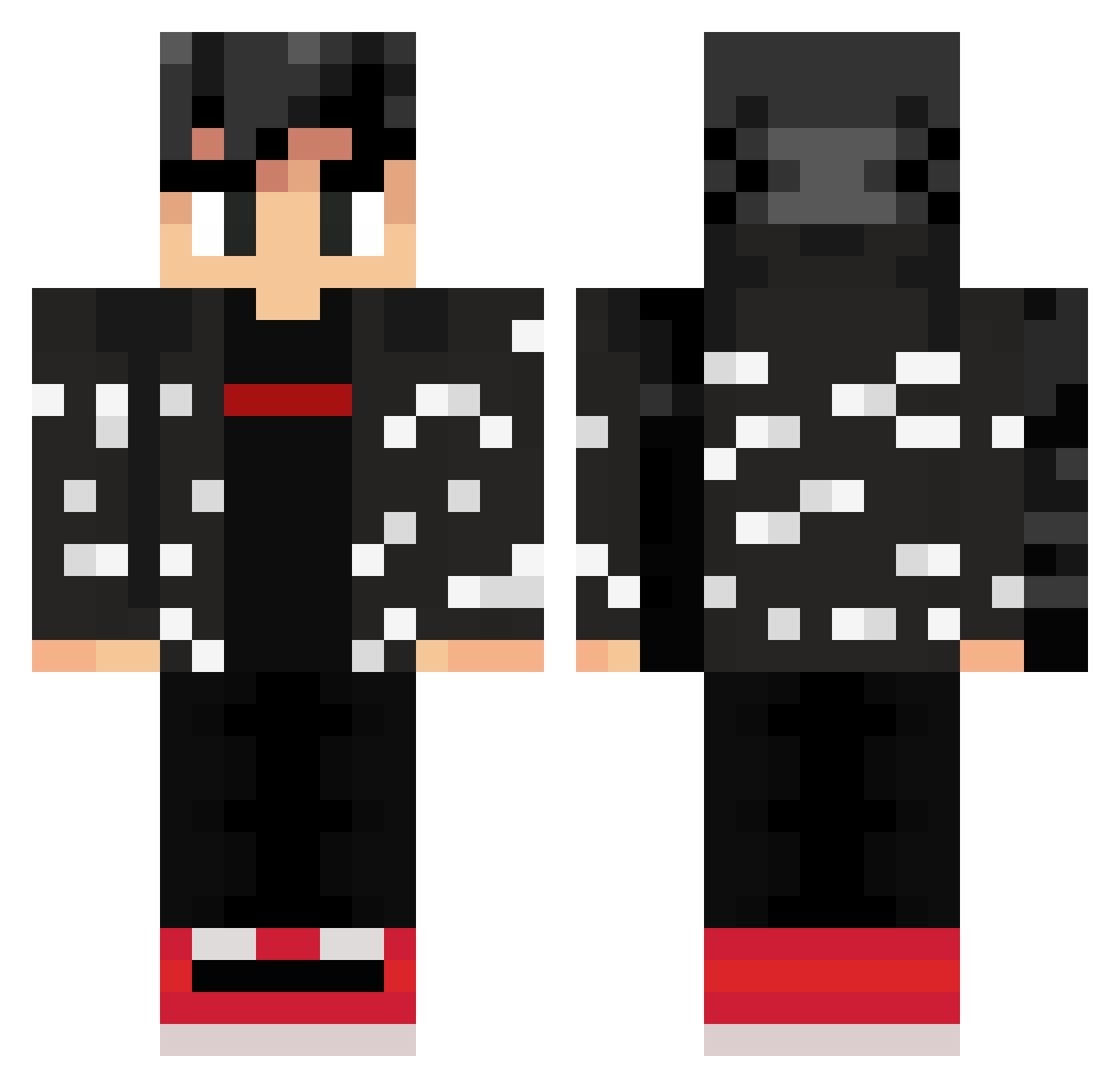
Current Minecraft skin of the player KingTheFnsKid, loaded from the official Mojang API. Rotate the 3D model with your mouse or finger, then download the skin as a PNG file and use it in Minecraft: Bedrock Edition or Java Edition for free. When KingTheFnsKid changes their skin, this page updates automatically and the old skin stays in the history below.
Other players with this skin (309)
KingTheFnsKid was the 68th player we have seen with this skin, first spotted on 21.08.2026. The same skin was seen on these players. Open a nickname to see their current skin and skin history.
 DarkSpoon2000 AquaBeabs apisonadora Carnival352 weep0 D__exter Kiro_San1 heavenlee6969 Leonardo1675 SawyerBoom fusion______ Ray8832 EL_MEHDI Turkey900 LeonardoRai datt_BOI_77 Brathar5 Hiddledong thekchain Tomlo21 Mastertaco9000 CaballoSupremo _80HD EmirKaan09 hermengu4 Bucky82 Vincenzo_Gamer MoonHydra FlyingMarathon98 Lotwik BugerT4ng Fireball_DJ rodrinm123 its_jude10 Tashband Apple4294 KevinPR238 SusDrip Xxchristian26Xx notstefe AR3JK _Crotex VyzXx Gwyn13 ryu0721 Digital_Xcalibur GoldSilver445 DrJorvy Forrester_ RileyRUs x_Zoga_x Wavze__ Alex119098 Daenk_Miems crazysupermonkey booperrrrr BubbleDrift ShadowOfLex zor6 Prof_Hue
More Streetwear Minecraft skins
How to install the KingTheFnsKid skin
- Press the Download button above to save the skin as a PNG file.
- Minecraft: Bedrock Edition (PE): open the Dressing Room from the main menu (or tap your character → Edit Character), go to Classic Skins → Owned, press the + (new skin) button, choose the downloaded PNG and pick the Classic (Steve) model. Works on PC and mobile; consoles cannot import custom skins.
- Minecraft: Java Edition: open the Minecraft Launcher, go to the Skins tab, click New Skin, load the PNG, pick the Classic (Steve) model and press Save & Use. You can also upload it at minecraft.net → Profile → Change Skin.
The skin does not show up after import - what should I do?
Restart Minecraft and open the Dressing Room again - imported skins sometimes appear only after a restart. Also make sure you selected the imported skin and picked the Classic (Steve) model.
Which model should I choose, Classic or Slim?
This skin is designed for the Classic (Steve) model. If you pick the wrong model, the arms of the skin will look stretched or squeezed.
Is the skin of KingTheFnsKid free to download?
Yes. Press Download, save the PNG file and use it in Minecraft: Bedrock Edition or Java Edition - no payment or registration needed. The skin also works on multiplayer servers and Realms.
More skins
Looking for more? Go back to all Minecraft skins and check the top skins of the week, month and all time, or find any player's skin by nickname.