
Khimzz - Minecraft Skins & Skin History
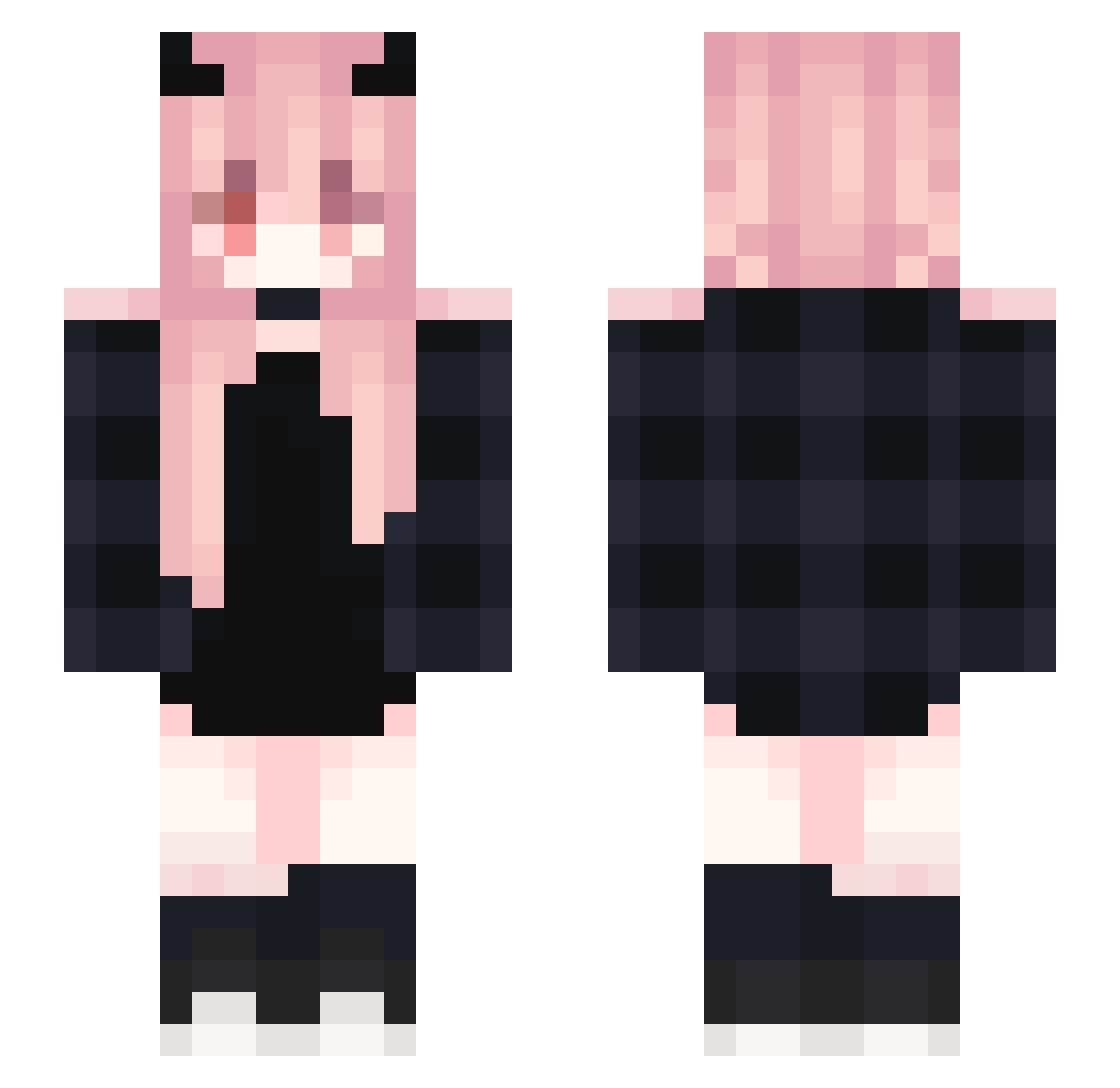
Current Minecraft skin of the player Khimzz, loaded from the official Mojang API. Rotate the 3D model with your mouse or finger, then download the skin as a PNG file and use it in Minecraft: Bedrock Edition or Java Edition for free. When Khimzz changes their skin, this page updates automatically and the old skin stays in the history below.
Other players with this skin (367)
Khimzz was the 262nd player we have seen with this skin, first spotted on 04.10.2026. The same skin was seen on these players. Open a nickname to see their current skin and skin history.
 kagura_yami SaionjiIA Asaria0906 hotmomma2321 Crawks GeLizz7 Zarawrr NotPS1 MengHJ BasedSmurfy FriickinOscar Wostexx Fefe125 kt_8o8 CyberGem25 ColdDAZE SwinkaPeppa24 niniww jiyumm TurboBoosted FindingValkyrie CoolTigerBeans Xiaolong0820 SDADADAS RyuZU_0614 zonasheep_ usagi0314 JujuLeGrosDoudou ayataka_1 ProgramXD6715 xXdevilconvictXx doudou0204 Ptit_Biscuit96 ZhI_cHu_ Plutobunny muyu_521 emmychuu Klinkklink Po1123 shu_na p1okk Yoshiplays23 QfusuQ Mistress_Lily xXx_MaiKerU_xXx _xQueen JustHizokai LilacTime 20kina madslovelys Smile881121 Fo1nix rosa_phoenix Frambis KSW3905 yoruduki moyufengse Petale1 Lanxa MO_silence
More Demon Horns Minecraft skins
How to install the Khimzz skin
- Press the Download button above to save the skin as a PNG file.
- Minecraft: Bedrock Edition (PE): open the Dressing Room from the main menu (or tap your character → Edit Character), go to Classic Skins → Owned, press the + (new skin) button, choose the downloaded PNG and pick the Slim (Alex) model. Works on PC and mobile; consoles cannot import custom skins.
- Minecraft: Java Edition: open the Minecraft Launcher, go to the Skins tab, click New Skin, load the PNG, pick the Slim (Alex) model and press Save & Use. You can also upload it at minecraft.net → Profile → Change Skin.
The skin does not show up after import - what should I do?
Restart Minecraft and open the Dressing Room again - imported skins sometimes appear only after a restart. Also make sure you selected the imported skin and picked the Slim (Alex) model.
Which model should I choose, Classic or Slim?
This skin is designed for the Slim (Alex) model. If you pick the wrong model, the arms of the skin will look stretched or squeezed.
Is the skin of Khimzz free to download?
Yes. Press Download, save the PNG file and use it in Minecraft: Bedrock Edition or Java Edition - no payment or registration needed. The skin also works on multiplayer servers and Realms.
More skins
Looking for more? Go back to all Minecraft skins and check the top skins of the week, month and all time, or find any player's skin by nickname.