
Kerbiy - Minecraft Skins & Skin History
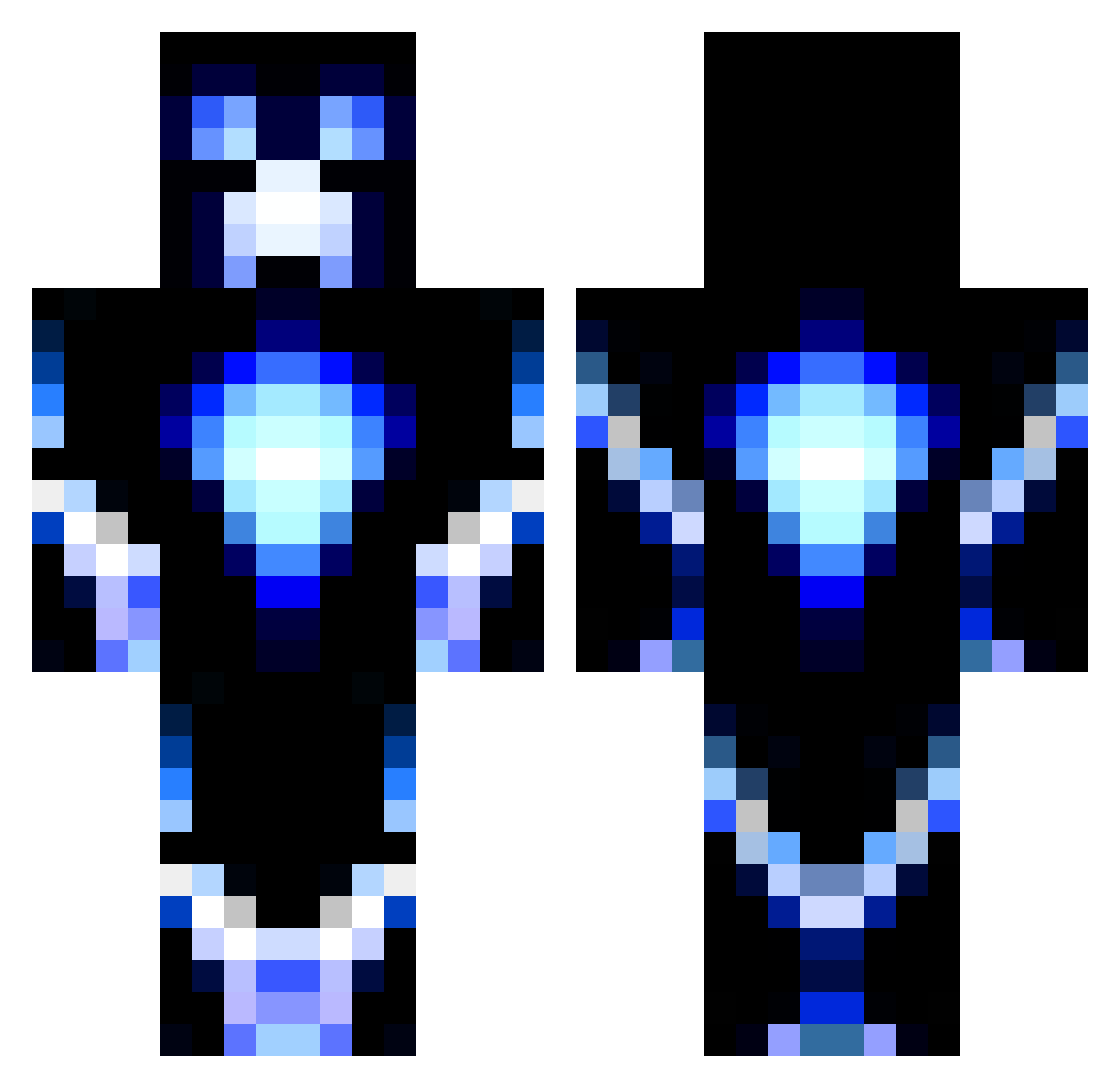
Current Minecraft skin of the player Kerbiy, loaded from the official Mojang API. Rotate the 3D model with your mouse or finger, then download the skin as a PNG file and use it in Minecraft: Bedrock Edition or Java Edition for free. When Kerbiy changes their skin, this page updates automatically and the old skin stays in the history below.
Other players with this skin (1186)
Kerbiy was the 203rd player we have seen with this skin, first spotted on 13.08.2026. The same skin was seen on these players. Open a nickname to see their current skin and skin history.
 Haydentin sNeXii ShadowDesign Graban00 Benedikt0702 namruhf bobbythebrother2 tilou1618 TheHawk944 Ben124578 tylerzeke22 ZAY91 ImCurly sham_bmw TheoP7 rexbobo mcnamara2002 spryo99 FREAKY_XYZ FieryTiger14 Thunderstrike135 skycrafter83 JJayden456 awesomej21 pucknell G0LDy108 lcrothers poopchops chrisscotti sage123 Chainzz ASASIN123 _P_a_r_k_ willyup MagikarpDerps Buddelmoritz vbrodsky1 Avrix37 Gladius_Crafter FantasyIce Yankeedude626 UneChebris XMonkeyBomberX magnus__9294 loke24 Valtam3 Terrorforce alexster_m Dark16Recon tomyboy7 gunzablazin10 ltthebeast itsKiDeR Felixthekiller01 blaireaudu06 mjandersson ASVPxNOVA Gurraz05 calculus101 23PegasusGaming
More Glowing Minecraft skins
How to install the Kerbiy skin
- Press the Download button above to save the skin as a PNG file.
- Minecraft: Bedrock Edition (PE): open the Dressing Room from the main menu (or tap your character → Edit Character), go to Classic Skins → Owned, press the + (new skin) button, choose the downloaded PNG and pick the Classic (Steve) model. Works on PC and mobile; consoles cannot import custom skins.
- Minecraft: Java Edition: open the Minecraft Launcher, go to the Skins tab, click New Skin, load the PNG, pick the Classic (Steve) model and press Save & Use. You can also upload it at minecraft.net → Profile → Change Skin.
The skin does not show up after import - what should I do?
Restart Minecraft and open the Dressing Room again - imported skins sometimes appear only after a restart. Also make sure you selected the imported skin and picked the Classic (Steve) model.
Which model should I choose, Classic or Slim?
This skin is designed for the Classic (Steve) model. If you pick the wrong model, the arms of the skin will look stretched or squeezed.
Is the skin of Kerbiy free to download?
Yes. Press Download, save the PNG file and use it in Minecraft: Bedrock Edition or Java Edition - no payment or registration needed. The skin also works on multiplayer servers and Realms.
More skins
Looking for more? Go back to all Minecraft skins and check the top skins of the week, month and all time, or find any player's skin by nickname.