
KaleCute - Minecraft Skins & Skin History
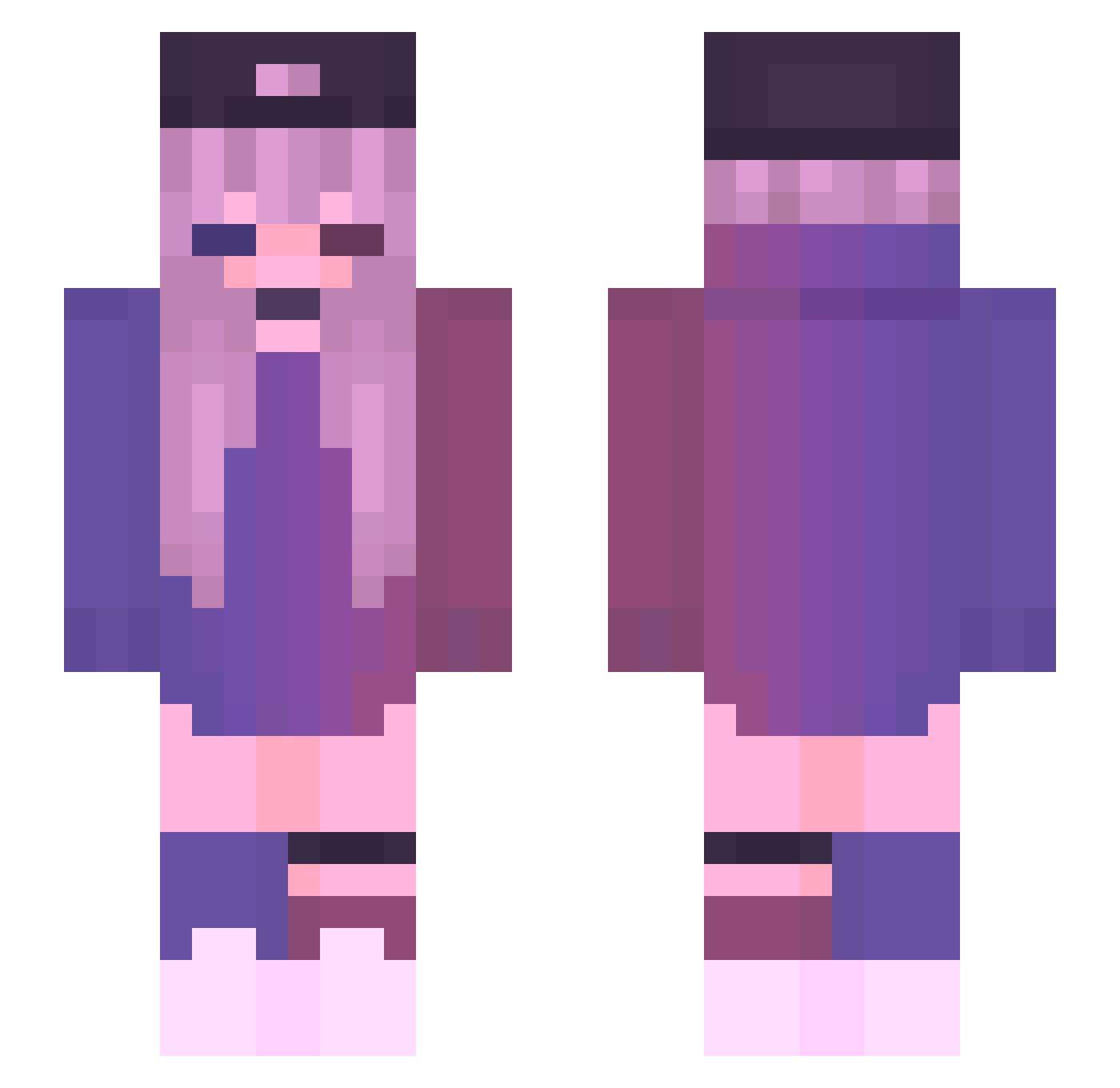
Current Minecraft skin of the player KaleCute, loaded from the official Mojang API. Rotate the 3D model with your mouse or finger, then download the skin as a PNG file and use it in Minecraft: Bedrock Edition or Java Edition for free. When KaleCute changes their skin, this page updates automatically and the old skin stays in the history below.
Other players with this skin (126)
KaleCute was the 76th player we have seen with this skin, first spotted on 23.09.2026. The same skin was seen on these players. Open a nickname to see their current skin and skin history.
 _Zaxe Alinepw xHarleyx8 Corex553 ntn_31 AlanYip onewaycyy _CyDaPb_ Zozolek Ally_xoxx SharonHakvoortx Scthy Yukinae_28 Iceprincess0906 ItsJustEmii Diane_LPB miuki666 ak4789133 Etrop212 NipaXGOD Rosy03 Azaia7719 Bili_Sasog Bloom_Droom JOOAJOOA MillePieps123 GeekRoyal04 jeeeezzes RORY_UwU ShiSan13 WiQsiaaa sadfoggi Appleberryy xx3vaxx miso12345 RelmaX_ skyelovemines xRumeysa DiamondChuX plattimnum Faustine_85 FeffyCh_ moopneuma _NotErica kwutey SlayerFantasy_ Juwon_301 FrenchPurple Rosieee101 Mogsoccer Cxxtlxn omarun09 zqua statefarmsteve1 WhosNathann Azarence Julienaz1 _luss_ Smelly_Skunk puppe803
More Cap Minecraft skins
How to install the KaleCute skin
- Press the Download button above to save the skin as a PNG file.
- Minecraft: Bedrock Edition (PE): open the Dressing Room from the main menu (or tap your character → Edit Character), go to Classic Skins → Owned, press the + (new skin) button, choose the downloaded PNG and pick the Slim (Alex) model. Works on PC and mobile; consoles cannot import custom skins.
- Minecraft: Java Edition: open the Minecraft Launcher, go to the Skins tab, click New Skin, load the PNG, pick the Slim (Alex) model and press Save & Use. You can also upload it at minecraft.net → Profile → Change Skin.
The skin does not show up after import - what should I do?
Restart Minecraft and open the Dressing Room again - imported skins sometimes appear only after a restart. Also make sure you selected the imported skin and picked the Slim (Alex) model.
Which model should I choose, Classic or Slim?
This skin is designed for the Slim (Alex) model. If you pick the wrong model, the arms of the skin will look stretched or squeezed.
Is the skin of KaleCute free to download?
Yes. Press Download, save the PNG file and use it in Minecraft: Bedrock Edition or Java Edition - no payment or registration needed. The skin also works on multiplayer servers and Realms.
More skins
Looking for more? Go back to all Minecraft skins and check the top skins of the week, month and all time, or find any player's skin by nickname.