
JustAdam17 - Minecraft Skins & Skin History
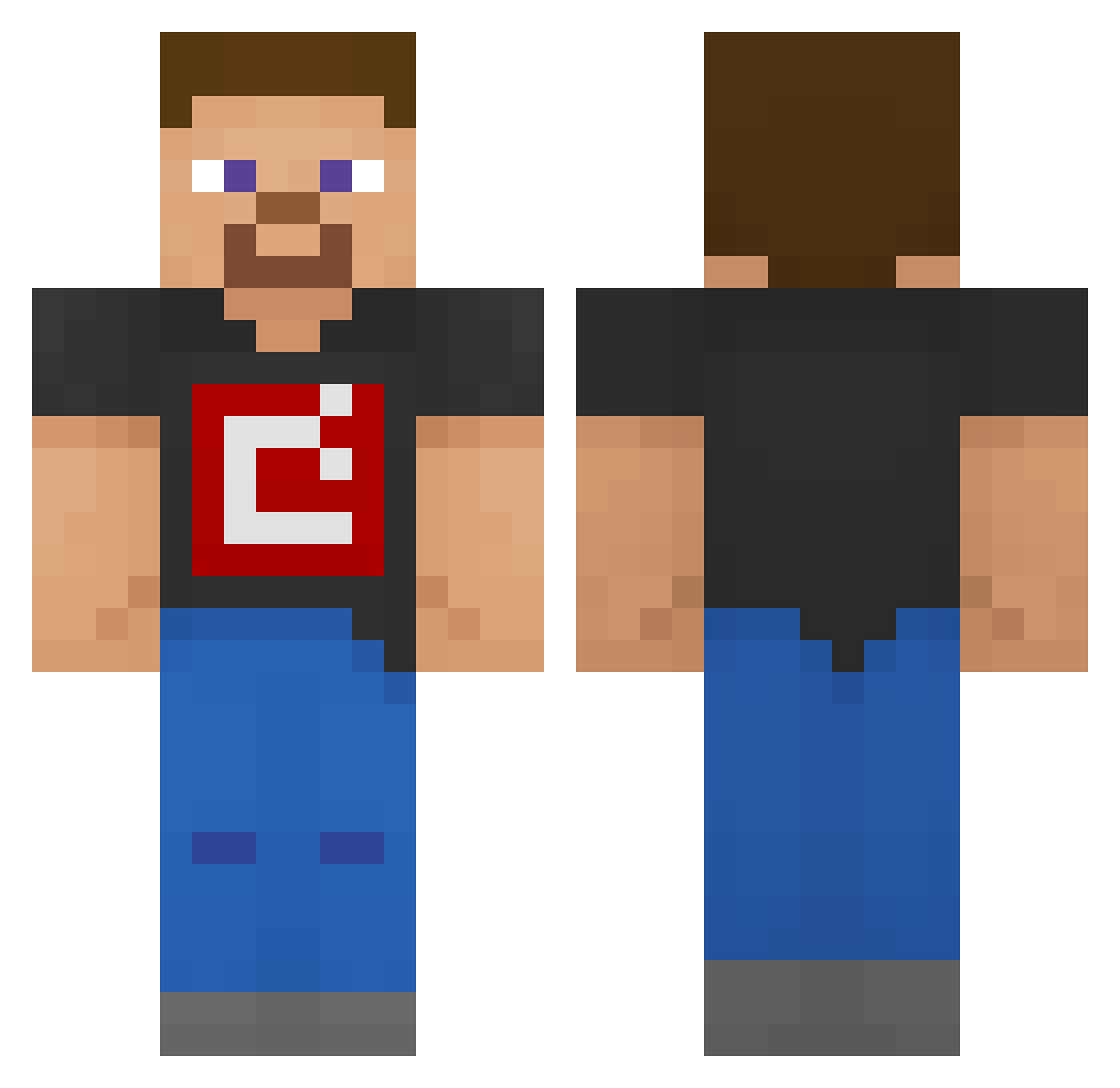
Current Minecraft skin of the player JustAdam17, loaded from the official Mojang API. Rotate the 3D model with your mouse or finger, then download the skin as a PNG file and use it in Minecraft: Bedrock Edition or Java Edition for free. When JustAdam17 changes their skin, this page updates automatically and the old skin stays in the history below.
Other players with this skin (193)
JustAdam17 was the 83rd player we have seen with this skin, first spotted on 07.09.2026. The same skin was seen on these players. Open a nickname to see their current skin and skin history.
 dedocta
 Drjameslfc Unallowable N3GHTMARE_BLADE Dylan_g1161 Arth5566 FinPoseidon51 SpiralYT09 Blackblip At0wu TidakTahu yalin12344321 IamSpeeby s202ii Dragon_Knight_ FunJuanPablo UltraMaxim y4ch0_ You2a King_DrakQ SAE4 VolovikT HunterLeVrai zgs5 mario_sonic1 Stofith Sum_Yun_Gaii LegendOfRdr2 KemalHasan09 GrandLuigi Nobody259 paidofilos69 Cirkambo OrangeTree321 chromeee1 fabriciopaz13 ManuMC1057 Lxai10 Roy110812 KajusLTK FireThing432 Trxintyy Cabelcar56 AliveJr shimon09 Dang29 Lcon331 Shn1zel Goldish_Apple Tandoo79 TC_M4jster ShadowVN99 Bob_The_Owner
 Juanchix123 SupYall_01 epickcin PistonFace08 elcejasfaster bananaman11111 VrIndieGames
How to install the JustAdam17 skin
- Press the Download button above to save the skin as a PNG file.
- Minecraft: Bedrock Edition (PE): open the Dressing Room from the main menu (or tap your character → Edit Character), go to Classic Skins → Owned, press the + (new skin) button, choose the downloaded PNG and pick the Classic (Steve) model. Works on PC and mobile; consoles cannot import custom skins.
- Minecraft: Java Edition: open the Minecraft Launcher, go to the Skins tab, click New Skin, load the PNG, pick the Classic (Steve) model and press Save & Use. You can also upload it at minecraft.net → Profile → Change Skin.
The skin does not show up after import - what should I do?
Restart Minecraft and open the Dressing Room again - imported skins sometimes appear only after a restart. Also make sure you selected the imported skin and picked the Classic (Steve) model.
Which model should I choose, Classic or Slim?
This skin is designed for the Classic (Steve) model. If you pick the wrong model, the arms of the skin will look stretched or squeezed.
Is the skin of JustAdam17 free to download?
Yes. Press Download, save the PNG file and use it in Minecraft: Bedrock Edition or Java Edition - no payment or registration needed. The skin also works on multiplayer servers and Realms.
More skins
Looking for more? Go back to all Minecraft skins and check the top skins of the week, month and all time, or find any player's skin by nickname.