
JonahRM1999 - Minecraft Skins & Skin History
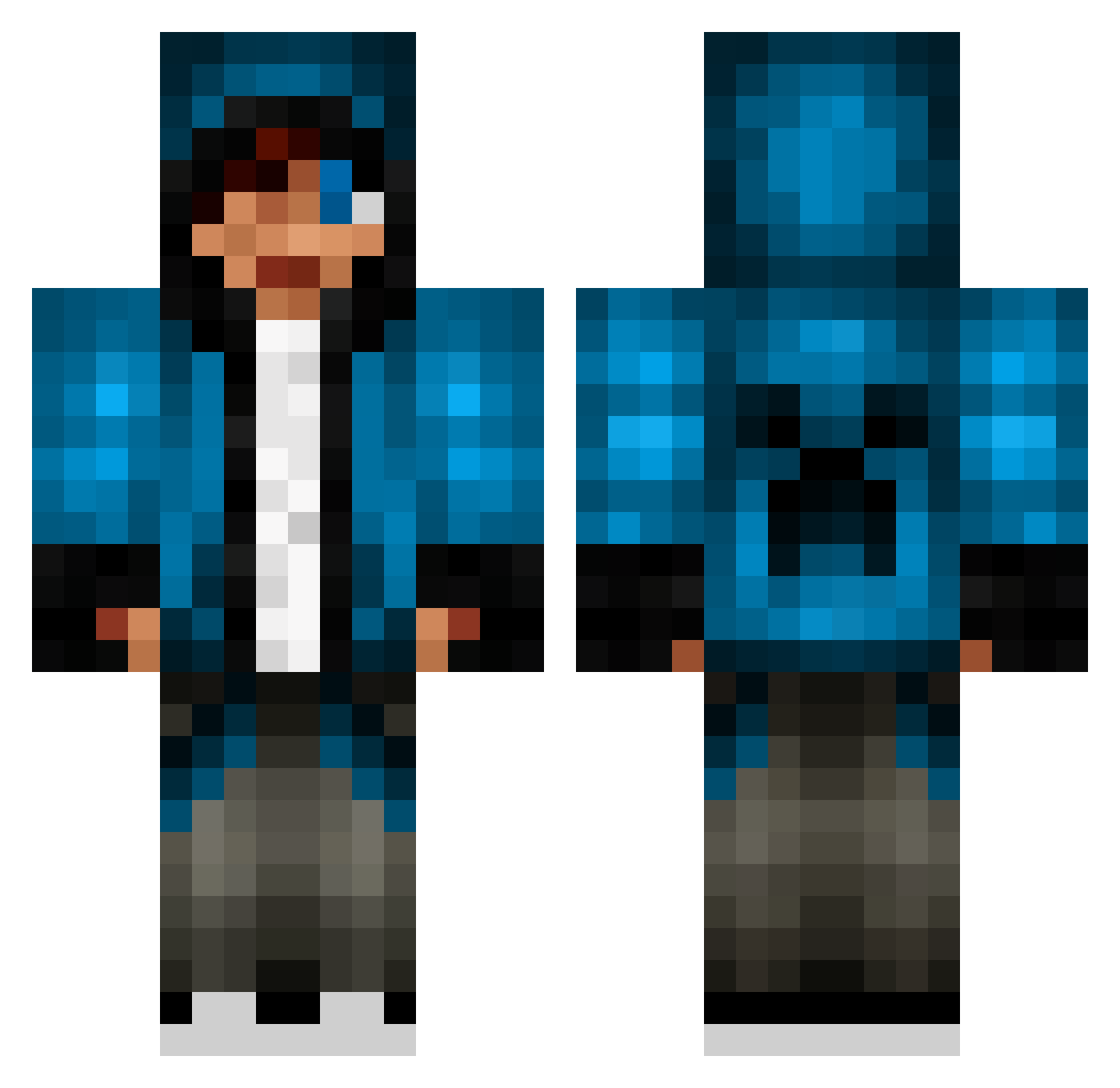
Current Minecraft skin of the player JonahRM1999, loaded from the official Mojang API. Rotate the 3D model with your mouse or finger, then download the skin as a PNG file and use it in Minecraft: Bedrock Edition or Java Edition for free. When JonahRM1999 changes their skin, this page updates automatically and the old skin stays in the history below.
Other players with this skin (837)
JonahRM1999 was the 764th player we have seen with this skin, first spotted on 05.11.2026. The same skin was seen on these players. Open a nickname to see their current skin and skin history.
 CSD0318 awesomenest2 plewie shazrush Kitepai BringClass Kidloy OlsenKasper IzakJosef DANOMORT dynamatt runnerup360 Gerardy20032014 djty5000 blueminer189 Fivos_Apoel Domo2205 kiishi5460 Zach2695 Nunynovak BurritoAllen Minecraftsword45 BlokCanavari TOM5TA noahs46 xSNEAKYK1LL4x Freddie134 tvtype LittleBuddy87 DCSForerunner TonSan31 joebro100 thomsen2006 InfernoBlaze123 Lucazade125 stronggreene __Silencer__ jojororo1129 edwinvandersar1 Thelord221 HenkJan168 Basticraft2012 TrollCreeper7 unknownXblade UNiiXz JOSH81101 RyanSiu2014 Faisal2076 Shaqvic xxLordHDxx Rcfreak Neffmonkey ezracoolguy samkwok69 EikenHD Gtzwickedest KERR003 omarwss DaveTheDuke RohanW1
More Creeper Minecraft skins
How to install the JonahRM1999 skin
- Press the Download button above to save the skin as a PNG file.
- Minecraft: Bedrock Edition (PE): open the Dressing Room from the main menu (or tap your character → Edit Character), go to Classic Skins → Owned, press the + (new skin) button, choose the downloaded PNG and pick the Classic (Steve) model. Works on PC and mobile; consoles cannot import custom skins.
- Minecraft: Java Edition: open the Minecraft Launcher, go to the Skins tab, click New Skin, load the PNG, pick the Classic (Steve) model and press Save & Use. You can also upload it at minecraft.net → Profile → Change Skin.
The skin does not show up after import - what should I do?
Restart Minecraft and open the Dressing Room again - imported skins sometimes appear only after a restart. Also make sure you selected the imported skin and picked the Classic (Steve) model.
Which model should I choose, Classic or Slim?
This skin is designed for the Classic (Steve) model. If you pick the wrong model, the arms of the skin will look stretched or squeezed.
Is the skin of JonahRM1999 free to download?
Yes. Press Download, save the PNG file and use it in Minecraft: Bedrock Edition or Java Edition - no payment or registration needed. The skin also works on multiplayer servers and Realms.
More skins
Looking for more? Go back to all Minecraft skins and check the top skins of the week, month and all time, or find any player's skin by nickname.