
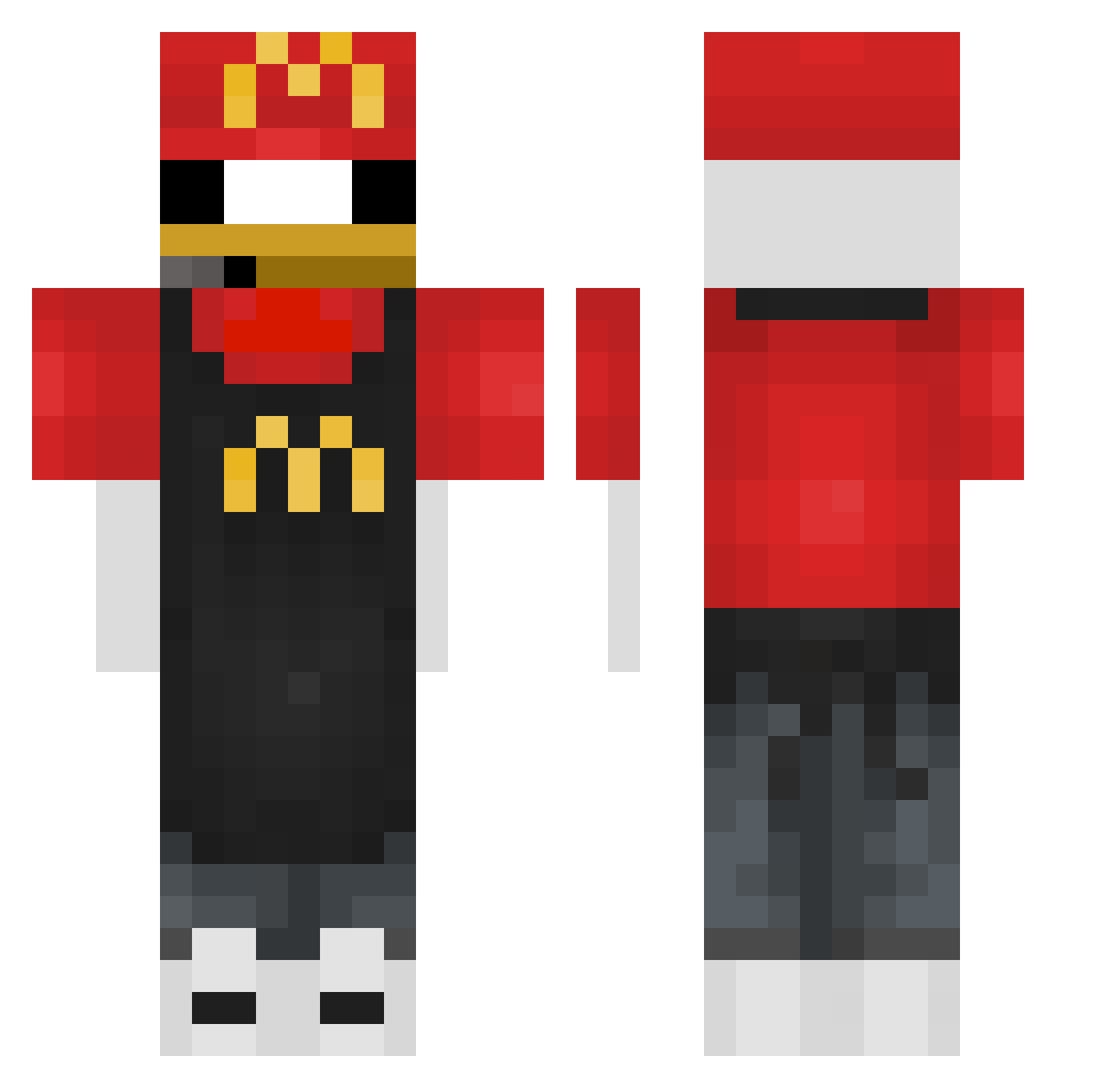
Current Minecraft skin of the player JachammerVT, loaded from the official Mojang API. Rotate the 3D model with your mouse or finger, then download the skin as a PNG file and use it in Minecraft: Bedrock Edition or Java Edition for free. When JachammerVT changes their skin, this page updates automatically and the old skin stays in the history below.
Other players with this skin (302)
JachammerVT was the 114th player we have seen with this skin, first spotted on 24.08.2026. The same skin was seen on these players. Open a nickname to see their current skin and skin history.
 bonillabros Mr_S4ndm4n jasiu6688 casperaiden ryoryoryoryou gooseigoose453 Slinkydinkie278 AydenDeluxe
 qLurkz Megabudino szymonmm4 dorazi7 aloha_tlm ktq_3 DDori_4 CCTV07 _xedar_ XIONG0522 Cledier Crashoutunc micoch1
 JstnMine Liangscm Pyrrxss borito1 BigBudda45 Socks_for7 DEdropbox JOSICRAFT4899 1ManWreckingCrew
 xALXS Delvyy00 _ITron_ Amusy_ CHARLY_VG Gonzalloooo danolo12 deviousadri fakerek6 OlliTeus XDemon2012 B0SS Cheezits UrsoDasCavernas Lynexsss
 robotfelix2710 vo1dzzzzzzz DreadPirateFalls kurosaki23 HsUaN226 cobain92 Levivrc2011 Asian_Vivo samuelgrm Freialund GreenTokyo eivinii1
 SpiderOne0203 PVP_GOD123456
 YonatanShalit1
More Donald Duck Minecraft skins
How to install the JachammerVT skin
- Press the Download button above to save the skin as a PNG file.
- Minecraft: Bedrock Edition (PE): open the Dressing Room from the main menu (or tap your character → Edit Character), go to Classic Skins → Owned, press the + (new skin) button, choose the downloaded PNG and pick the Classic (Steve) model. Works on PC and mobile; consoles cannot import custom skins.
- Minecraft: Java Edition: open the Minecraft Launcher, go to the Skins tab, click New Skin, load the PNG, pick the Classic (Steve) model and press Save & Use. You can also upload it at minecraft.net → Profile → Change Skin.
The skin does not show up after import - what should I do?
Restart Minecraft and open the Dressing Room again - imported skins sometimes appear only after a restart. Also make sure you selected the imported skin and picked the Classic (Steve) model.
Which model should I choose, Classic or Slim?
This skin is designed for the Classic (Steve) model. If you pick the wrong model, the arms of the skin will look stretched or squeezed.
Is the skin of JachammerVT free to download?
Yes. Press Download, save the PNG file and use it in Minecraft: Bedrock Edition or Java Edition - no payment or registration needed. The skin also works on multiplayer servers and Realms.
More skins
Looking for more? Go back to all Minecraft skins and check the top skins of the week, month and all time, or find any player's skin by nickname.