
JUJUYING - Minecraft Skins & Skin History
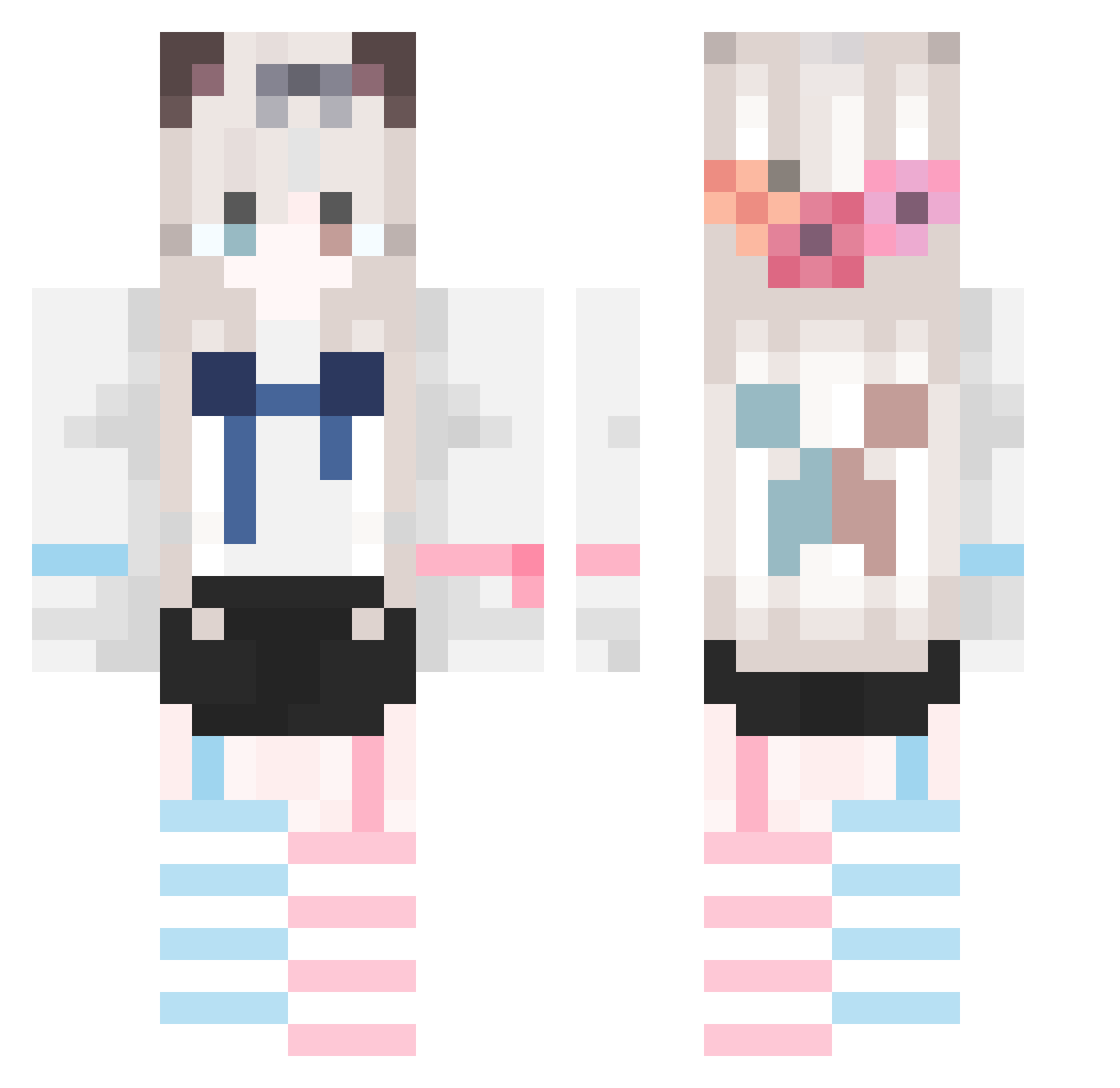
Current Minecraft skin of the player JUJUYING, loaded from the official Mojang API. Rotate the 3D model with your mouse or finger, then download the skin as a PNG file and use it in Minecraft: Bedrock Edition or Java Edition for free. When JUJUYING changes their skin, this page updates automatically and the old skin stays in the history below.
Other players with this skin (747)
JUJUYING was the 227th player we have seen with this skin, first spotted on 27.08.2026. The same skin was seen on these players. Open a nickname to see their current skin and skin history.
 naixingcheng Ce51um gaodaory v_OvO_v__ Baijiuins TEKLIGHT yumanyang xxdsh dafengqixi yunchuan112 lii667 meijicheng925615 fangfff Ying_Frostmourne Eliii1111 buzeng111 De_Cacao Purely14 Trihion O114514 mufe_zm EpicfToxic wainuo wsy000 16860 alaskaturnips TRkkkkk YuriKokone UNreda111 Senseofdirection Meltryllith Kittylii0 zhandouji Niedlich2333 zzkerawa DHLED kamijjc rui221 BronyZaychik MinorRole_ Ellie_2233 sleepcat1445 Zyyy0520 Galaxy350378 XiaoBai_bai EssexCV King_of_HIM HAJ2008 Rio_D AKuang6 Leewwell Emila_luo wennr Rtdytvxzu fungus_zip sorryking_ lucky_Yi yuhanchen123 Stewiemeg Stevvvven
More Cat Ears Minecraft skins
How to install the JUJUYING skin
- Press the Download button above to save the skin as a PNG file.
- Minecraft: Bedrock Edition (PE): open the Dressing Room from the main menu (or tap your character → Edit Character), go to Classic Skins → Owned, press the + (new skin) button, choose the downloaded PNG and pick the Classic (Steve) model. Works on PC and mobile; consoles cannot import custom skins.
- Minecraft: Java Edition: open the Minecraft Launcher, go to the Skins tab, click New Skin, load the PNG, pick the Classic (Steve) model and press Save & Use. You can also upload it at minecraft.net → Profile → Change Skin.
The skin does not show up after import - what should I do?
Restart Minecraft and open the Dressing Room again - imported skins sometimes appear only after a restart. Also make sure you selected the imported skin and picked the Classic (Steve) model.
Which model should I choose, Classic or Slim?
This skin is designed for the Classic (Steve) model. If you pick the wrong model, the arms of the skin will look stretched or squeezed.
Is the skin of JUJUYING free to download?
Yes. Press Download, save the PNG file and use it in Minecraft: Bedrock Edition or Java Edition - no payment or registration needed. The skin also works on multiplayer servers and Realms.
More skins
Looking for more? Go back to all Minecraft skins and check the top skins of the week, month and all time, or find any player's skin by nickname.