
Irkie - Minecraft Skins & Skin History
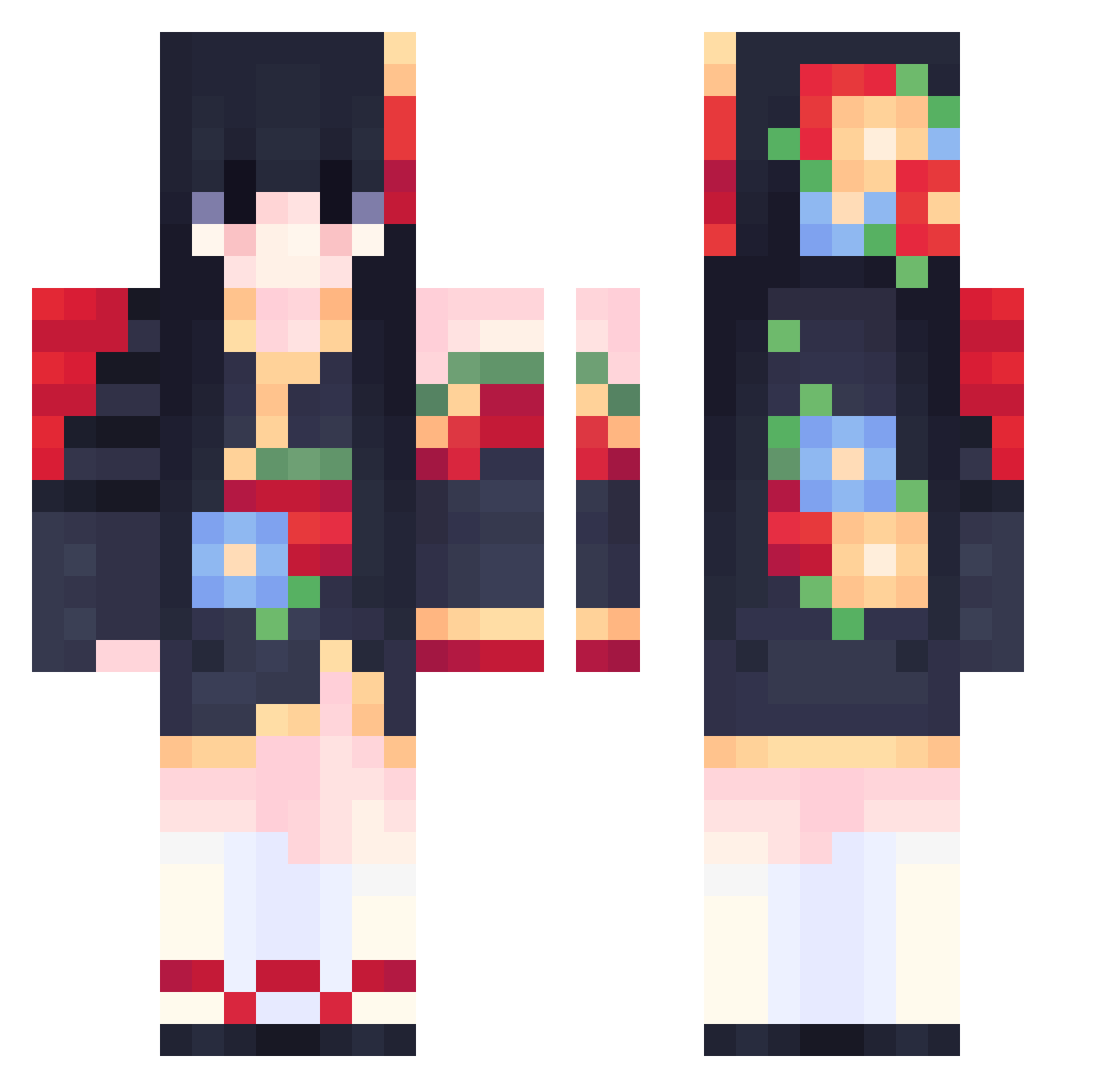
Current Minecraft skin of the player Irkie, loaded from the official Mojang API. Rotate the 3D model with your mouse or finger, then download the skin as a PNG file and use it in Minecraft: Bedrock Edition or Java Edition for free. When Irkie changes their skin, this page updates automatically and the old skin stays in the history below.
Other players with this skin (556)
Irkie was the 271st player we have seen with this skin, first spotted on 17.09.2026. The same skin was seen on these players. Open a nickname to see their current skin and skin history.
 Curistina_ ovenhead95 trashleyyyyy Lisbonne Evilbrrat huayuanye MaruchanRoss itslunabelle Eoncey Aderlia clapwhenshewalk Abzzu DcwSakura MessDuke AXWinterXA _anow littletyk AMATHIST1 Mincay TheBattyGoddess k1nococo EarlyYang DarOne Chlo1825 SpoonGobby meri_me justtherealclxo Sheyanya JiRanTaNengHuoDe Rinz3469 ana_nogueira cqmyi NaokoKirino260 Sucier Ferris06 Deeba_A MWadzy006 s43k0i Voidrist meimeihuagongzhu Sqiggy0 sadecezeyn jackylrj Berli123 Maphnele SkyeWa luobo_OXO RUby_126 thayzfeh sofipro1 LeReveEnsoleille carrot_owo_ Bugnie SushiiGeisha o_Mittens_o Taco_1859 Jihoon_07 1kscftie medi00 CielDucVong
More Floral Minecraft skins
How to install the Irkie skin
- Press the Download button above to save the skin as a PNG file.
- Minecraft: Bedrock Edition (PE): open the Dressing Room from the main menu (or tap your character → Edit Character), go to Classic Skins → Owned, press the + (new skin) button, choose the downloaded PNG and pick the Classic (Steve) model. Works on PC and mobile; consoles cannot import custom skins.
- Minecraft: Java Edition: open the Minecraft Launcher, go to the Skins tab, click New Skin, load the PNG, pick the Classic (Steve) model and press Save & Use. You can also upload it at minecraft.net → Profile → Change Skin.
The skin does not show up after import - what should I do?
Restart Minecraft and open the Dressing Room again - imported skins sometimes appear only after a restart. Also make sure you selected the imported skin and picked the Classic (Steve) model.
Which model should I choose, Classic or Slim?
This skin is designed for the Classic (Steve) model. If you pick the wrong model, the arms of the skin will look stretched or squeezed.
Is the skin of Irkie free to download?
Yes. Press Download, save the PNG file and use it in Minecraft: Bedrock Edition or Java Edition - no payment or registration needed. The skin also works on multiplayer servers and Realms.
More skins
Looking for more? Go back to all Minecraft skins and check the top skins of the week, month and all time, or find any player's skin by nickname.