
ImBatman89 - Minecraft Skins & Skin History
Current Minecraft skin of the player ImBatman89, loaded from the official Mojang API. Rotate the 3D model with your mouse or finger, then download the skin as a PNG file and use it in Minecraft: Bedrock Edition or Java Edition for free. When ImBatman89 changes their skin, this page updates automatically and the old skin stays in the history below.
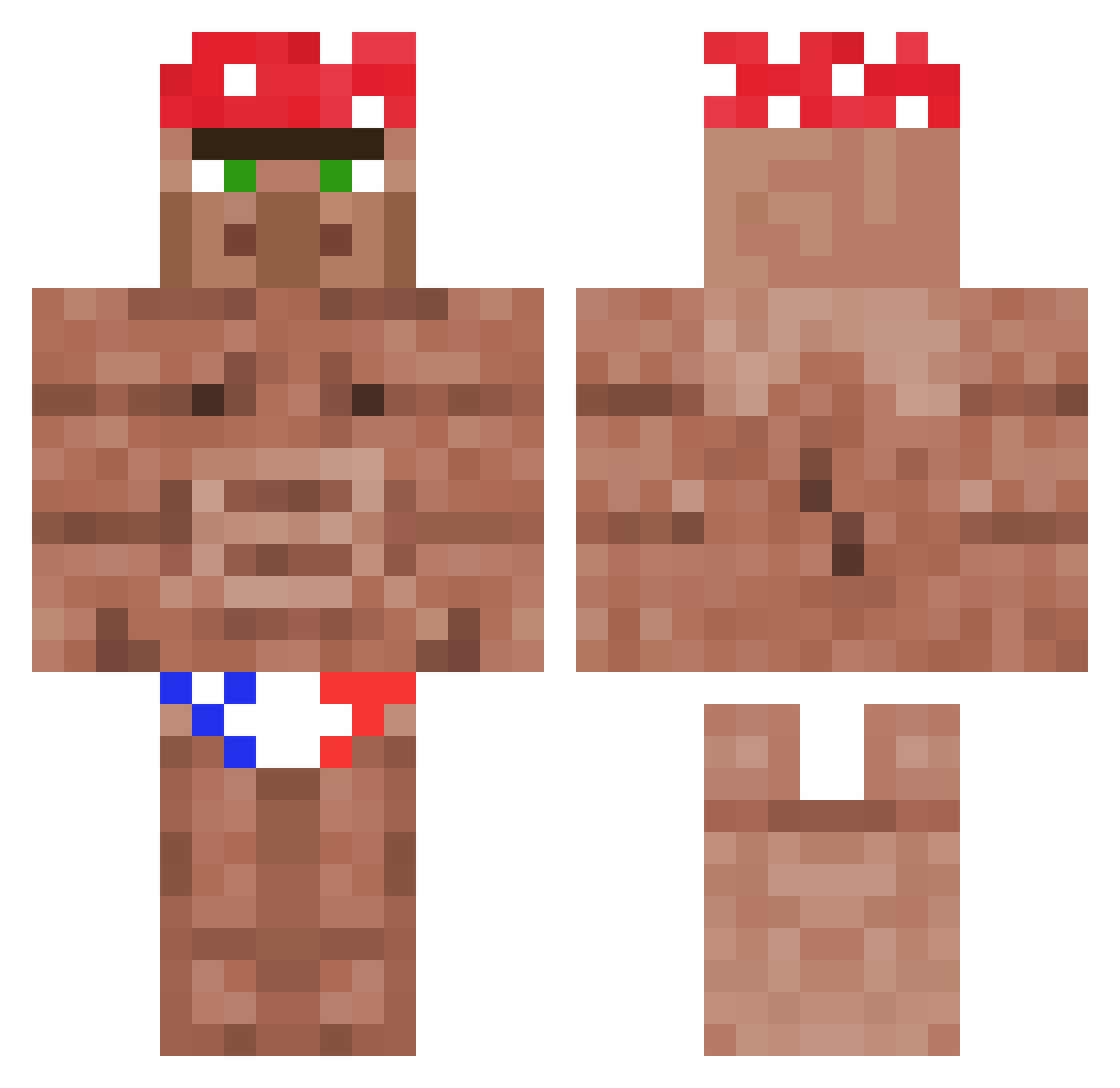
Other players with this skin (1178)
ImBatman89 was the 153rd player we have seen with this skin, first spotted on 07.08.2026. The same skin was seen on these players. Open a nickname to see their current skin and skin history.
 MJgay23 Logic_Titan cheesynutz Yearel ehvtje Zomboy122 K2nizzy GIGA_PENETRATOR SenorPixels vote4pack manidk13 zolrakz PAT8707 Ammar_Op BullVibe
 DEHH2 hobbitkeks Stassiak smumsy k_copsey multiverse86 goatered di39o Fondro2004 JailVII Higan_Bana Betton3000 Mikim7s Forost04 leeseokjun0808 Boikki TheMich2112 StereoActive00 pos1sh1tterWW GobbeMeister PabloPabloskii UrbanCrab3 Le0nio DyingNova ZikZak9 JointDeCulas meepic12 FranCani22 mogson93 MrFLie BL4W5 BearCobos EvolKrysis coral3651000 JohnCina Emerdon14 Croc2017 KROVIKYT Odye BenjaminChq Sparta_32_ jhope02188 PWNatorPWNED Dag0s ninja_digger
More Ricardo Milos Minecraft skins
See all 100 Ricardo Milos skins
How to install the ImBatman89 skin
- Press the Download button above to save the skin as a PNG file.
- Minecraft: Bedrock Edition (PE): open the Dressing Room from the main menu (or tap your character → Edit Character), go to Classic Skins → Owned, press the + (new skin) button, choose the downloaded PNG and pick the Classic (Steve) model. Works on PC and mobile; consoles cannot import custom skins.
- Minecraft: Java Edition: open the Minecraft Launcher, go to the Skins tab, click New Skin, load the PNG, pick the Classic (Steve) model and press Save & Use. You can also upload it at minecraft.net → Profile → Change Skin.
The skin does not show up after import - what should I do?
Restart Minecraft and open the Dressing Room again - imported skins sometimes appear only after a restart. Also make sure you selected the imported skin and picked the Classic (Steve) model.
Which model should I choose, Classic or Slim?
This skin is designed for the Classic (Steve) model. If you pick the wrong model, the arms of the skin will look stretched or squeezed.
Is the skin of ImBatman89 free to download?
Yes. Press Download, save the PNG file and use it in Minecraft: Bedrock Edition or Java Edition - no payment or registration needed. The skin also works on multiplayer servers and Realms.
More skins
Looking for more? Go back to all Minecraft skins and check the top skins of the week, month and all time, or find any player's skin by nickname.