
IEatDonutzzz - Minecraft Skins & Skin History
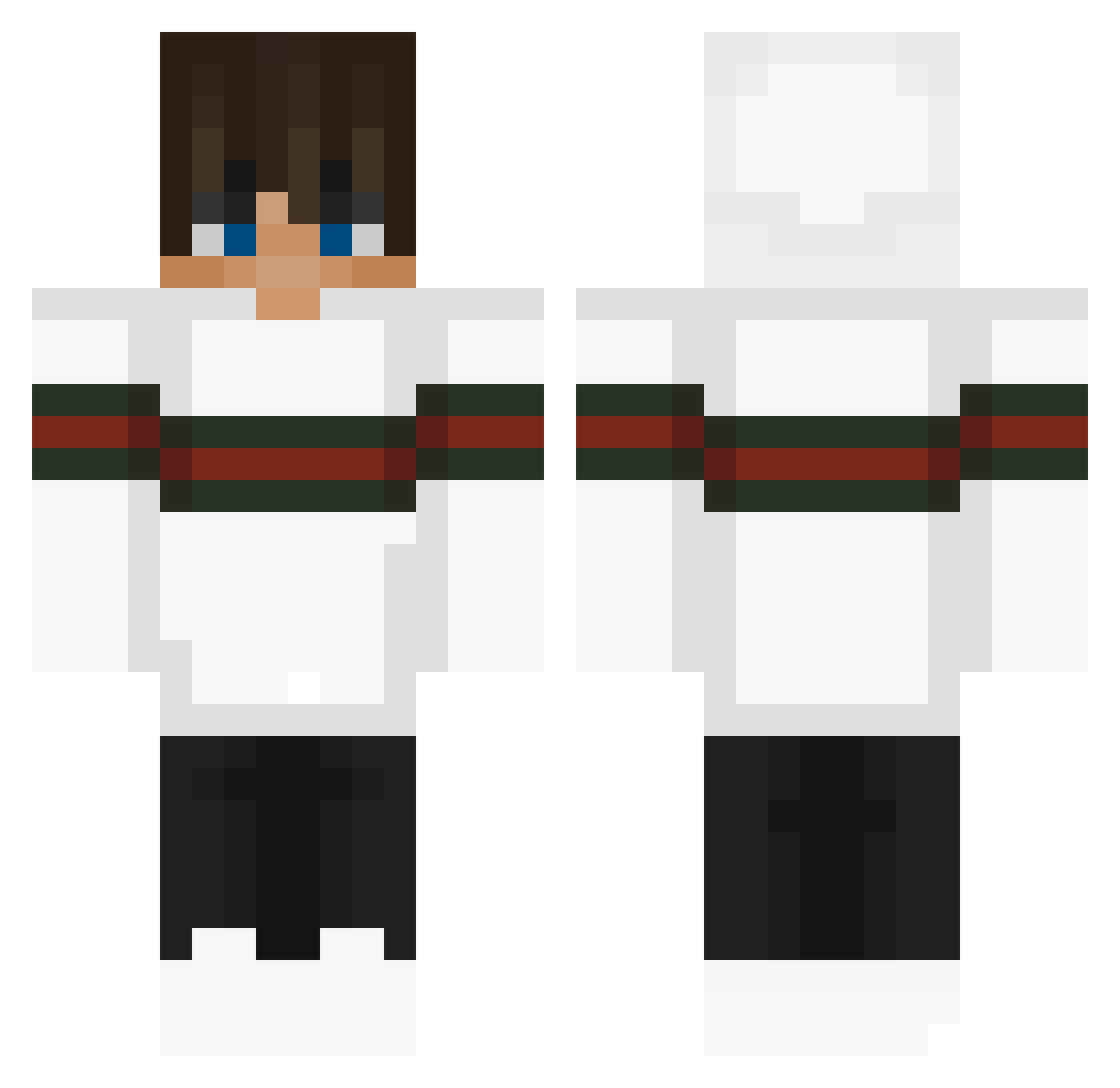
Current Minecraft skin of the player IEatDonutzzz, loaded from the official Mojang API. Rotate the 3D model with your mouse or finger, then download the skin as a PNG file and use it in Minecraft: Bedrock Edition or Java Edition for free. When IEatDonutzzz changes their skin, this page updates automatically and the old skin stays in the history below.
Other players with this skin (58)
IEatDonutzzz was the 4th player we have seen with this skin, first spotted on 31.07.2026. The same skin was seen on these players. Open a nickname to see their current skin and skin history.
 ReoLusia antekgg12 dimkn Freez1 Xanix_ JenGunSeng Chatonail AH8_1 pixiboyy JeruPVP_ NeoroxLive TrollBoy9 szymczqK MateoTimon hypebeast_6969 Phoenix_GHG_88 D2M1X JeiJohnson Jumle2109 xemptt nocs_123 0sCh3rSaxL Monasterio23 Gaming24hrs JNSpradlin Drawchen richhiii NIGHTWOLF8840 Heckler65 Nickdc93 FlazzyGG001 CalmWanderer kzn120120 BIGNICKOBREIN xlilkiller159x ImS0rryx Ciocka Kenzy120120 Stitch_idk PRO_thuryboy TheKingsFool06 dj_scott feyetar NinjaSkills_007 Ty4Two Rouzxr Frederik_219 mIhauZabijaka lebcrafter 42_kerem niamhsmith753 Szczurek1534 AllEyezOnMert IFIoFIoI vear2545 OSYY AshtonSickoMode TC9live
More Streetwear Minecraft skins
How to install the IEatDonutzzz skin
- Press the Download button above to save the skin as a PNG file.
- Minecraft: Bedrock Edition (PE): open the Dressing Room from the main menu (or tap your character → Edit Character), go to Classic Skins → Owned, press the + (new skin) button, choose the downloaded PNG and pick the Classic (Steve) model. Works on PC and mobile; consoles cannot import custom skins.
- Minecraft: Java Edition: open the Minecraft Launcher, go to the Skins tab, click New Skin, load the PNG, pick the Classic (Steve) model and press Save & Use. You can also upload it at minecraft.net → Profile → Change Skin.
The skin does not show up after import - what should I do?
Restart Minecraft and open the Dressing Room again - imported skins sometimes appear only after a restart. Also make sure you selected the imported skin and picked the Classic (Steve) model.
Which model should I choose, Classic or Slim?
This skin is designed for the Classic (Steve) model. If you pick the wrong model, the arms of the skin will look stretched or squeezed.
Is the skin of IEatDonutzzz free to download?
Yes. Press Download, save the PNG file and use it in Minecraft: Bedrock Edition or Java Edition - no payment or registration needed. The skin also works on multiplayer servers and Realms.
More skins
Looking for more? Go back to all Minecraft skins and check the top skins of the week, month and all time, or find any player's skin by nickname.