
Hulla300 - Minecraft Skins & Skin History
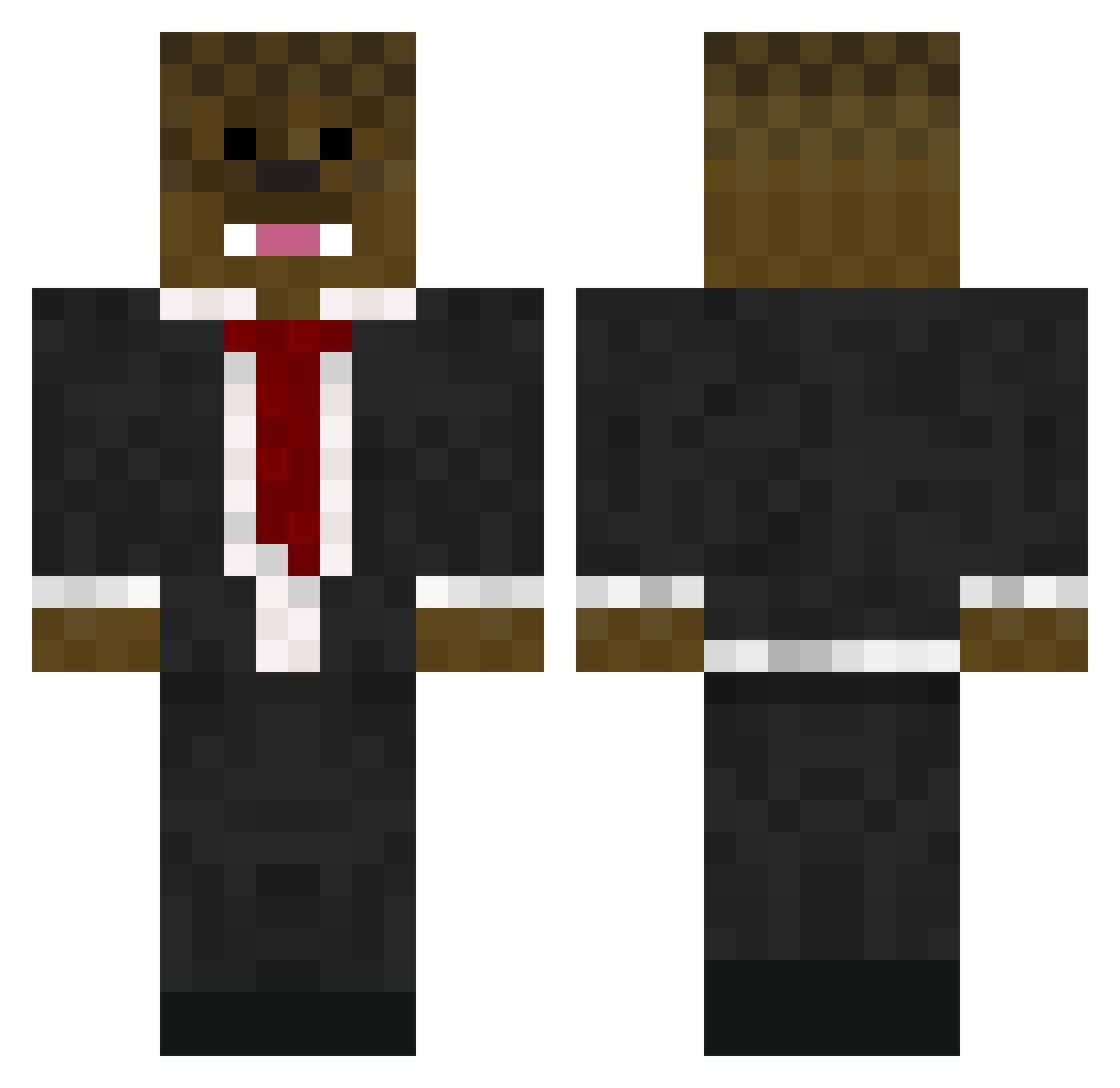
Current Minecraft skin of the player Hulla300, loaded from the official Mojang API. Rotate the 3D model with your mouse or finger, then download the skin as a PNG file and use it in Minecraft: Bedrock Edition or Java Edition for free. When Hulla300 changes their skin, this page updates automatically and the old skin stays in the history below.
Other players with this skin (576)
Hulla300 was the 324th player we have seen with this skin, first spotted on 19.09.2026. The same skin was seen on these players. Open a nickname to see their current skin and skin history.
 Butterking2099 THEMCPRO10 100Tbone THLee420 Jamesondeb ozzie2013 asfjerome4444 bungajacob jimbob20021 alexisurpapa Alexrox17 23Jeter HungerDeans rifle_baller30 sebastian417 twitterwill Young_Money16 woody2kids JamieDoDis BryceMaximus patrick4216 Scania147 BeanyBoi_6947 bmjbros SonofBlackHammer Thesandman5122 frederiksteffen SnipingTerror FluffyPanda0205 zombieblue45 WillMcL975 zdrian PankzMC bendenton01 Darthbunny25 BarcelonaBacca MidNidht_154 aXAFLUFFY Jacob_Baseball_9 Bacca125 Wells150 beatzzroo Jamjar812 spartantoribe04 login5599 Nicholascm2004 isaacsilver2 Jonniboy628 MCraftBaseball Red_dragons162 ManOfTheBacca1 MmMm1111 madmatt1155 captainsmarty99 Wizmind08 brodzinski14 Dylrod02 LORDLOJERO ruckis26 CreasedBear
More Chewbacca Minecraft skins
How to install the Hulla300 skin
- Press the Download button above to save the skin as a PNG file.
- Minecraft: Bedrock Edition (PE): open the Dressing Room from the main menu (or tap your character → Edit Character), go to Classic Skins → Owned, press the + (new skin) button, choose the downloaded PNG and pick the Classic (Steve) model. Works on PC and mobile; consoles cannot import custom skins.
- Minecraft: Java Edition: open the Minecraft Launcher, go to the Skins tab, click New Skin, load the PNG, pick the Classic (Steve) model and press Save & Use. You can also upload it at minecraft.net → Profile → Change Skin.
The skin does not show up after import - what should I do?
Restart Minecraft and open the Dressing Room again - imported skins sometimes appear only after a restart. Also make sure you selected the imported skin and picked the Classic (Steve) model.
Which model should I choose, Classic or Slim?
This skin is designed for the Classic (Steve) model. If you pick the wrong model, the arms of the skin will look stretched or squeezed.
Is the skin of Hulla300 free to download?
Yes. Press Download, save the PNG file and use it in Minecraft: Bedrock Edition or Java Edition - no payment or registration needed. The skin also works on multiplayer servers and Realms.
More skins
Looking for more? Go back to all Minecraft skins and check the top skins of the week, month and all time, or find any player's skin by nickname.