
Gustivo09 - Minecraft Skins & Skin History
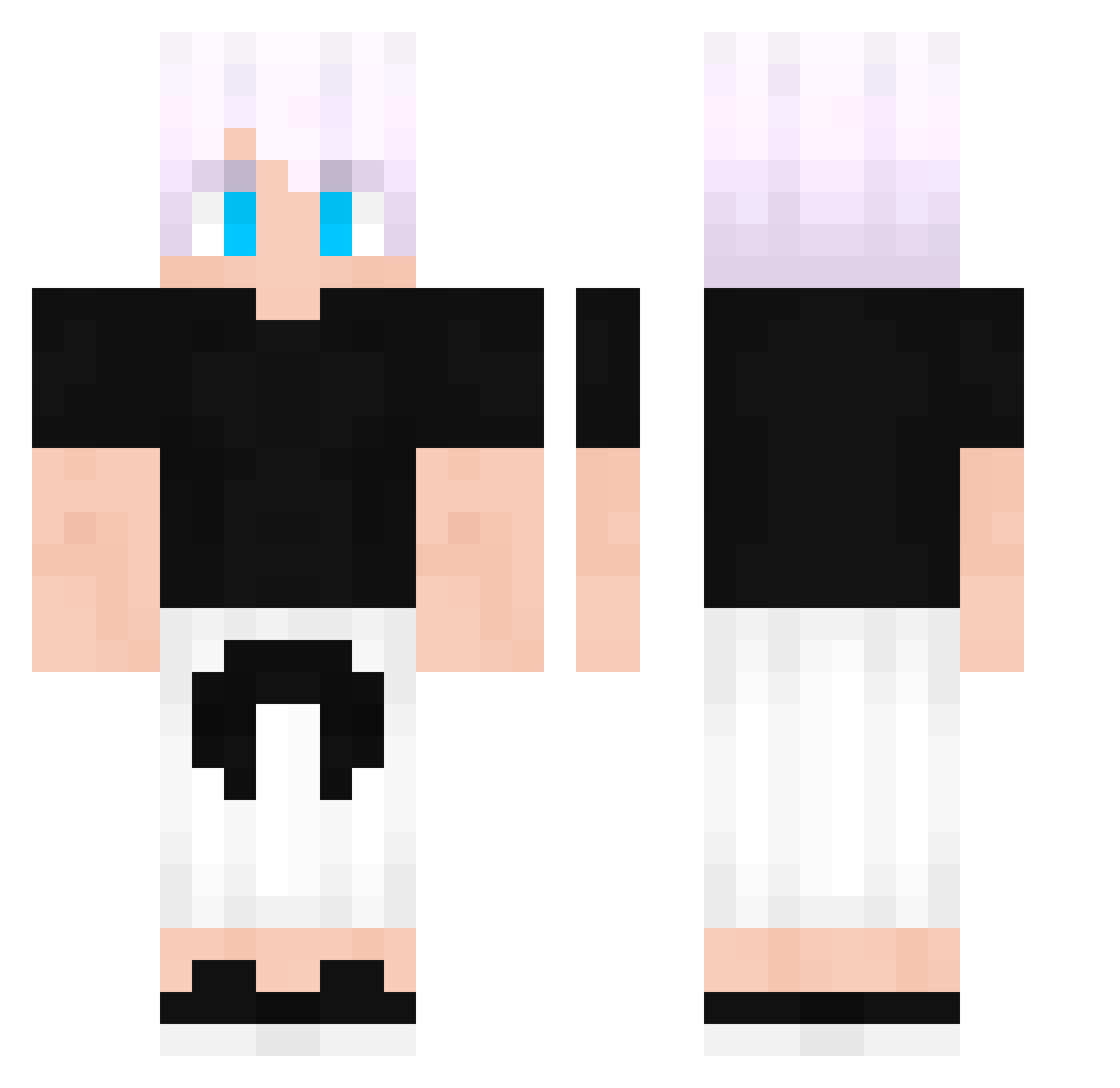
Current Minecraft skin of the player Gustivo09, loaded from the official Mojang API. Rotate the 3D model with your mouse or finger, then download the skin as a PNG file and use it in Minecraft: Bedrock Edition or Java Edition for free. When Gustivo09 changes their skin, this page updates automatically and the old skin stays in the history below.
Other players with this skin (68)
Gustivo09 was the 37th player we have seen with this skin, first spotted on 16.09.2026. The same skin was seen on these players. Open a nickname to see their current skin and skin history.
 Moonss_ RealAcea periluci mehmetzahid70 Jayfair2009 Itzz_Strix raze_try CarlosJoako 1056156 FireCinnamon29 BadPipee dirtyEfan Halo12345678 Bside2 Begonja TheScotts_ caleebe PS_leekangsan Ivancitouwu Momores LyzZ_7 swight01 ninja_w230 Bartixmix13 Skkyou Miles_Morales456 K4ryuu minhyeoy0 Kurisuu_15 Eliansan SixUUU telaila Ch4ikz LUCEK2317 AlistarDev EMILION27 illian Bjacobo123 fushenglo Eloryy SpeedLapin Voythic Josemm97 AyaanKhalid2009 Czekoladzia hammoudi1010 akanexuss yumin000 SleepyExility DamonM jvl1ann
 Kosturi6860 _WillyWiger_ criscro TheRealMilanator santimikecrack Munaz_ ShinaTufan Sir_Moyano PieroM
More Satoru Gojo Minecraft skins
See all 1318 Satoru Gojo skins
How to install the Gustivo09 skin
- Press the Download button above to save the skin as a PNG file.
- Minecraft: Bedrock Edition (PE): open the Dressing Room from the main menu (or tap your character → Edit Character), go to Classic Skins → Owned, press the + (new skin) button, choose the downloaded PNG and pick the Classic (Steve) model. Works on PC and mobile; consoles cannot import custom skins.
- Minecraft: Java Edition: open the Minecraft Launcher, go to the Skins tab, click New Skin, load the PNG, pick the Classic (Steve) model and press Save & Use. You can also upload it at minecraft.net → Profile → Change Skin.
The skin does not show up after import - what should I do?
Restart Minecraft and open the Dressing Room again - imported skins sometimes appear only after a restart. Also make sure you selected the imported skin and picked the Classic (Steve) model.
Which model should I choose, Classic or Slim?
This skin is designed for the Classic (Steve) model. If you pick the wrong model, the arms of the skin will look stretched or squeezed.
Is the skin of Gustivo09 free to download?
Yes. Press Download, save the PNG file and use it in Minecraft: Bedrock Edition or Java Edition - no payment or registration needed. The skin also works on multiplayer servers and Realms.
More skins
Looking for more? Go back to all Minecraft skins and check the top skins of the week, month and all time, or find any player's skin by nickname.