
Gustavo_2820 - Minecraft Skins & Skin History
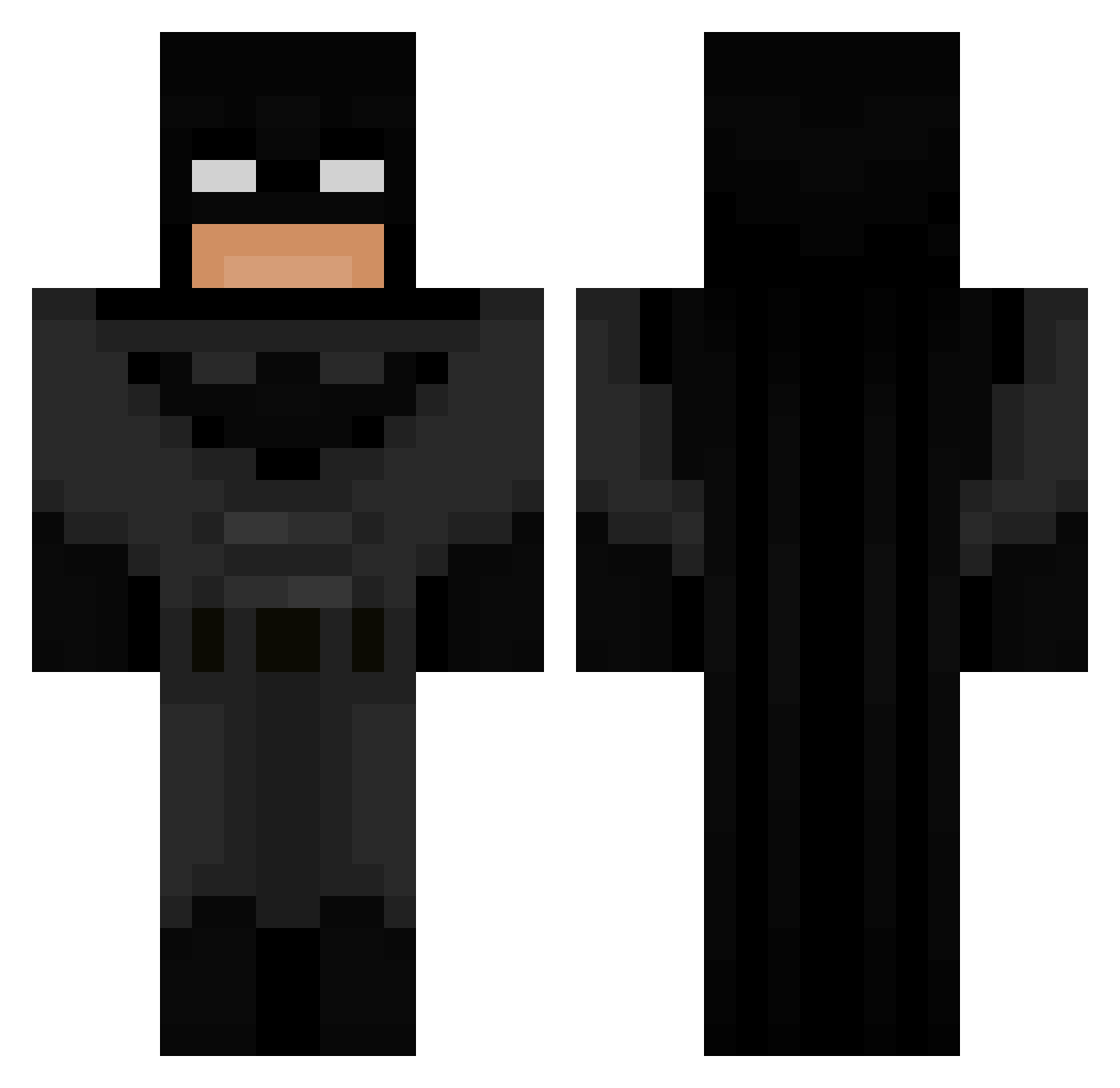
Current Minecraft skin of the player Gustavo_2820, loaded from the official Mojang API. Rotate the 3D model with your mouse or finger, then download the skin as a PNG file and use it in Minecraft: Bedrock Edition or Java Edition for free. When Gustavo_2820 changes their skin, this page updates automatically and the old skin stays in the history below.
Other players with this skin (590)
Gustavo_2820 was the 20th player we have seen with this skin, first spotted on 27.07.2026. The same skin was seen on these players. Open a nickname to see their current skin and skin history.
 GianConG ihs04 Lemnos51 Super5397 nettypooh shjo_ BubbleBallz 29JMoney29 MHester188 WiggilyMonkey lauti2302 77r1 Domko10 Bruh_BTW HCTW17 _Moonkeyman_ Bwaaz_ CYARNZ1 D0ky123 Tornqvistar Frejuuuuu ticxy Piraat sirlovealot2 HotSauce14 Luzbe22 x_Shisui_x fryzy784 xru_ MegaTheOG mirkaa juicebox263 purpcy ConSpeikel fatihtalhak palodeajo Soen8 VeCloud nuttybuddy789 maxiicasla PHJordan ItsJonn8 Queertis Bredisgud ikonopka I_Have_Arm_Pits dandoni_ maxmax16 Okayawa BananaBoi2477 CosmeticCoast vggo123 Tcyluxx Pluggish SGSHAUN98 Elux0 0ligofrenia
 Halacopter roblox_user_1337 Batman_Temper
More Batman Minecraft skins
How to install the Gustavo_2820 skin
- Press the Download button above to save the skin as a PNG file.
- Minecraft: Bedrock Edition (PE): open the Dressing Room from the main menu (or tap your character → Edit Character), go to Classic Skins → Owned, press the + (new skin) button, choose the downloaded PNG and pick the Classic (Steve) model. Works on PC and mobile; consoles cannot import custom skins.
- Minecraft: Java Edition: open the Minecraft Launcher, go to the Skins tab, click New Skin, load the PNG, pick the Classic (Steve) model and press Save & Use. You can also upload it at minecraft.net → Profile → Change Skin.
The skin does not show up after import - what should I do?
Restart Minecraft and open the Dressing Room again - imported skins sometimes appear only after a restart. Also make sure you selected the imported skin and picked the Classic (Steve) model.
Which model should I choose, Classic or Slim?
This skin is designed for the Classic (Steve) model. If you pick the wrong model, the arms of the skin will look stretched or squeezed.
Is the skin of Gustavo_2820 free to download?
Yes. Press Download, save the PNG file and use it in Minecraft: Bedrock Edition or Java Edition - no payment or registration needed. The skin also works on multiplayer servers and Realms.
More skins
Looking for more? Go back to all Minecraft skins and check the top skins of the week, month and all time, or find any player's skin by nickname.