
GinjaJess - Minecraft Skins & Skin History
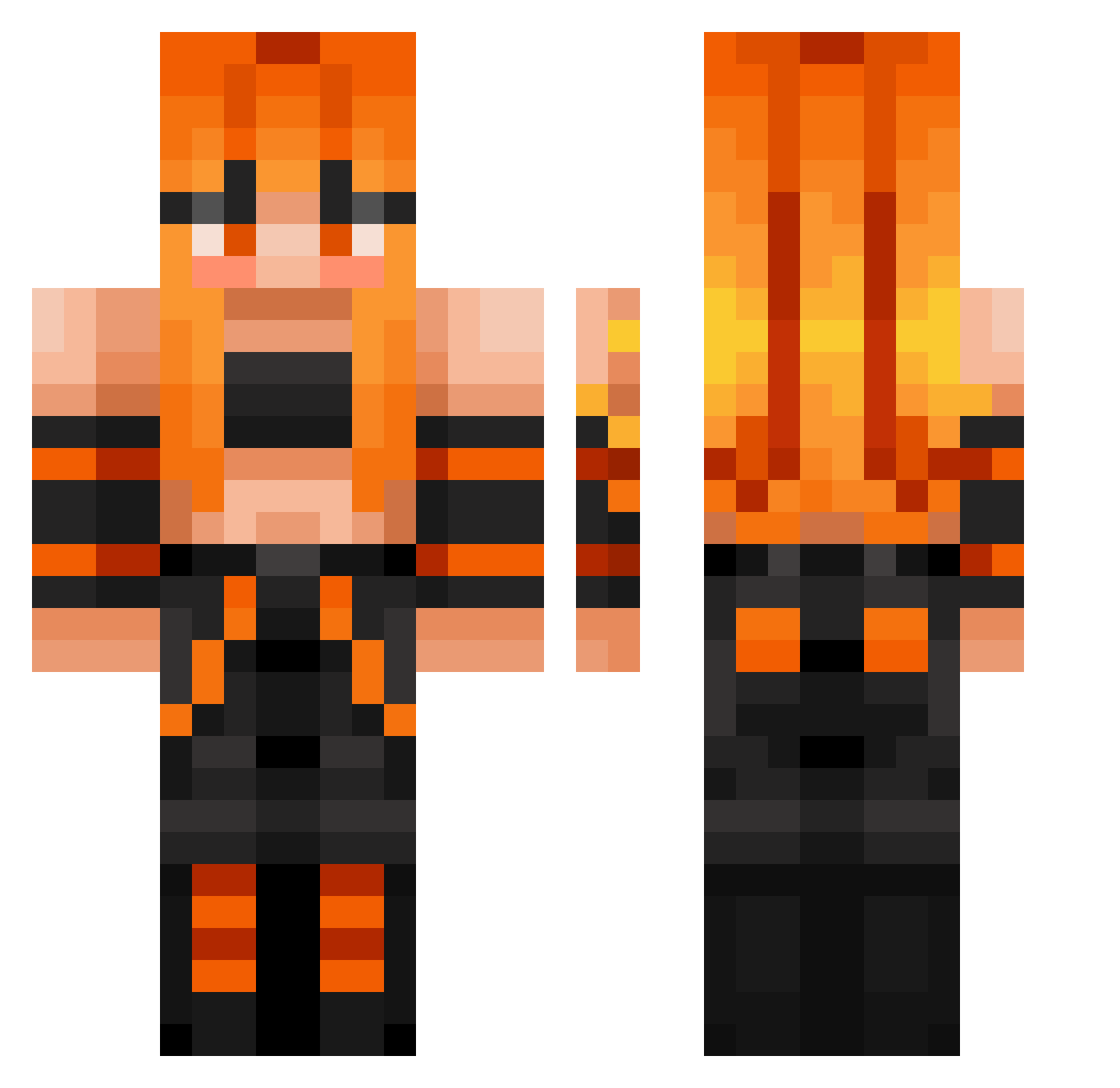
Current Minecraft skin of the player GinjaJess, loaded from the official Mojang API. Rotate the 3D model with your mouse or finger, then download the skin as a PNG file and use it in Minecraft: Bedrock Edition or Java Edition for free. When GinjaJess changes their skin, this page updates automatically and the old skin stays in the history below.
Other players with this skin (457)
GinjaJess was the 440th player we have seen with this skin, first spotted on 14.11.2026. The same skin was seen on these players. Open a nickname to see their current skin and skin history.
 hansin0312 Foxxx13 caraak61 Alchamaedus cbot725 dominooo100 johnycomp11 Metric2303 jmben7 Cinnamonns shardoftears Blannyy WendKy charles425 RuanSwart viettrungday RealShady primaKin _Pauul_ nenastyas RedRoseG xMelBellex sephiroth2783 ryuuuuuu12311 DannyOwU RukirGamingYT AccursedOni menofgod2 aurorapaw Crystal1651 pshakal AmandaPandaPanic luzzz0 milleam PhoenixLumina Neurox558 pathy1 Marz2_3 Corsi Mirahav OneRetroTurtle lil_LIE UncleNatan NDrake2003 tryful dianix09 ridder_tobi Islam39550 jenci1127 Hondou123 goomie88 HanaKisaki lilgoose13 Mackaron1 LooLue CheckedHail69420 AngryBrex simssi59 dodge78 raptorgamer2012
More Girl Minecraft skins
How to install the GinjaJess skin
- Press the Download button above to save the skin as a PNG file.
- Minecraft: Bedrock Edition (PE): open the Dressing Room from the main menu (or tap your character → Edit Character), go to Classic Skins → Owned, press the + (new skin) button, choose the downloaded PNG and pick the Classic (Steve) model. Works on PC and mobile; consoles cannot import custom skins.
- Minecraft: Java Edition: open the Minecraft Launcher, go to the Skins tab, click New Skin, load the PNG, pick the Classic (Steve) model and press Save & Use. You can also upload it at minecraft.net → Profile → Change Skin.
The skin does not show up after import - what should I do?
Restart Minecraft and open the Dressing Room again - imported skins sometimes appear only after a restart. Also make sure you selected the imported skin and picked the Classic (Steve) model.
Which model should I choose, Classic or Slim?
This skin is designed for the Classic (Steve) model. If you pick the wrong model, the arms of the skin will look stretched or squeezed.
Is the skin of GinjaJess free to download?
Yes. Press Download, save the PNG file and use it in Minecraft: Bedrock Edition or Java Edition - no payment or registration needed. The skin also works on multiplayer servers and Realms.
More skins
Looking for more? Go back to all Minecraft skins and check the top skins of the week, month and all time, or find any player's skin by nickname.