
GhostRecall248 - Minecraft Skins & Skin History
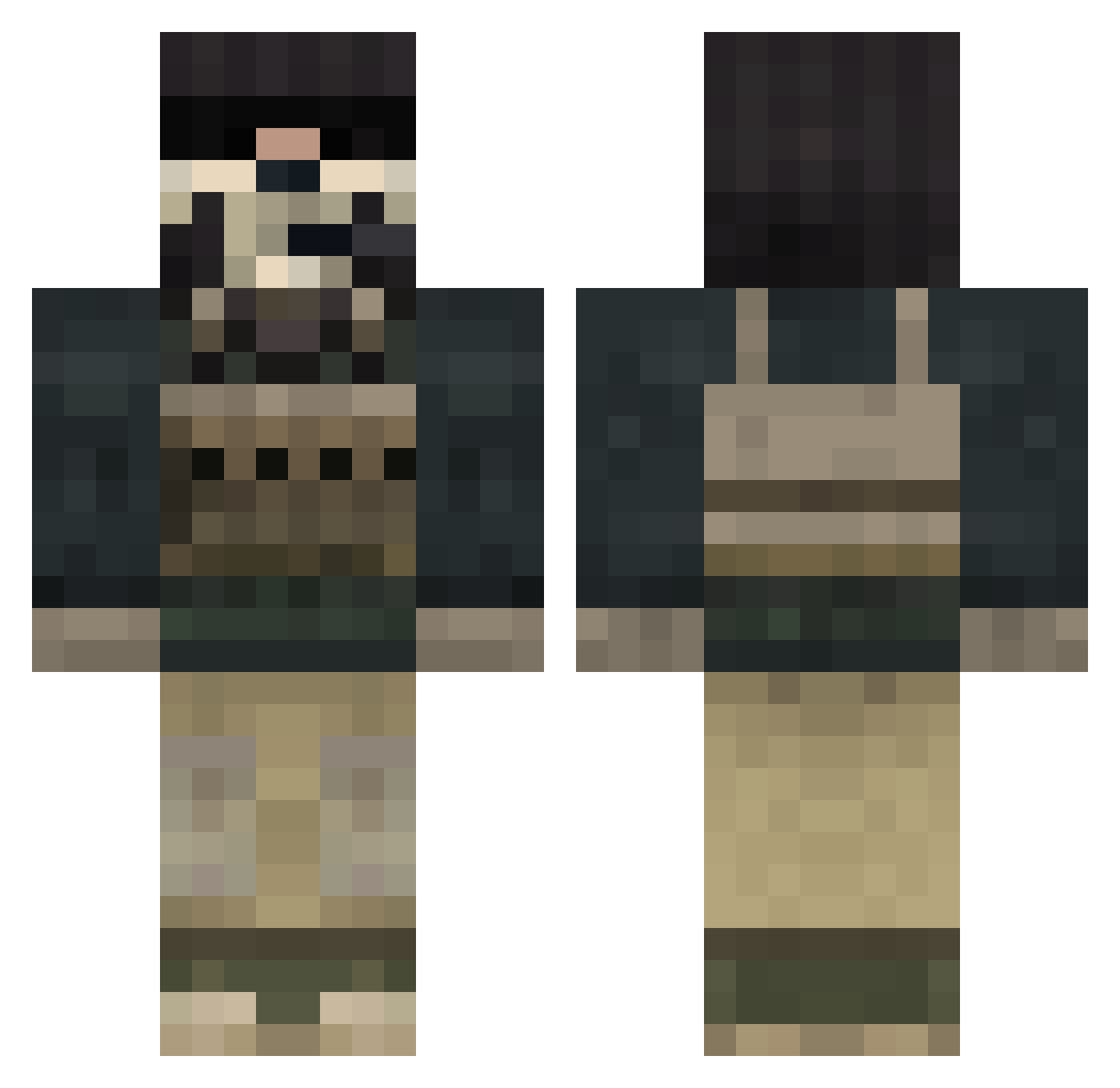
Current Minecraft skin of the player GhostRecall248, loaded from the official Mojang API. Rotate the 3D model with your mouse or finger, then download the skin as a PNG file and use it in Minecraft: Bedrock Edition or Java Edition for free. When GhostRecall248 changes their skin, this page updates automatically and the old skin stays in the history below.
Other players with this skin (848)
GhostRecall248 was the 297th player we have seen with this skin, first spotted on 07.09.2026. The same skin was seen on these players. Open a nickname to see their current skin and skin history.
 Wytse ericseth PsYcHoTiiC_v MoodyJensa andersholme pengxu12345 YeahItsDJ joramdenbesten StudPuppy55 minko1337 Ghostyh theblackteap3 littlesteve09 osvaldeloki ilyvictoria Aqwijn HOXTON115 ChipChip6141 Dragonhead2003 peteypower5 VaL3ns dragonmike14 byDracool KINGHAKING CongoKarl Pottsie70 mig214 xTwiSt199 Grigsby34 CrazedBanana83 Revolution18 Drakusmc Lisches cangani Bailey_x11 xxsplyntrxx MattDahDon jedijens jgwrestler iTz_SAFI44 JacKit2145 andre_seelmann kaiwaiii caleb360 Tucker493 TheHamBot acrylicowl 6Jay2002 sevilla56 Canadian_Corp TheLoneStalker_ Lancer1559 Charlie3774 WorldStar69 dexnewyen hulkmarvel1 GamingAlert10 Indev_T diegocossu zvf27
More Call Of Duty Minecraft skins
See all 174 Call Of Duty skins
How to install the GhostRecall248 skin
- Press the Download button above to save the skin as a PNG file.
- Minecraft: Bedrock Edition (PE): open the Dressing Room from the main menu (or tap your character → Edit Character), go to Classic Skins → Owned, press the + (new skin) button, choose the downloaded PNG and pick the Classic (Steve) model. Works on PC and mobile; consoles cannot import custom skins.
- Minecraft: Java Edition: open the Minecraft Launcher, go to the Skins tab, click New Skin, load the PNG, pick the Classic (Steve) model and press Save & Use. You can also upload it at minecraft.net → Profile → Change Skin.
The skin does not show up after import - what should I do?
Restart Minecraft and open the Dressing Room again - imported skins sometimes appear only after a restart. Also make sure you selected the imported skin and picked the Classic (Steve) model.
Which model should I choose, Classic or Slim?
This skin is designed for the Classic (Steve) model. If you pick the wrong model, the arms of the skin will look stretched or squeezed.
Is the skin of GhostRecall248 free to download?
Yes. Press Download, save the PNG file and use it in Minecraft: Bedrock Edition or Java Edition - no payment or registration needed. The skin also works on multiplayer servers and Realms.
More skins
Looking for more? Go back to all Minecraft skins and check the top skins of the week, month and all time, or find any player's skin by nickname.