
Gawthorne - Minecraft Skins & Skin History
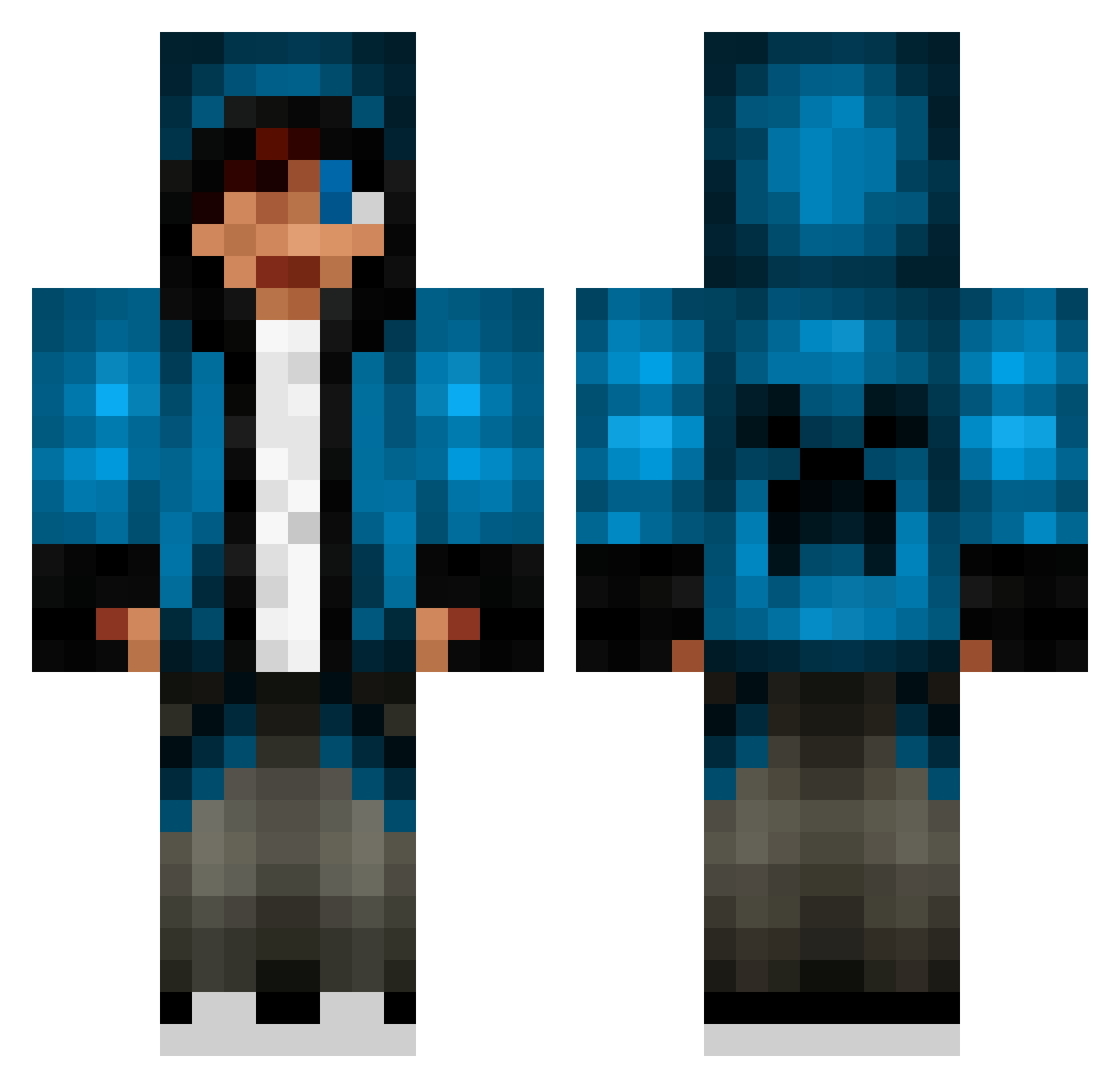
Current Minecraft skin of the player Gawthorne, loaded from the official Mojang API. Rotate the 3D model with your mouse or finger, then download the skin as a PNG file and use it in Minecraft: Bedrock Edition or Java Edition for free. When Gawthorne changes their skin, this page updates automatically and the old skin stays in the history below.
Other players with this skin (653)
Gawthorne was the 554th player we have seen with this skin, first spotted on 11.10.2026. The same skin was seen on these players. Open a nickname to see their current skin and skin history.
 brock0124 H4yli3 mccguest Florinooo YikIJiN Caleber48 PhyscoKiller348 Thomaskeir Atts624 jordankatz SPACEINVADER121 Robbo3535 OhLookItsChris TRIG3R3D jaiden816 hgxegz nags54 White_eagle19 kion6057 heroborn42 epicunicorn345 VJolfer skyder45 maximryk2008 Ricky_Bert steamfunlab16 Paney_ MAjEsTIcLEgeNd90 KiiNG0Kz tanyabasso kennyjr06 Fifth_Element_00 MrGamerSK vlump BlueWolverine47 pedroman101 zacharyhyatt JonasK2004 JPW7 deathmaker18 EGHman simonmoor Goldenguy123 dcxtrickzz832 justincool15 Superravn keeperof7keys Skythefly457 Elementboy69 Gavinski2 2Piggys DSolano06 II_NoVah_II crushcrushfist crimox91 Bobbybill100 Kaiman10000 dionhernandez1 OklahomaBoy13 legoboytrooper
More Creeper Minecraft skins
How to install the Gawthorne skin
- Press the Download button above to save the skin as a PNG file.
- Minecraft: Bedrock Edition (PE): open the Dressing Room from the main menu (or tap your character → Edit Character), go to Classic Skins → Owned, press the + (new skin) button, choose the downloaded PNG and pick the Classic (Steve) model. Works on PC and mobile; consoles cannot import custom skins.
- Minecraft: Java Edition: open the Minecraft Launcher, go to the Skins tab, click New Skin, load the PNG, pick the Classic (Steve) model and press Save & Use. You can also upload it at minecraft.net → Profile → Change Skin.
The skin does not show up after import - what should I do?
Restart Minecraft and open the Dressing Room again - imported skins sometimes appear only after a restart. Also make sure you selected the imported skin and picked the Classic (Steve) model.
Which model should I choose, Classic or Slim?
This skin is designed for the Classic (Steve) model. If you pick the wrong model, the arms of the skin will look stretched or squeezed.
Is the skin of Gawthorne free to download?
Yes. Press Download, save the PNG file and use it in Minecraft: Bedrock Edition or Java Edition - no payment or registration needed. The skin also works on multiplayer servers and Realms.
More skins
Looking for more? Go back to all Minecraft skins and check the top skins of the week, month and all time, or find any player's skin by nickname.