
FoggyNeko - Minecraft Skins & Skin History
Current Minecraft skin of the player FoggyNeko, loaded from the official Mojang API. Rotate the 3D model with your mouse or finger, then download the skin as a PNG file and use it in Minecraft: Bedrock Edition or Java Edition for free. When FoggyNeko changes their skin, this page updates automatically and the old skin stays in the history below.
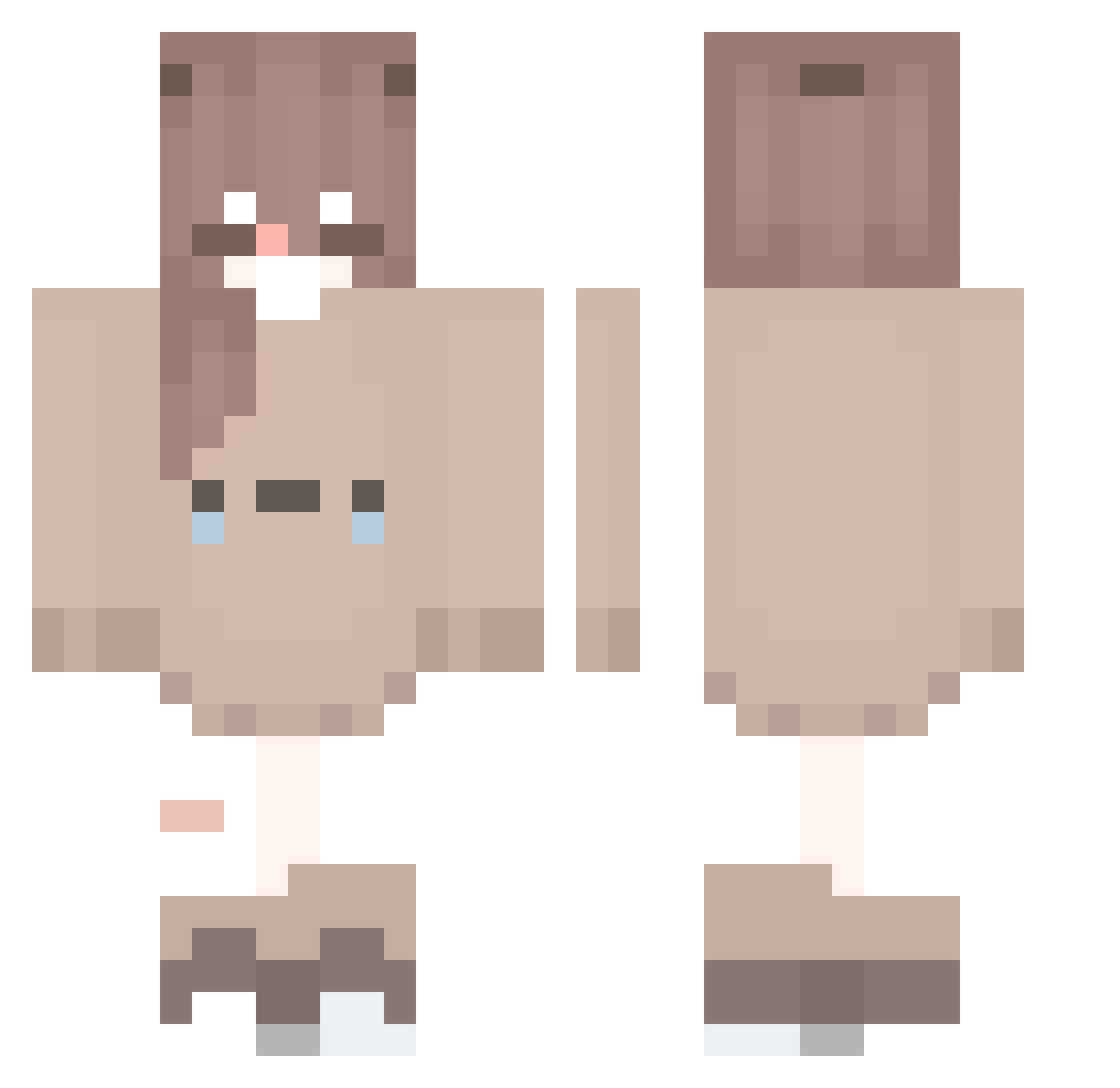
Other players with this skin (174)
FoggyNeko was the 4th player we have seen with this skin, first spotted on 24.07.2026. The same skin was seen on these players. Open a nickname to see their current skin and skin history.
 sb_xSoNa_0720 Hecatierz MILOSZ0507 ILikeSleeping
 OoArtaoisoO serowe Han_Field Pumiyuki SKzMXDD westshaddock Abd_king bbyrr MimiMimi1111 HayamiK hunngvm2 Gigi_x_ Galaxy_Gaming_YT TahuRebuZ XxPsyZchoX TsukiZ002 xenzy_GG SkyGuima Coolbaby07 ejay192 reururu sharkliy mockup1 ruzkky 46cm3
 Luhvx Cupid_H3art Dinonugget_ pmnhan08 Minniloli Heedyi Duck_Big Zitr3x AIKO_Pekorin
 AstaPotato yuzuka_a Kinatari Bladeplay SamikNet tawa_dayo Wentzin _Beloved_F3N1X_ astrokitty_7 VuxxLmtEdge SparkleDa1st AnnyMarx Risheee Klosban Miyu002 MrLarpp MIiH8 JuliaLuna0 Catrina2 Jurubebaa sasa016016 Kamiya_Ai
More Bear Ears Minecraft skins
How to install the FoggyNeko skin
- Press the Download button above to save the skin as a PNG file.
- Minecraft: Bedrock Edition (PE): open the Dressing Room from the main menu (or tap your character → Edit Character), go to Classic Skins → Owned, press the + (new skin) button, choose the downloaded PNG and pick the Classic (Steve) model. Works on PC and mobile; consoles cannot import custom skins.
- Minecraft: Java Edition: open the Minecraft Launcher, go to the Skins tab, click New Skin, load the PNG, pick the Classic (Steve) model and press Save & Use. You can also upload it at minecraft.net → Profile → Change Skin.
The skin does not show up after import - what should I do?
Restart Minecraft and open the Dressing Room again - imported skins sometimes appear only after a restart. Also make sure you selected the imported skin and picked the Classic (Steve) model.
Which model should I choose, Classic or Slim?
This skin is designed for the Classic (Steve) model. If you pick the wrong model, the arms of the skin will look stretched or squeezed.
Is the skin of FoggyNeko free to download?
Yes. Press Download, save the PNG file and use it in Minecraft: Bedrock Edition or Java Edition - no payment or registration needed. The skin also works on multiplayer servers and Realms.
More skins
Looking for more? Go back to all Minecraft skins and check the top skins of the week, month and all time, or find any player's skin by nickname.