
Flame_subzero - Minecraft Skins & Skin History
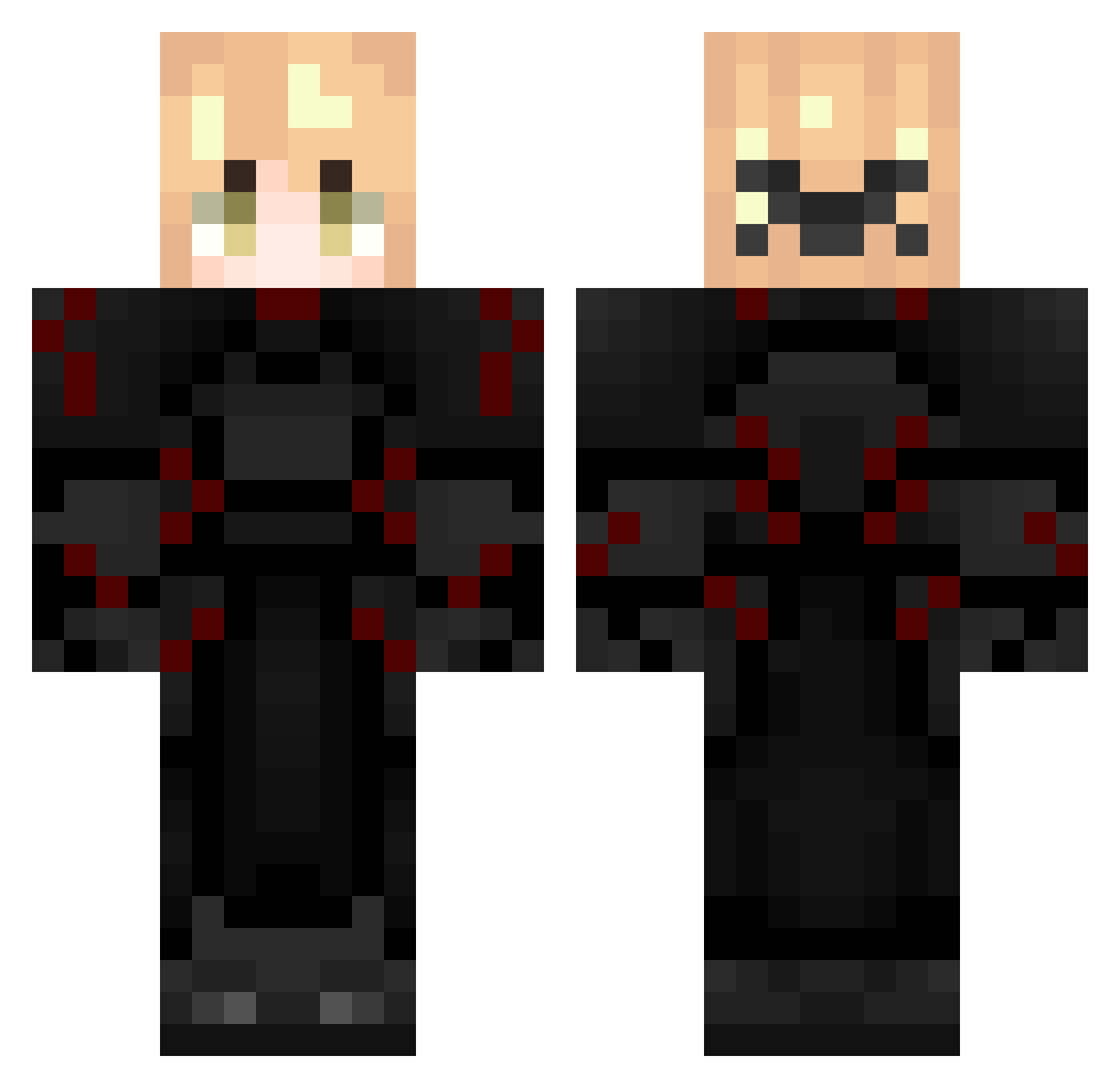
Current Minecraft skin of the player Flame_subzero, loaded from the official Mojang API. Rotate the 3D model with your mouse or finger, then download the skin as a PNG file and use it in Minecraft: Bedrock Edition or Java Edition for free. When Flame_subzero changes their skin, this page updates automatically and the old skin stays in the history below.
Other players with this skin (287)
Flame_subzero was the 131st player we have seen with this skin, first spotted on 13.09.2026. The same skin was seen on these players. Open a nickname to see their current skin and skin history.
 Nishowo starplain XQCGY TheKoumes Bullnizz fgcmarios bkiwi GamerShrimYt 7enzt_ SYED_1 1372x Lonsavc zewux3 Luigi2128 Wx9up 054_SunaT darkaskarot ENDERFLY54321 aerglowi
 conexionmc quangg6678
 eaatt bigusdayz ItzDevii Raizen1v9 Ka1ser_1 tost_alan brycie067583 au1ol mrymrqs LilGoat83 XavierOwnsU zivetVxAEC Geminz dad144210099 JohnPork5674 ValentinErik tenshisxd hung2k9 Blackoutgeo xmuzaafake Emerald_secret22 Ji9STAR21 A_muffin_
 Franklinho Tymofiiyka232fun sia00 tpxlc II19lI Almicko A1Idn LT5DemonXd SouAtlon AadiHQ Jason300814 Formidablade ryuksrijan righclick sheeeeeeeesh69 Raijinnn67
More Knight Minecraft skins
How to install the Flame_subzero skin
- Press the Download button above to save the skin as a PNG file.
- Minecraft: Bedrock Edition (PE): open the Dressing Room from the main menu (or tap your character → Edit Character), go to Classic Skins → Owned, press the + (new skin) button, choose the downloaded PNG and pick the Classic (Steve) model. Works on PC and mobile; consoles cannot import custom skins.
- Minecraft: Java Edition: open the Minecraft Launcher, go to the Skins tab, click New Skin, load the PNG, pick the Classic (Steve) model and press Save & Use. You can also upload it at minecraft.net → Profile → Change Skin.
The skin does not show up after import - what should I do?
Restart Minecraft and open the Dressing Room again - imported skins sometimes appear only after a restart. Also make sure you selected the imported skin and picked the Classic (Steve) model.
Which model should I choose, Classic or Slim?
This skin is designed for the Classic (Steve) model. If you pick the wrong model, the arms of the skin will look stretched or squeezed.
Is the skin of Flame_subzero free to download?
Yes. Press Download, save the PNG file and use it in Minecraft: Bedrock Edition or Java Edition - no payment or registration needed. The skin also works on multiplayer servers and Realms.
More skins
Looking for more? Go back to all Minecraft skins and check the top skins of the week, month and all time, or find any player's skin by nickname.