
Farax_xx - Minecraft Skins & Skin History
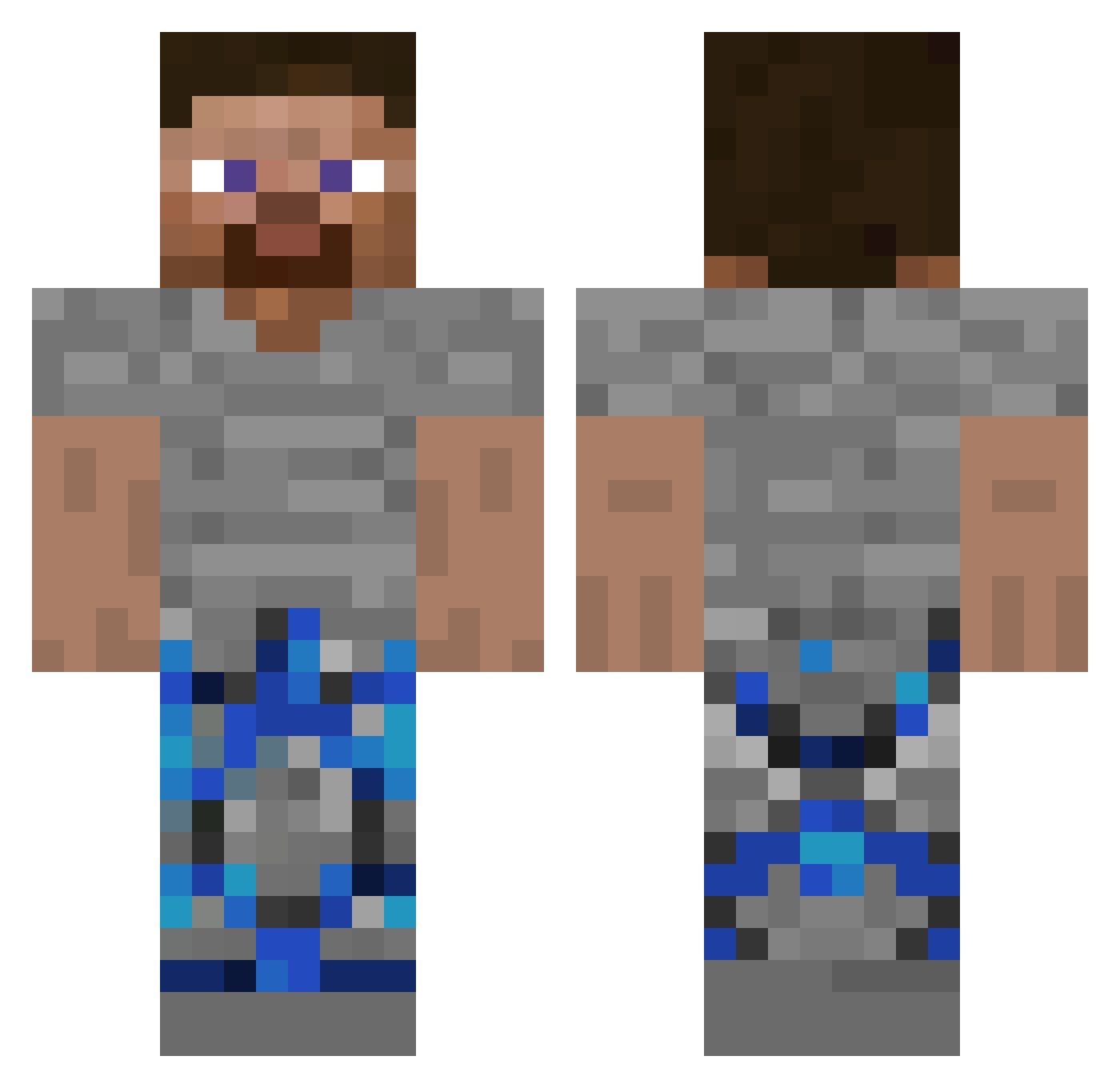
Current Minecraft skin of the player Farax_xx, loaded from the official Mojang API. Rotate the 3D model with your mouse or finger, then download the skin as a PNG file and use it in Minecraft: Bedrock Edition or Java Edition for free. When Farax_xx changes their skin, this page updates automatically and the old skin stays in the history below.
Other players with this skin (73)
Farax_xx was the 19th player we have seen with this skin, first spotted on 14.08.2026. The same skin was seen on these players. Open a nickname to see their current skin and skin history.
 BKON120FPS
 FrostyOdyseyYT DrDoniutt BigBrainNate daczxx Axelz321 pz1squire DrDontDoIt Smilybeebob Medic83 QDbyclown Piswasser3103 MREYPMA_TikTok 480fps_ MaximVrotEbatel coolgamer24618 DrDcnvt th4RealDrDonut DrDonutSMP apirequests Natefilson Geo0114 ESASP Brizo27 CRT_Loudy sqxqz drcoconutt12 rzuc Steak67903
 meekolaj yobro1122
 JWTackle
 mitek122 sq_odai123_87677 EKKOREE_mhMXgZg GB_Tavin PranitVip69 JHFCHJAA BigMamma360 W4VYT Jacobzek zakboxedu Iron_Isaaq6 Materia4 abolfazlX1 Truongnho_em ghxst211005 WalmartMarlowwW leeyumm1 MatadorDeBetas Liffing BlotsZZ KingJaxOMG HAFO_ itz_Yuk1_ khoonineola DrDonutttttttttt Varloxp Karli1860 CrazySkeleton170
How to install the Farax_xx skin
- Press the Download button above to save the skin as a PNG file.
- Minecraft: Bedrock Edition (PE): open the Dressing Room from the main menu (or tap your character → Edit Character), go to Classic Skins → Owned, press the + (new skin) button, choose the downloaded PNG and pick the Classic (Steve) model. Works on PC and mobile; consoles cannot import custom skins.
- Minecraft: Java Edition: open the Minecraft Launcher, go to the Skins tab, click New Skin, load the PNG, pick the Classic (Steve) model and press Save & Use. You can also upload it at minecraft.net → Profile → Change Skin.
The skin does not show up after import - what should I do?
Restart Minecraft and open the Dressing Room again - imported skins sometimes appear only after a restart. Also make sure you selected the imported skin and picked the Classic (Steve) model.
Which model should I choose, Classic or Slim?
This skin is designed for the Classic (Steve) model. If you pick the wrong model, the arms of the skin will look stretched or squeezed.
Is the skin of Farax_xx free to download?
Yes. Press Download, save the PNG file and use it in Minecraft: Bedrock Edition or Java Edition - no payment or registration needed. The skin also works on multiplayer servers and Realms.
More skins
Looking for more? Go back to all Minecraft skins and check the top skins of the week, month and all time, or find any player's skin by nickname.