
F3ugen - Minecraft Skins & Skin History
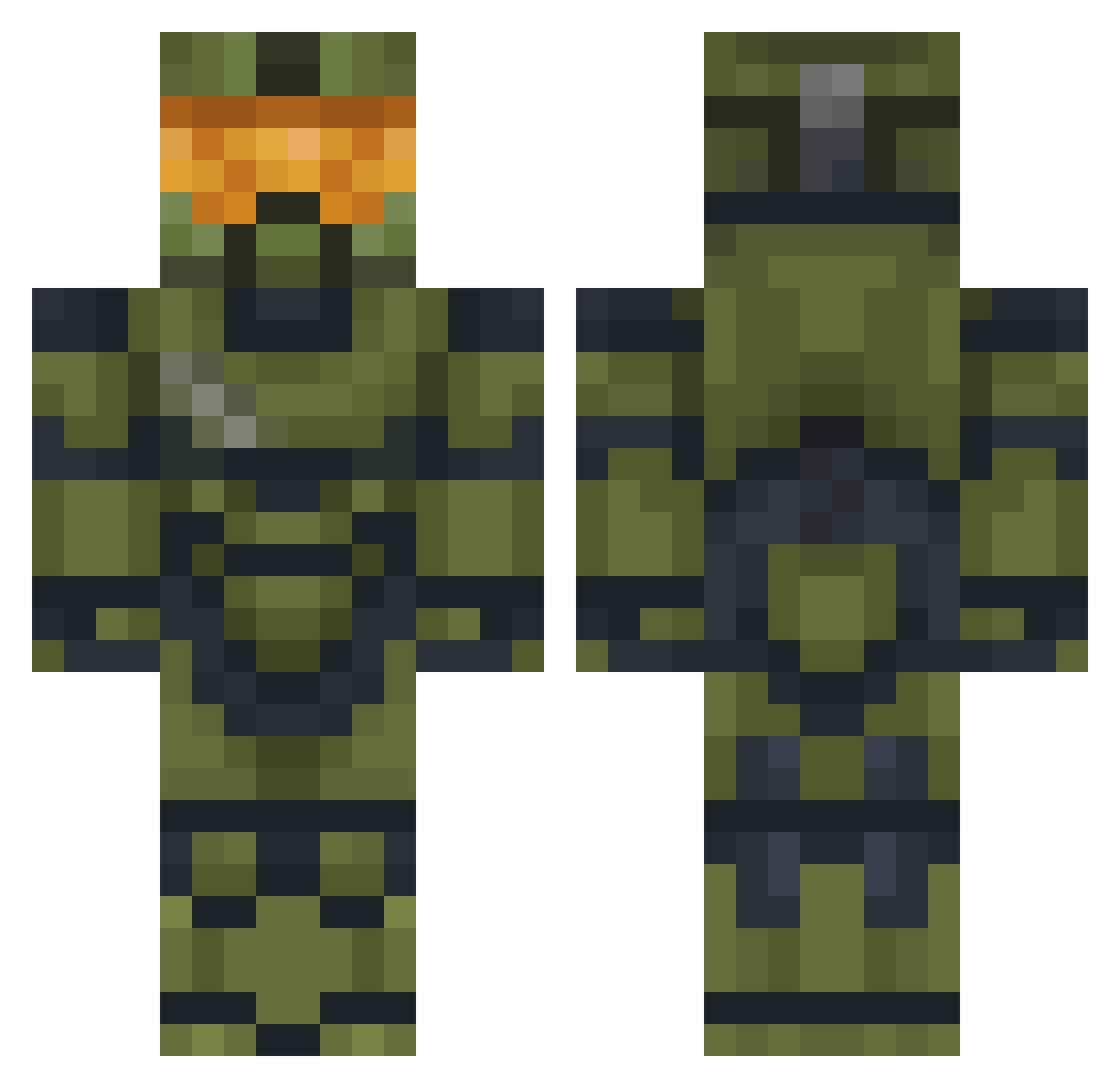
Current Minecraft skin of the player F3ugen, loaded from the official Mojang API. Rotate the 3D model with your mouse or finger, then download the skin as a PNG file and use it in Minecraft: Bedrock Edition or Java Edition for free. When F3ugen changes their skin, this page updates automatically and the old skin stays in the history below.
Other players with this skin (477)
F3ugen was the 442nd player we have seen with this skin, first spotted on 25.10.2026. The same skin was seen on these players. Open a nickname to see their current skin and skin history.
 VicShaq Gmaer169 Chickenb0ne Bruttuz07 Greenspartan03 ChiefRustyT HELLWOLFF SamM18 iHazMaTx Batuga Concussion102 jedislayer86 Roo1204 IQemmy blackrider_388 Berz4n TomasPalas2 IntelShooter PonkiePoy Milkychugz AwesominoX AfikTheKashio Deshonoree MrEichi Gostofsparta3 Theapplejoos Advintage56 sharkster danielmirand shadowjoker23 Kaptinfapton Tumacho69 CiccioBit2007 fix1969 ElCamuflado_ LBdragon123 Cowboy231999 ActualBonobo DeJosse Kaltrax Firecharge7 AntoineW33 shark_minigun mybootyburns Kiddo_Kid Viccubman6 Kaesebroetchen36 HamrTime JacobyKenobe Bucktacular Theblind420 FacePlantUK Crashanburn88 justaguy38 FoldupScarf7417 KnightFog Mskelaj Vrael95 Shepherd55 LunarFox95
More Master Chief Minecraft skins
See all 526 Master Chief skins
How to install the F3ugen skin
- Press the Download button above to save the skin as a PNG file.
- Minecraft: Bedrock Edition (PE): open the Dressing Room from the main menu (or tap your character → Edit Character), go to Classic Skins → Owned, press the + (new skin) button, choose the downloaded PNG and pick the Classic (Steve) model. Works on PC and mobile; consoles cannot import custom skins.
- Minecraft: Java Edition: open the Minecraft Launcher, go to the Skins tab, click New Skin, load the PNG, pick the Classic (Steve) model and press Save & Use. You can also upload it at minecraft.net → Profile → Change Skin.
The skin does not show up after import - what should I do?
Restart Minecraft and open the Dressing Room again - imported skins sometimes appear only after a restart. Also make sure you selected the imported skin and picked the Classic (Steve) model.
Which model should I choose, Classic or Slim?
This skin is designed for the Classic (Steve) model. If you pick the wrong model, the arms of the skin will look stretched or squeezed.
Is the skin of F3ugen free to download?
Yes. Press Download, save the PNG file and use it in Minecraft: Bedrock Edition or Java Edition - no payment or registration needed. The skin also works on multiplayer servers and Realms.
More skins
Looking for more? Go back to all Minecraft skins and check the top skins of the week, month and all time, or find any player's skin by nickname.