
Enzeras04 - Minecraft Skins & Skin History
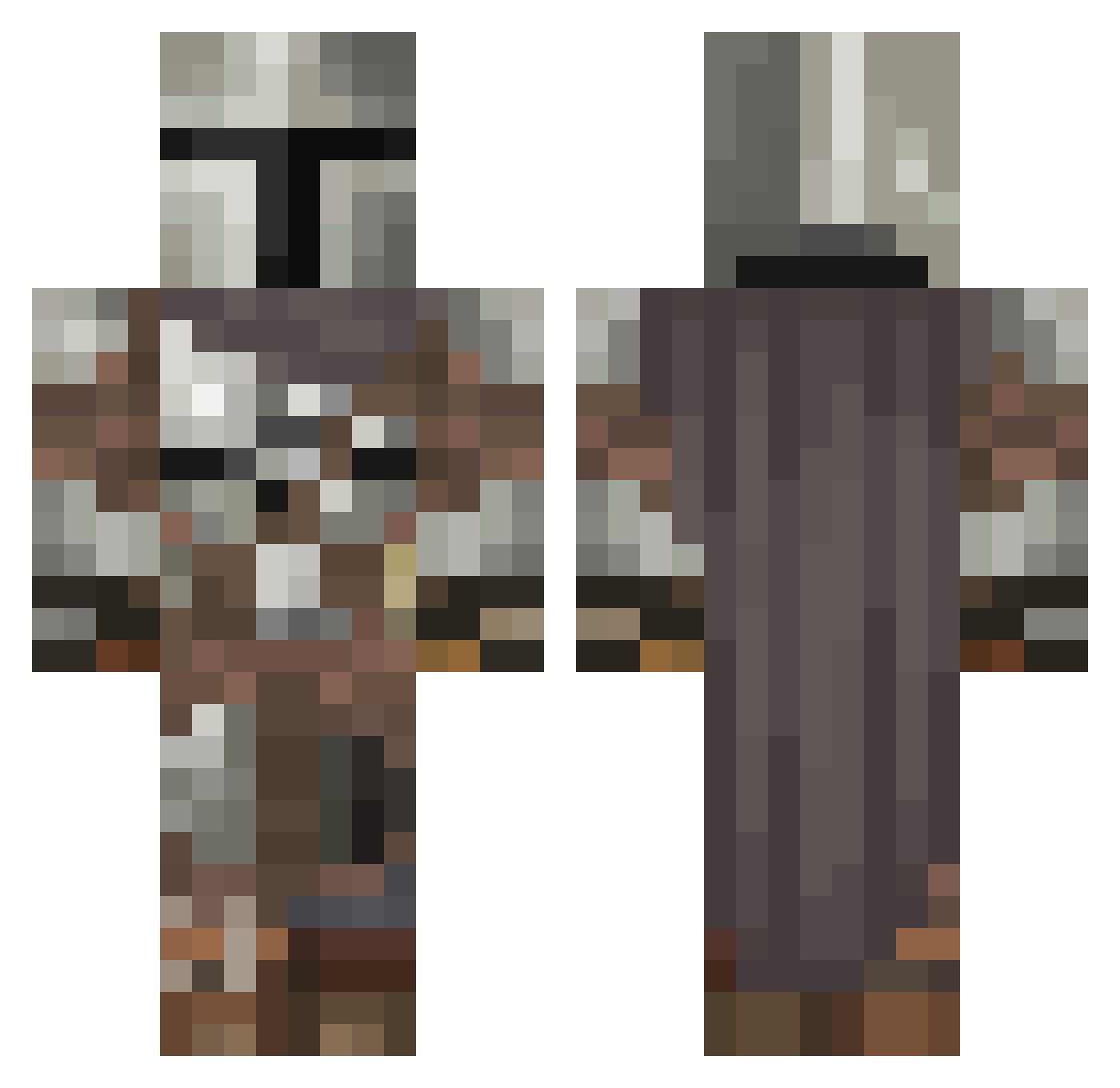
Current Minecraft skin of the player Enzeras04, loaded from the official Mojang API. Rotate the 3D model with your mouse or finger, then download the skin as a PNG file and use it in Minecraft: Bedrock Edition or Java Edition for free. When Enzeras04 changes their skin, this page updates automatically and the old skin stays in the history below.
Other players with this skin (545)
Enzeras04 was the 518th player we have seen with this skin, first spotted on 27.10.2026. The same skin was seen on these players. Open a nickname to see their current skin and skin history.
 ReakClover Novastar29 TylerNord THEE33HT Shakermaker221 Smthchll 1Yacobo AesritalTrinity nrwf Loodger zaroii FalcorGaming MesquiitaBBeauty GoldfishTheCool Primek714 CUPaRAM3EN ____CON____ ElTioPalo Valdi STOOPIDO2 UndoingRelic304 Taaww IonKnight abrays TK_ImminentSeal Wiewlor Kamijoubreaker ChrisWolvez Robertsdave96 BoopieLoopie Raulgonz3 Nomad696 Golden_32 Manc0li0m MatureToilet adrygf dongodamoon PlexAlanche Brunouu susw12 mbelelel Cyberpath MGySgtHeath TheLocki666 VolcanBlue ItsEd Danny_Hahn LogicalCoding muntino Fitzayyyy Vodkacrafter Jelloskelo Gumpnik Kingsaftw Fluffybritches HeFromNorway rsample29 Drytro Unotur1 SweatpantsZach
More The Mandalorian Minecraft skins
See all 591 The Mandalorian skins
How to install the Enzeras04 skin
- Press the Download button above to save the skin as a PNG file.
- Minecraft: Bedrock Edition (PE): open the Dressing Room from the main menu (or tap your character → Edit Character), go to Classic Skins → Owned, press the + (new skin) button, choose the downloaded PNG and pick the Classic (Steve) model. Works on PC and mobile; consoles cannot import custom skins.
- Minecraft: Java Edition: open the Minecraft Launcher, go to the Skins tab, click New Skin, load the PNG, pick the Classic (Steve) model and press Save & Use. You can also upload it at minecraft.net → Profile → Change Skin.
The skin does not show up after import - what should I do?
Restart Minecraft and open the Dressing Room again - imported skins sometimes appear only after a restart. Also make sure you selected the imported skin and picked the Classic (Steve) model.
Which model should I choose, Classic or Slim?
This skin is designed for the Classic (Steve) model. If you pick the wrong model, the arms of the skin will look stretched or squeezed.
Is the skin of Enzeras04 free to download?
Yes. Press Download, save the PNG file and use it in Minecraft: Bedrock Edition or Java Edition - no payment or registration needed. The skin also works on multiplayer servers and Realms.
More skins
Looking for more? Go back to all Minecraft skins and check the top skins of the week, month and all time, or find any player's skin by nickname.