
EhhCool - Minecraft Skins & Skin History
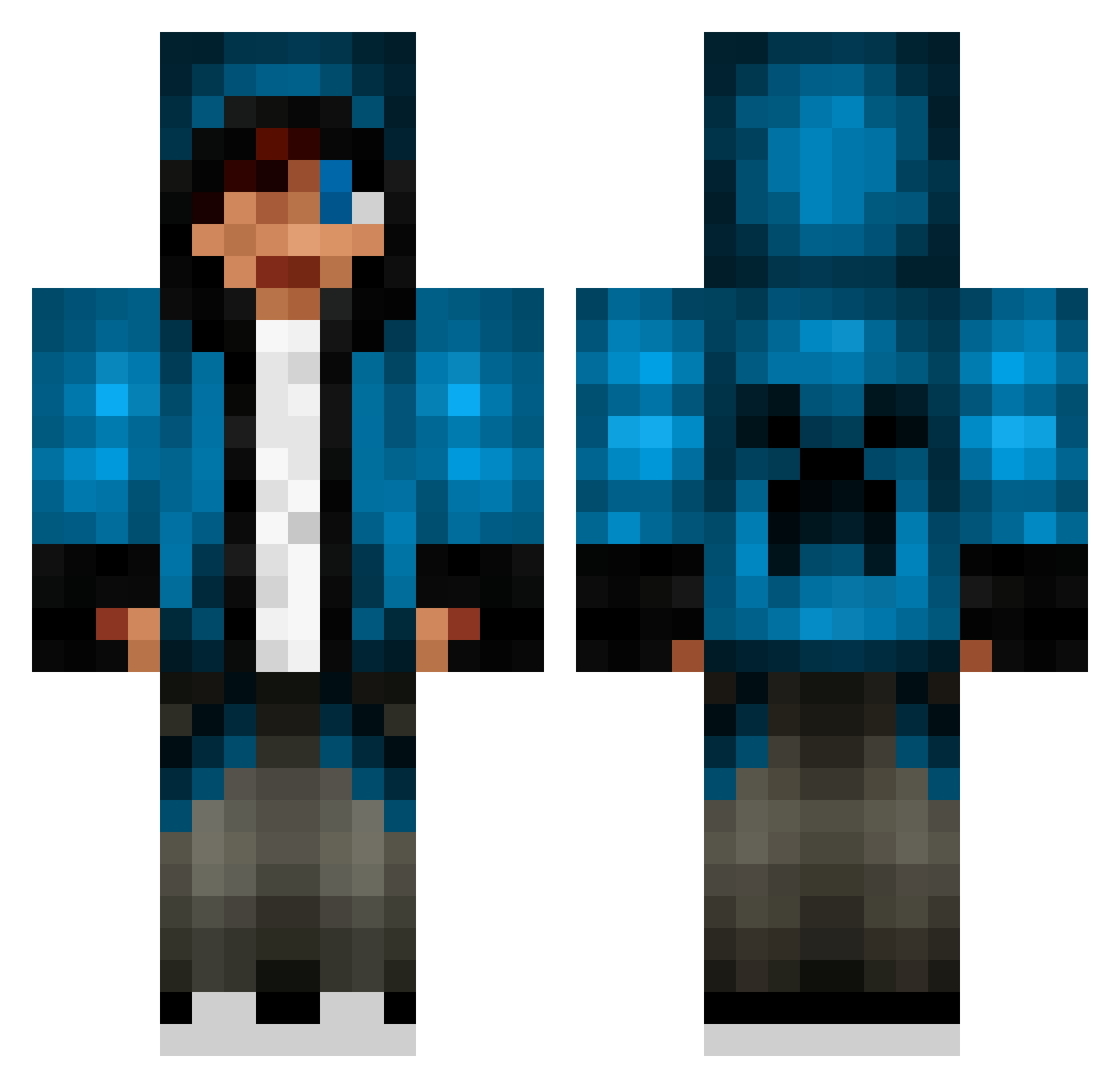
Current Minecraft skin of the player EhhCool, loaded from the official Mojang API. Rotate the 3D model with your mouse or finger, then download the skin as a PNG file and use it in Minecraft: Bedrock Edition or Java Edition for free. When EhhCool changes their skin, this page updates automatically and the old skin stays in the history below.
Other players with this skin (653)
EhhCool was the 187th player we have seen with this skin, first spotted on 23.08.2026. The same skin was seen on these players. Open a nickname to see their current skin and skin history.
 SoraSkies Hollywo0od itsthatKiddo Copey3 JayBeBird Chellz_ OavuAlt bossboy12366 BramVos Chaz_2002 thud890 _elsa Heatseaker_55 nawaf_56 FlamingDeath18 Aelfan playam11 DoctorDoom600 ALJL B_B_0_0 Muscles2000 timefordeath27 StoneThower MCsuperGamer Laith_gamer SxPxAxZxZ armageddon541 Joelalan blabla23 PhantomViperX M7MD1417 xx_masterkill_xx wataruichikawa JonathanGreyWolf Tai_the_Bold bubblebob247 Kjetti ohtheregoes yeshualualu cocobanana777 Angrysquirrel03 komarac12 Tarpenter jason12722222 That_One_Jack redpuredude IdunnHK kwonHo yoitsnova highguy3202 00Cman00 ininlaw devilkiller1234 aliaforthemurder lachy69er Monkkeyy danjere tuike matthawk34 RedIsConfuzled
More Creeper Minecraft skins
How to install the EhhCool skin
- Press the Download button above to save the skin as a PNG file.
- Minecraft: Bedrock Edition (PE): open the Dressing Room from the main menu (or tap your character → Edit Character), go to Classic Skins → Owned, press the + (new skin) button, choose the downloaded PNG and pick the Classic (Steve) model. Works on PC and mobile; consoles cannot import custom skins.
- Minecraft: Java Edition: open the Minecraft Launcher, go to the Skins tab, click New Skin, load the PNG, pick the Classic (Steve) model and press Save & Use. You can also upload it at minecraft.net → Profile → Change Skin.
The skin does not show up after import - what should I do?
Restart Minecraft and open the Dressing Room again - imported skins sometimes appear only after a restart. Also make sure you selected the imported skin and picked the Classic (Steve) model.
Which model should I choose, Classic or Slim?
This skin is designed for the Classic (Steve) model. If you pick the wrong model, the arms of the skin will look stretched or squeezed.
Is the skin of EhhCool free to download?
Yes. Press Download, save the PNG file and use it in Minecraft: Bedrock Edition or Java Edition - no payment or registration needed. The skin also works on multiplayer servers and Realms.
More skins
Looking for more? Go back to all Minecraft skins and check the top skins of the week, month and all time, or find any player's skin by nickname.