
Ebersbach420 - Minecraft Skins & Skin History
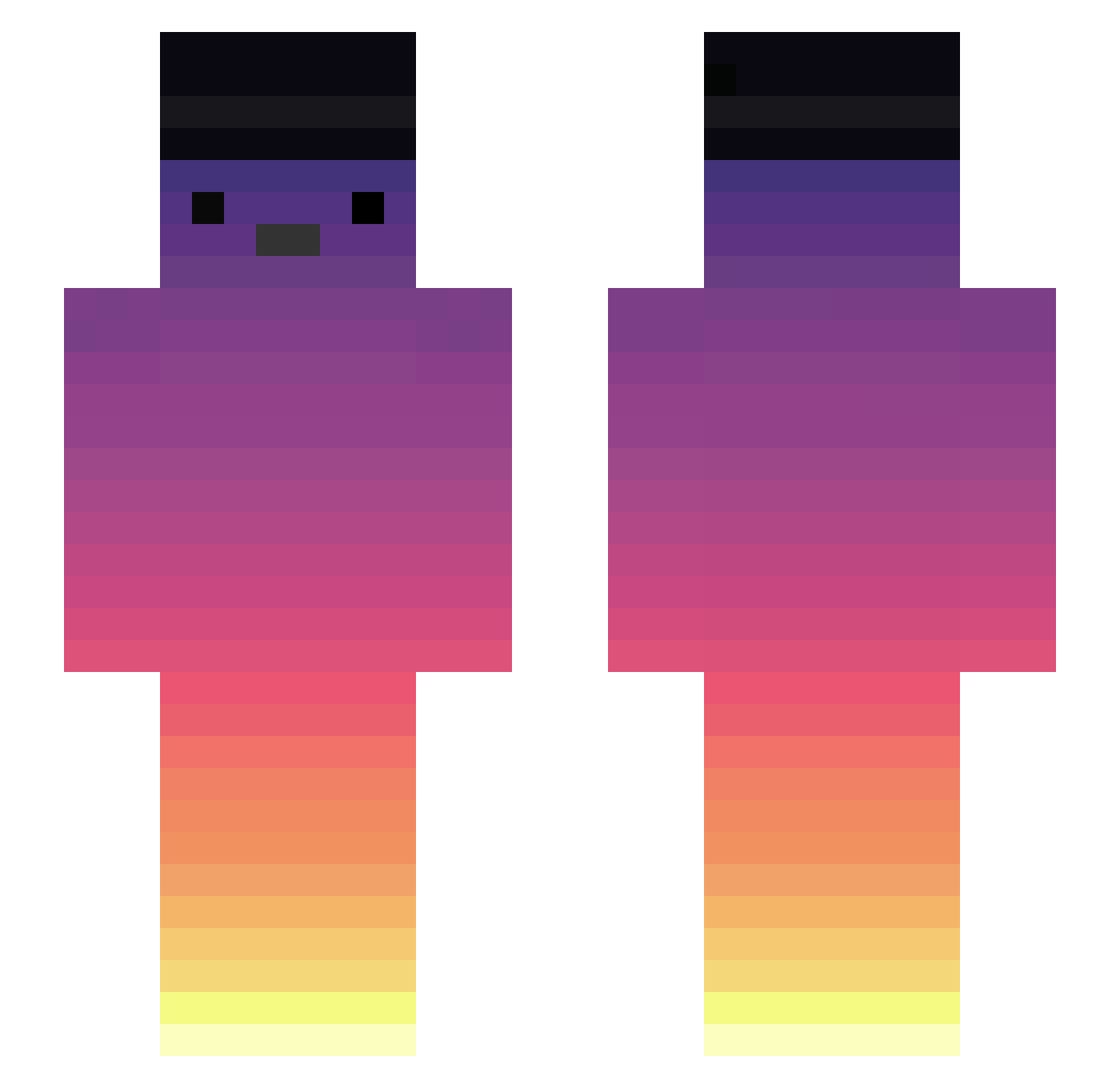
Current Minecraft skin of the player Ebersbach420, loaded from the official Mojang API. Rotate the 3D model with your mouse or finger, then download the skin as a PNG file and use it in Minecraft: Bedrock Edition or Java Edition for free. When Ebersbach420 changes their skin, this page updates automatically and the old skin stays in the history below.
Other players with this skin (375)
Ebersbach420 was the 74th player we have seen with this skin, first spotted on 20.08.2026. The same skin was seen on these players. Open a nickname to see their current skin and skin history.
 FennoR4 Mr_Heinle Blitz5208 Span08 Thisorp Blxckkz agressivereader Usuariodedrogas Eryniith A22003 Javi089 TaLckerJr Z7zAsura wesshr upliftmike4 Ihave_no_idea ycaro67 Wasted_MA OMARziano Micinka_LP Tomotin9 ENursey Royalliam2012 Funaemon_1112 Zeras56 SK8pedroSK8 SytheP ChampionHurley ZecaPR19 SrLordHades MissValkar 3341103818 _David_Benes hayyy_ lipezz hotaruH NyksRebels Sock61 CraZyMooN311 Jango0517 Dr_Fenton Jvmello10 sachy111 O0zob 35kuro burak1maestro MosquitoMolhado mudinho_062 PYL29 mugmile HH_51124 HazelBee4301904 ElTricep420 KhalfaniBenz yKairos FlackkS aTTaX421 LordGabs123 nuuuooo JImmyBrown
More Sunset Minecraft skins
How to install the Ebersbach420 skin
- Press the Download button above to save the skin as a PNG file.
- Minecraft: Bedrock Edition (PE): open the Dressing Room from the main menu (or tap your character → Edit Character), go to Classic Skins → Owned, press the + (new skin) button, choose the downloaded PNG and pick the Slim (Alex) model. Works on PC and mobile; consoles cannot import custom skins.
- Minecraft: Java Edition: open the Minecraft Launcher, go to the Skins tab, click New Skin, load the PNG, pick the Slim (Alex) model and press Save & Use. You can also upload it at minecraft.net → Profile → Change Skin.
The skin does not show up after import - what should I do?
Restart Minecraft and open the Dressing Room again - imported skins sometimes appear only after a restart. Also make sure you selected the imported skin and picked the Slim (Alex) model.
Which model should I choose, Classic or Slim?
This skin is designed for the Slim (Alex) model. If you pick the wrong model, the arms of the skin will look stretched or squeezed.
Is the skin of Ebersbach420 free to download?
Yes. Press Download, save the PNG file and use it in Minecraft: Bedrock Edition or Java Edition - no payment or registration needed. The skin also works on multiplayer servers and Realms.
More skins
Looking for more? Go back to all Minecraft skins and check the top skins of the week, month and all time, or find any player's skin by nickname.