
Dravixu - Minecraft Skins & Skin History
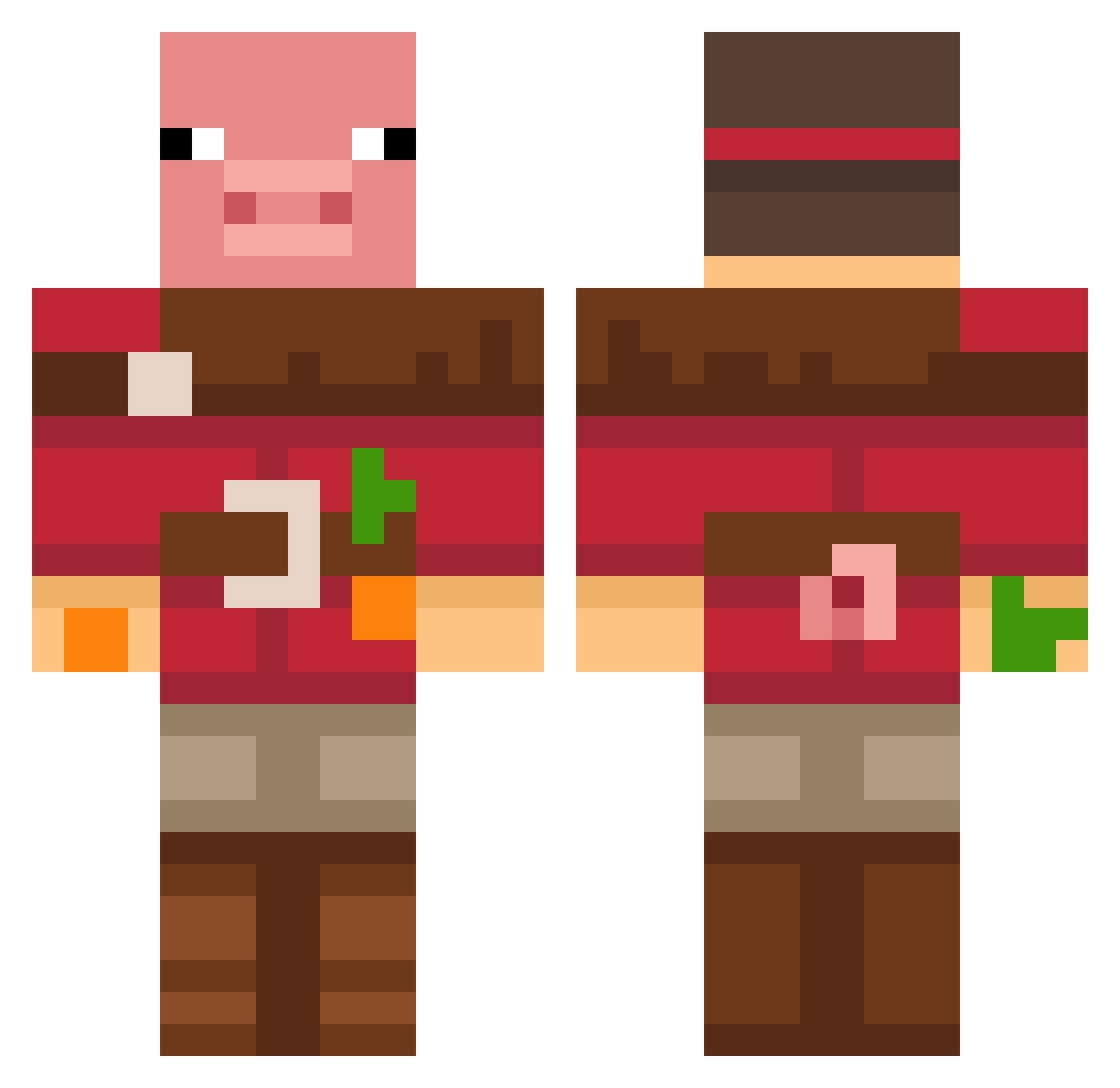
Current Minecraft skin of the player Dravixu, loaded from the official Mojang API. Rotate the 3D model with your mouse or finger, then download the skin as a PNG file and use it in Minecraft: Bedrock Edition or Java Edition for free. When Dravixu changes their skin, this page updates automatically and the old skin stays in the history below.
Other players with this skin (640)
Dravixu was the 301st player we have seen with this skin, first spotted on 13.09.2026. The same skin was seen on these players. Open a nickname to see their current skin and skin history.
 9040 K123c4 Andyboyomg 140103 MonkeyDselviv holapavo
 Entity404error Peaky_Blind MangoFan20 Mon_Lai Ru09_0 brynniepoo SushiRice12 oneone222
 Revithekid Hunter53151 SkyWhale3000 yul_0213 mettiiiii seadogharbor MoisoZ kaca24s4 Carter_the_great Black325 IAmWilliamZ JhayCartie eduar_RD BumperHumper1 ATT111 Atu_se WandWiggler RockCraft87 RTXBernstein lukasheiden wonjun082312 Leungryong Ricsi_14 NCProductions TacosDeBarbacoa2 Lottyyy Benjam33n Szkarlatny CornCon2021 ChiPheo
 ItsGlizen gomgge HiImDomWasTaken Losmic pigkiller247 Jockael skulldragon5HD dasazzang nosperado sussyv krssme Davz19 XSaber20 LoafTheCheese La1mX RivDiv
More Pig Minecraft skins
How to install the Dravixu skin
- Press the Download button above to save the skin as a PNG file.
- Minecraft: Bedrock Edition (PE): open the Dressing Room from the main menu (or tap your character → Edit Character), go to Classic Skins → Owned, press the + (new skin) button, choose the downloaded PNG and pick the Classic (Steve) model. Works on PC and mobile; consoles cannot import custom skins.
- Minecraft: Java Edition: open the Minecraft Launcher, go to the Skins tab, click New Skin, load the PNG, pick the Classic (Steve) model and press Save & Use. You can also upload it at minecraft.net → Profile → Change Skin.
The skin does not show up after import - what should I do?
Restart Minecraft and open the Dressing Room again - imported skins sometimes appear only after a restart. Also make sure you selected the imported skin and picked the Classic (Steve) model.
Which model should I choose, Classic or Slim?
This skin is designed for the Classic (Steve) model. If you pick the wrong model, the arms of the skin will look stretched or squeezed.
Is the skin of Dravixu free to download?
Yes. Press Download, save the PNG file and use it in Minecraft: Bedrock Edition or Java Edition - no payment or registration needed. The skin also works on multiplayer servers and Realms.
More skins
Looking for more? Go back to all Minecraft skins and check the top skins of the week, month and all time, or find any player's skin by nickname.