
Desovy - Minecraft Skins & Skin History
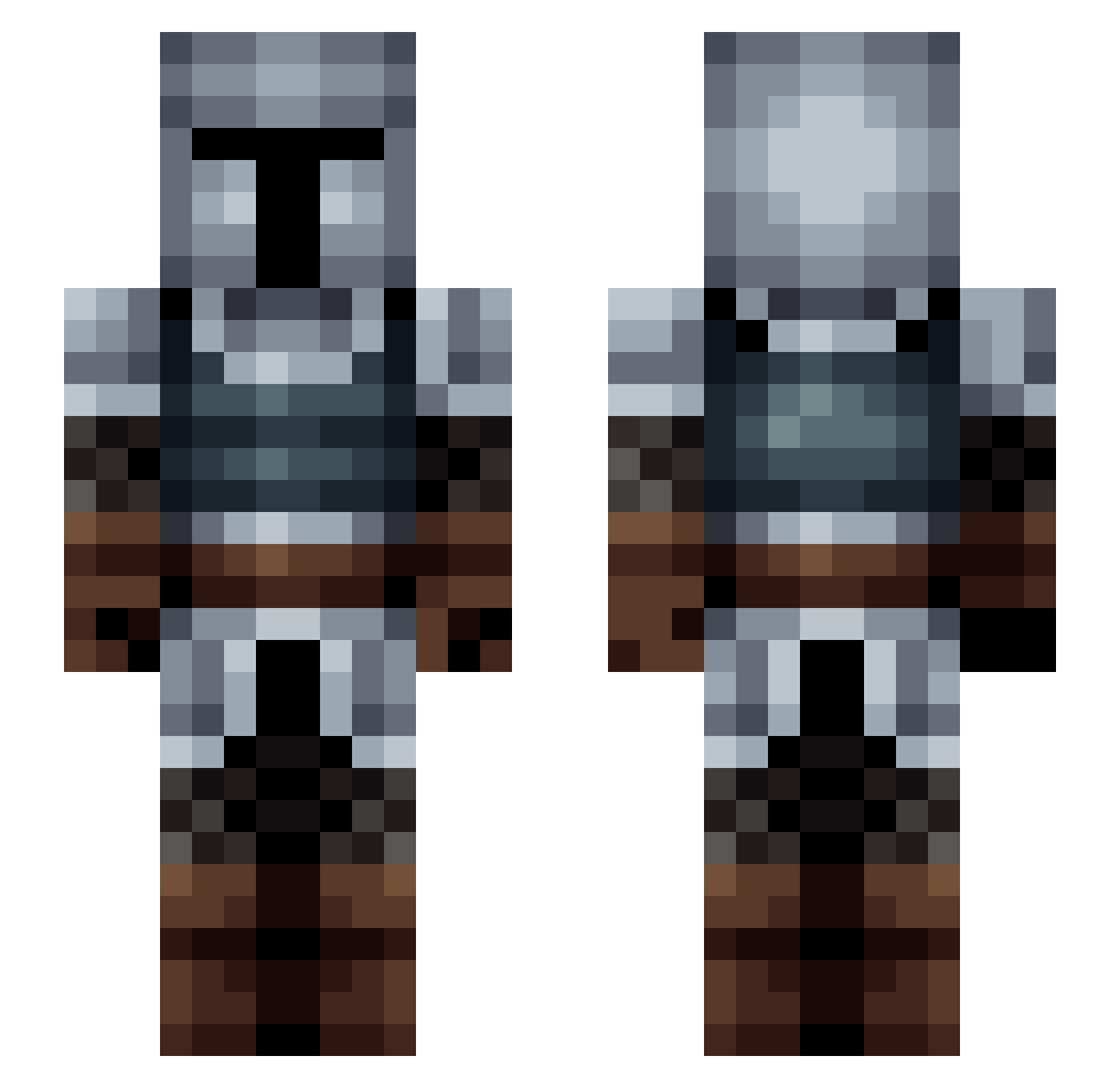
Current Minecraft skin of the player Desovy, loaded from the official Mojang API. Rotate the 3D model with your mouse or finger, then download the skin as a PNG file and use it in Minecraft: Bedrock Edition or Java Edition for free. When Desovy changes their skin, this page updates automatically and the old skin stays in the history below.
Other players with this skin (204)
Desovy was the 51st player we have seen with this skin, first spotted on 25.08.2026. The same skin was seen on these players. Open a nickname to see their current skin and skin history.
 Mathieuco18 Brutay Naganash beaston280 Bjabben12 M_DAWG03 Lt_Whisper Asserted Endersolar Moonlight_Talon GreyCross hammsandwich27 GreasyTroll04 LoonyLasVegas HeresSasquatch jassyking MattyDoge Rmr5243 Rezalis iiopdan Michel90513 yung_kire Calomero TobyFred99 haloman59 GoDanyo Draigo_Mordrak Nearoxx Nickadeamus Hyunric cameronflower ChelsSpencer99 Rockier RandomGamerOrg RazzHB _Strudel CounterfeitDog iceywifey ziptie14 banqi ZIO_2 kevline123 Tommy458a SavoryBoy DavyVG Epil cheeenis Shmegor Norrd xMasonx12 LatinoJuega Dardon Mcoley22 xshenx SgtSimile Gentoo979 AntiPhotonic BurgerBardh IIRONLAK EagleEyeOO
More Medieval Minecraft skins
How to install the Desovy skin
- Press the Download button above to save the skin as a PNG file.
- Minecraft: Bedrock Edition (PE): open the Dressing Room from the main menu (or tap your character → Edit Character), go to Classic Skins → Owned, press the + (new skin) button, choose the downloaded PNG and pick the Slim (Alex) model. Works on PC and mobile; consoles cannot import custom skins.
- Minecraft: Java Edition: open the Minecraft Launcher, go to the Skins tab, click New Skin, load the PNG, pick the Slim (Alex) model and press Save & Use. You can also upload it at minecraft.net → Profile → Change Skin.
The skin does not show up after import - what should I do?
Restart Minecraft and open the Dressing Room again - imported skins sometimes appear only after a restart. Also make sure you selected the imported skin and picked the Slim (Alex) model.
Which model should I choose, Classic or Slim?
This skin is designed for the Slim (Alex) model. If you pick the wrong model, the arms of the skin will look stretched or squeezed.
Is the skin of Desovy free to download?
Yes. Press Download, save the PNG file and use it in Minecraft: Bedrock Edition or Java Edition - no payment or registration needed. The skin also works on multiplayer servers and Realms.
More skins
Looking for more? Go back to all Minecraft skins and check the top skins of the week, month and all time, or find any player's skin by nickname.