
DeOsos - Minecraft Skins & Skin History
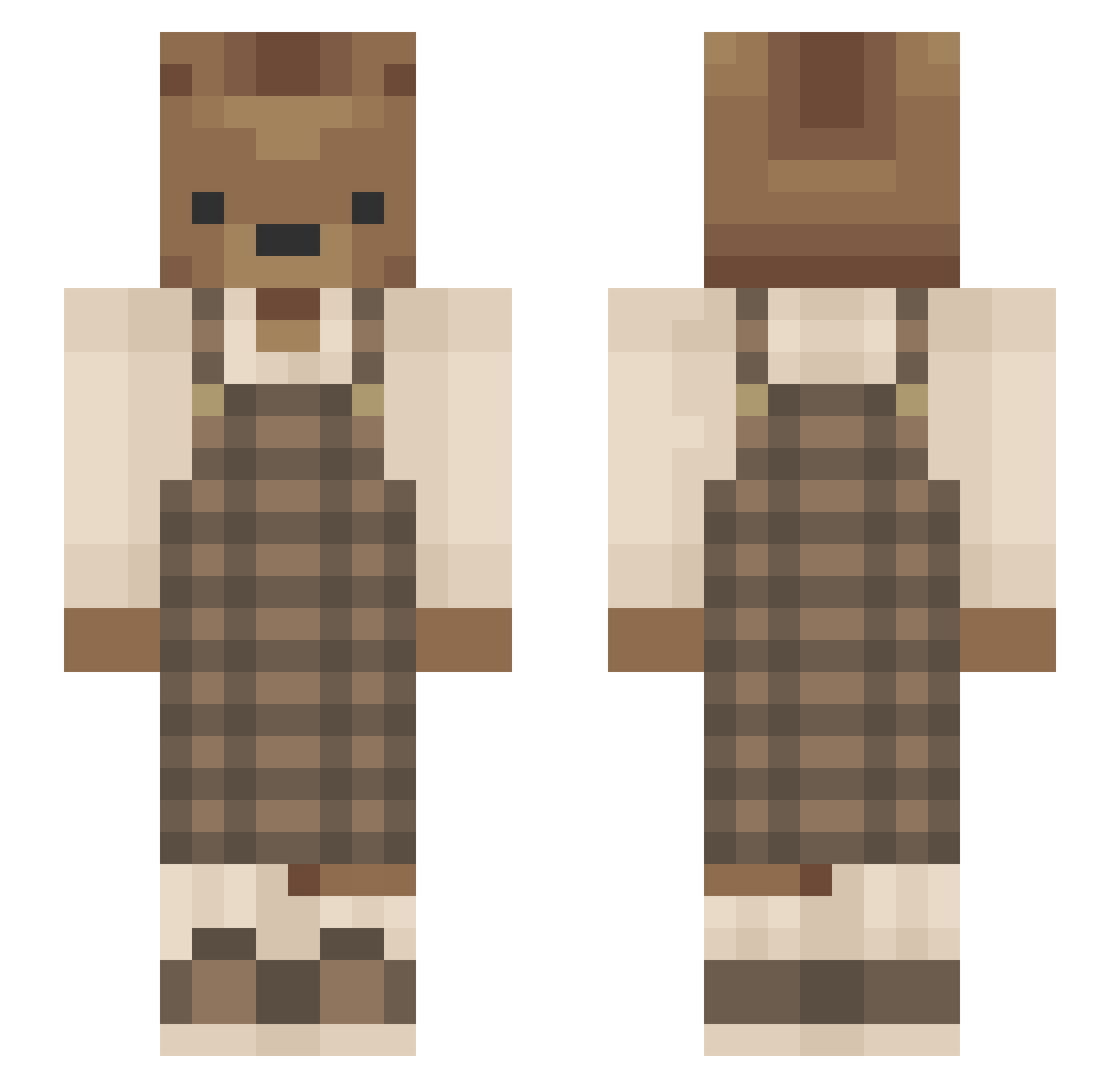
Current Minecraft skin of the player DeOsos, loaded from the official Mojang API. Rotate the 3D model with your mouse or finger, then download the skin as a PNG file and use it in Minecraft: Bedrock Edition or Java Edition for free. When DeOsos changes their skin, this page updates automatically and the old skin stays in the history below.
Other players with this skin (637)
DeOsos was the 282nd player we have seen with this skin, first spotted on 17.09.2026. The same skin was seen on these players. Open a nickname to see their current skin and skin history.
 MyDadWimpedOut aka078 Peru_Guy shxnnaa icenyo MeiPotato 0Dev0 _daedae_ MADIWADI09 Aussew cooleziomek ab_SPARKLES ChocolateBeard 4v3wy Shanshan420 Randomfluff Makesumn neozim126 dannyflowers mossbun iiimdsn EarlGrey7334 teddybauer12 _Humlan_ yourmom2323 yoonrice lemonade_candy jjcf89 Jujuba001 hjxsaver luluchyu vqia Nanimals bluetiare yeseong73 Fighter2004 ashley6259 caaaaasey__ witchfurby akbar999 PandaRoux75 roonii Aerina614 lauraleidaa Lilly_b135 Enthem pppuriin DivineG0d Ctrlzeke salataxv kknotek Chair_Man05 toastttttttttttt Bab1Bat theuntitledart TrapKingDanii xisp Zircon37 hdevney Olive_nerd
More Bear Minecraft skins
How to install the DeOsos skin
- Press the Download button above to save the skin as a PNG file.
- Minecraft: Bedrock Edition (PE): open the Dressing Room from the main menu (or tap your character → Edit Character), go to Classic Skins → Owned, press the + (new skin) button, choose the downloaded PNG and pick the Slim (Alex) model. Works on PC and mobile; consoles cannot import custom skins.
- Minecraft: Java Edition: open the Minecraft Launcher, go to the Skins tab, click New Skin, load the PNG, pick the Slim (Alex) model and press Save & Use. You can also upload it at minecraft.net → Profile → Change Skin.
The skin does not show up after import - what should I do?
Restart Minecraft and open the Dressing Room again - imported skins sometimes appear only after a restart. Also make sure you selected the imported skin and picked the Slim (Alex) model.
Which model should I choose, Classic or Slim?
This skin is designed for the Slim (Alex) model. If you pick the wrong model, the arms of the skin will look stretched or squeezed.
Is the skin of DeOsos free to download?
Yes. Press Download, save the PNG file and use it in Minecraft: Bedrock Edition or Java Edition - no payment or registration needed. The skin also works on multiplayer servers and Realms.
More skins
Looking for more? Go back to all Minecraft skins and check the top skins of the week, month and all time, or find any player's skin by nickname.