
David0820 - Minecraft Skins & Skin History
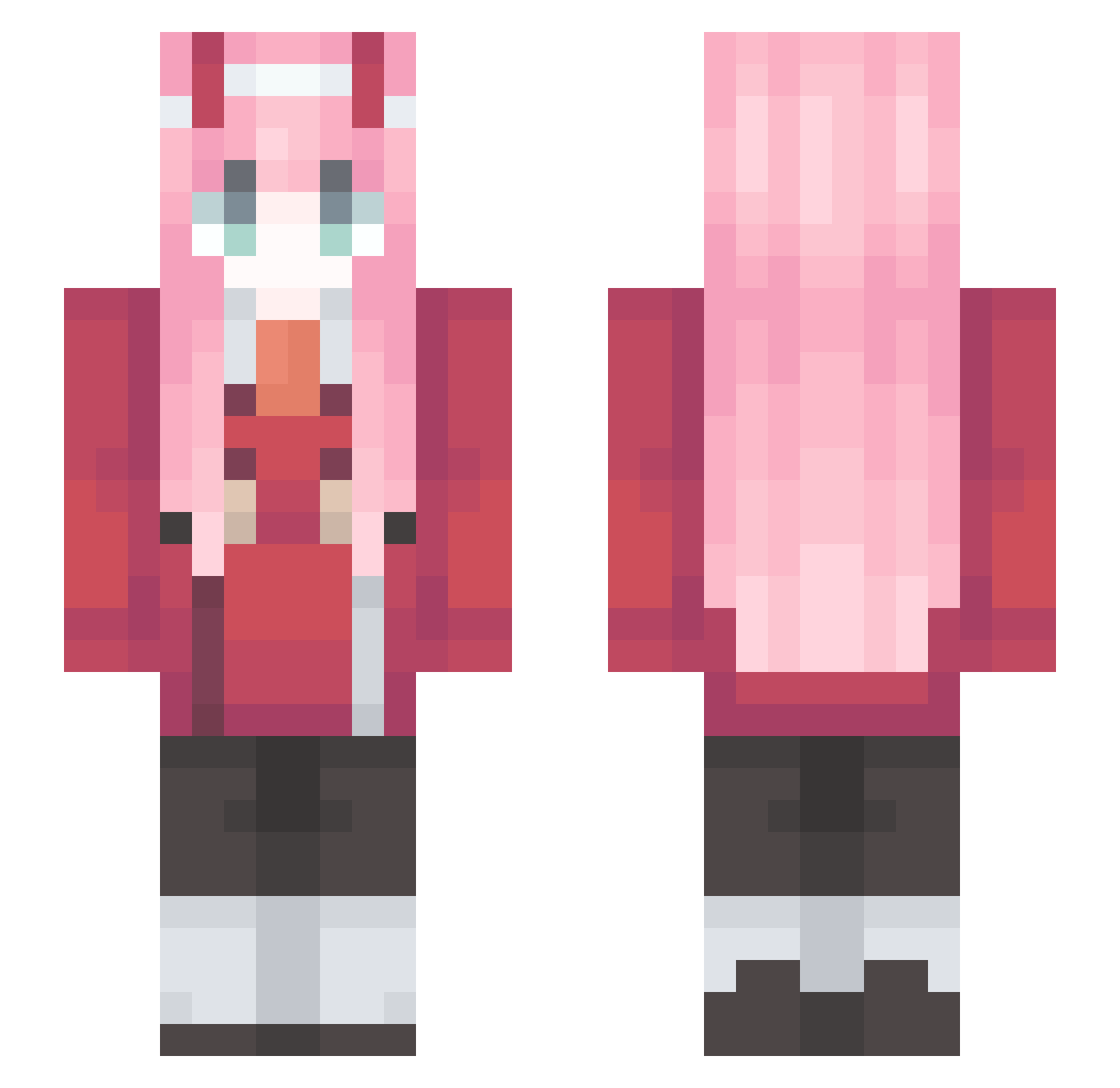
Current Minecraft skin of the player David0820, loaded from the official Mojang API. Rotate the 3D model with your mouse or finger, then download the skin as a PNG file and use it in Minecraft: Bedrock Edition or Java Edition for free. When David0820 changes their skin, this page updates automatically and the old skin stays in the history below.
Other players with this skin (89)
David0820 was the 41st player we have seen with this skin, first spotted on 10.09.2026. The same skin was seen on these players. Open a nickname to see their current skin and skin history.
 Joaowq3 ILLHYHL10305 SJJ__ ndaa_ Mr_Tychka qdoughnutp PichicaMurciana Sakura_DING adslk1234 Petrichorny Cotorage Lizararaga _Jonhn_ _jay930 Yo_Han_ sunjuu67 Qiiccc ZeroTwoTM Ahlum08 DOGMO Reversevepex Zaprador soda0828 lalaplaysMC zhuzhuzi_ WhisphereD shotmstr KillThaDab
 atimark s3aw33d ouyuan7 acepilotfan Iisy
 MZzy377 HighcoldAhao MZMF
 Magikorps MadnessAlice Hinata_______ Admittance Wanyth wyh2006 SaoYuki Dongho352 Shower1205 keentofairness ehdrnf chun7228 CMATA LKPrometeo WhiteTea_CN_ ASPAR7AME i_LP Ascidiacea Aruma0208 Athousand_ Mikufan_K Jengah SlimiTG vanklops
More Zero Two Minecraft skins
How to install the David0820 skin
- Press the Download button above to save the skin as a PNG file.
- Minecraft: Bedrock Edition (PE): open the Dressing Room from the main menu (or tap your character → Edit Character), go to Classic Skins → Owned, press the + (new skin) button, choose the downloaded PNG and pick the Slim (Alex) model. Works on PC and mobile; consoles cannot import custom skins.
- Minecraft: Java Edition: open the Minecraft Launcher, go to the Skins tab, click New Skin, load the PNG, pick the Slim (Alex) model and press Save & Use. You can also upload it at minecraft.net → Profile → Change Skin.
The skin does not show up after import - what should I do?
Restart Minecraft and open the Dressing Room again - imported skins sometimes appear only after a restart. Also make sure you selected the imported skin and picked the Slim (Alex) model.
Which model should I choose, Classic or Slim?
This skin is designed for the Slim (Alex) model. If you pick the wrong model, the arms of the skin will look stretched or squeezed.
Is the skin of David0820 free to download?
Yes. Press Download, save the PNG file and use it in Minecraft: Bedrock Edition or Java Edition - no payment or registration needed. The skin also works on multiplayer servers and Realms.
More skins
Looking for more? Go back to all Minecraft skins and check the top skins of the week, month and all time, or find any player's skin by nickname.