
Das1EI4K - Minecraft Skins & Skin History
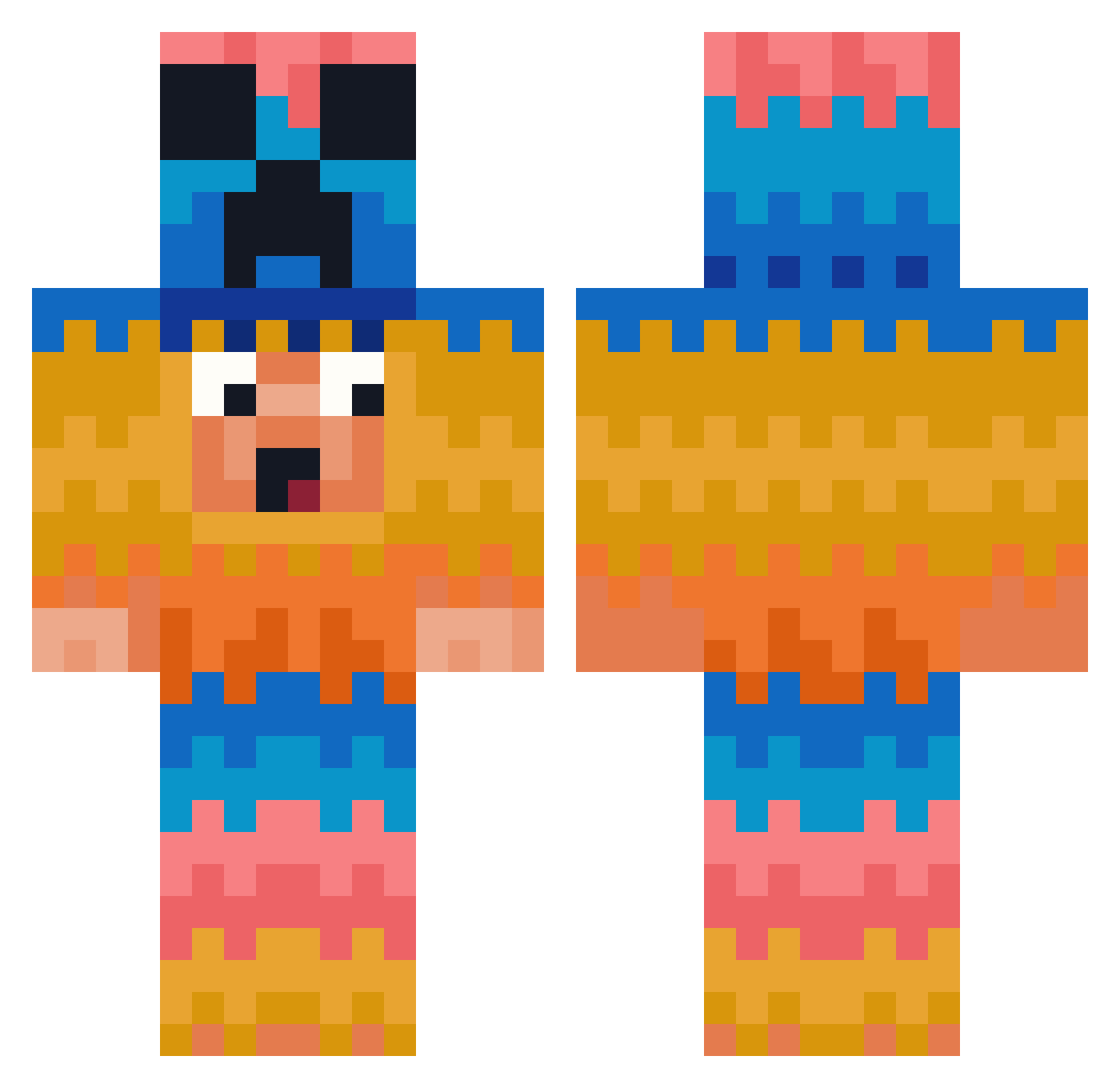
Current Minecraft skin of the player Das1EI4K, loaded from the official Mojang API. Rotate the 3D model with your mouse or finger, then download the skin as a PNG file and use it in Minecraft: Bedrock Edition or Java Edition for free. When Das1EI4K changes their skin, this page updates automatically and the old skin stays in the history below.
Other players with this skin (394)
Das1EI4K was the 175th player we have seen with this skin, first spotted on 13.09.2026. The same skin was seen on these players. Open a nickname to see their current skin and skin history.
 Andrezinho3 VaderInvader421 LevraiTyzzo luisvrsn Chibaminer gfhs stockbow Astarothhh27 BoyPlayer BraydenXboss OlackO Chascool fatihterim2002 Max1y Andr3Laranja poorrrrr sirskunkalot liamdodd CR_TACOS joemamaslay kns11 ItsKBxt Kingsquirel10 Dullyver Giorgett Lordan29 ExtremeTeno Slider3 SXEV Justben12 Egocentric736 Pyx578 PPXYLS itsyp21 Goty712 Sharkbaitra Fathead209 DanWTL
 skvll jkaue TAE2314 Arthurhbb moutonzeh Schweinekopf33 Jarro_073 DAVID_smecher VALMA9999 Andromedaro wldnjs0822 LALA66619 Nobody382 Espino_24 coozzi2000 UncleJack99 Valemon84 wuzaizai
 tacoking111 emoboy234 daradarakami Playton1
More Pinata Minecraft skins
How to install the Das1EI4K skin
- Press the Download button above to save the skin as a PNG file.
- Minecraft: Bedrock Edition (PE): open the Dressing Room from the main menu (or tap your character → Edit Character), go to Classic Skins → Owned, press the + (new skin) button, choose the downloaded PNG and pick the Classic (Steve) model. Works on PC and mobile; consoles cannot import custom skins.
- Minecraft: Java Edition: open the Minecraft Launcher, go to the Skins tab, click New Skin, load the PNG, pick the Classic (Steve) model and press Save & Use. You can also upload it at minecraft.net → Profile → Change Skin.
The skin does not show up after import - what should I do?
Restart Minecraft and open the Dressing Room again - imported skins sometimes appear only after a restart. Also make sure you selected the imported skin and picked the Classic (Steve) model.
Which model should I choose, Classic or Slim?
This skin is designed for the Classic (Steve) model. If you pick the wrong model, the arms of the skin will look stretched or squeezed.
Is the skin of Das1EI4K free to download?
Yes. Press Download, save the PNG file and use it in Minecraft: Bedrock Edition or Java Edition - no payment or registration needed. The skin also works on multiplayer servers and Realms.
More skins
Looking for more? Go back to all Minecraft skins and check the top skins of the week, month and all time, or find any player's skin by nickname.