
DarkFlashHD - Minecraft Skins & Skin History
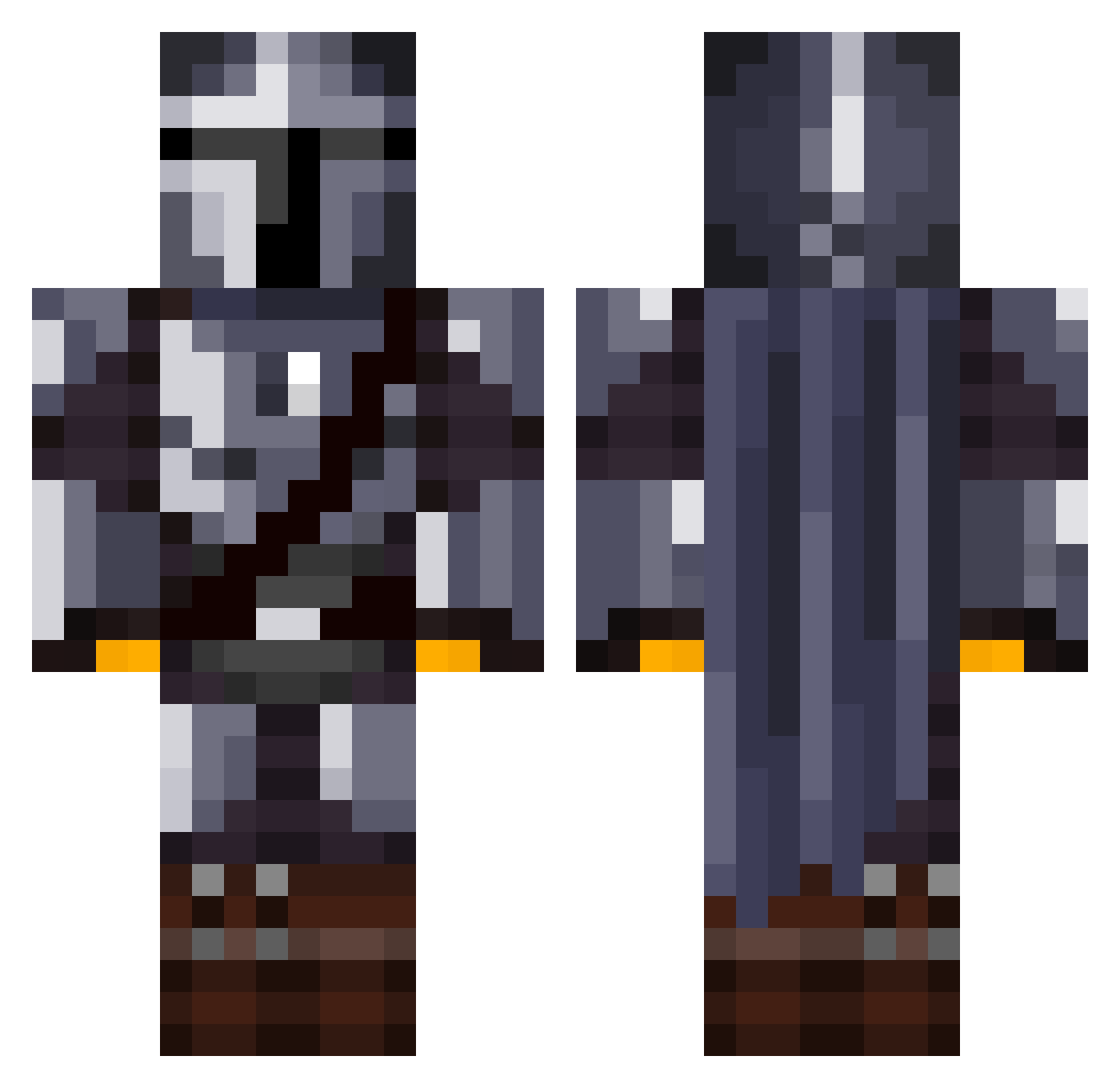
Current Minecraft skin of the player DarkFlashHD, loaded from the official Mojang API. Rotate the 3D model with your mouse or finger, then download the skin as a PNG file and use it in Minecraft: Bedrock Edition or Java Edition for free. When DarkFlashHD changes their skin, this page updates automatically and the old skin stays in the history below.
Other players with this skin (1076)
DarkFlashHD was the 248th player we have seen with this skin, first spotted on 14.08.2026. The same skin was seen on these players. Open a nickname to see their current skin and skin history.
 Jacoboludo16 Silentsnowman87 ElMango DBK29 Gweemie Tommyguns508 dservo2 Mexamer GunMasterNinja GoldenHound whearg steezy_eli Alexx318 denser12 broken_head Oliveirus hikazen7 MATEI12375 BigPoutine AndreSchaapen WolfOfBallSt Snowsk8erkid LittleHobbitBoy Rochascode Brasiboi Blue_Crusaders Dtron78 barneybailey MANCOMAN15 thebromin Lights__ MinuteGDS JadenPlaysMC420 xRogueDragonx WNPK_ Salarianin Jimmyl77 zhhhy Balakaye3 LbananaCZ yasu114514 Logamotive_ Finito915 Lucadeviljin scadaddle_ sF_Aura Mons_TV AgentJK8 Safa MESAMAN71 jgmin321 Hapsnet THE_GOROD Pessimistic_Guy ElMandela ElNiko_98 Pinyin_nnn beamuniz ISLiZzeRI WillSambrook
More The Mandalorian Minecraft skins
See all 525 The Mandalorian skins
How to install the DarkFlashHD skin
- Press the Download button above to save the skin as a PNG file.
- Minecraft: Bedrock Edition (PE): open the Dressing Room from the main menu (or tap your character → Edit Character), go to Classic Skins → Owned, press the + (new skin) button, choose the downloaded PNG and pick the Classic (Steve) model. Works on PC and mobile; consoles cannot import custom skins.
- Minecraft: Java Edition: open the Minecraft Launcher, go to the Skins tab, click New Skin, load the PNG, pick the Classic (Steve) model and press Save & Use. You can also upload it at minecraft.net → Profile → Change Skin.
The skin does not show up after import - what should I do?
Restart Minecraft and open the Dressing Room again - imported skins sometimes appear only after a restart. Also make sure you selected the imported skin and picked the Classic (Steve) model.
Which model should I choose, Classic or Slim?
This skin is designed for the Classic (Steve) model. If you pick the wrong model, the arms of the skin will look stretched or squeezed.
Is the skin of DarkFlashHD free to download?
Yes. Press Download, save the PNG file and use it in Minecraft: Bedrock Edition or Java Edition - no payment or registration needed. The skin also works on multiplayer servers and Realms.
More skins
Looking for more? Go back to all Minecraft skins and check the top skins of the week, month and all time, or find any player's skin by nickname.