
Dallas3456 - Minecraft Skins & Skin History
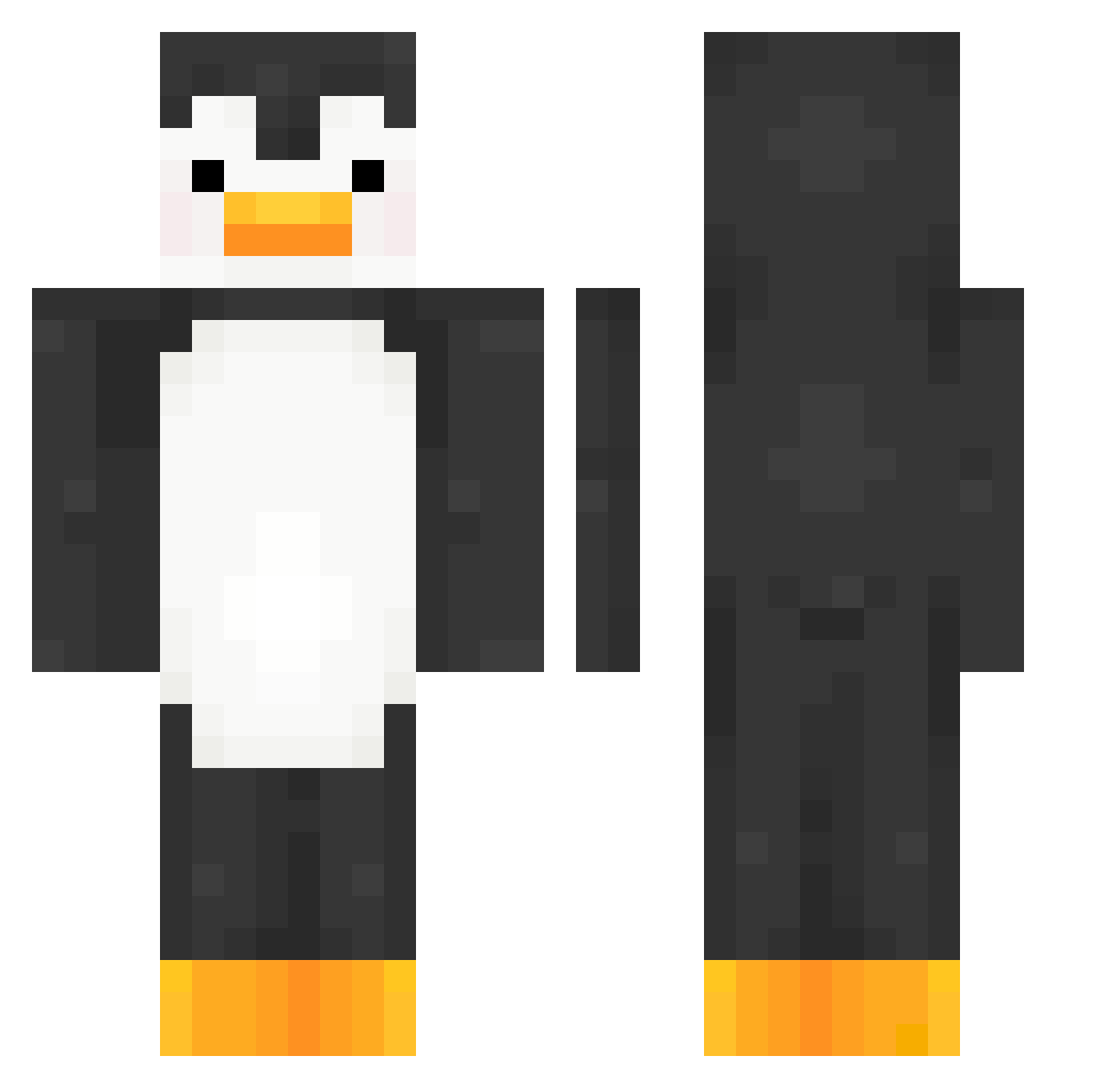
Current Minecraft skin of the player Dallas3456, loaded from the official Mojang API. Rotate the 3D model with your mouse or finger, then download the skin as a PNG file and use it in Minecraft: Bedrock Edition or Java Edition for free. When Dallas3456 changes their skin, this page updates automatically and the old skin stays in the history below.
Other players with this skin (356)
Dallas3456 was the 199th player we have seen with this skin, first spotted on 19.09.2026. The same skin was seen on these players. Open a nickname to see their current skin and skin history.
 jaeh002 aksxk Steyb soxlb iAdrix HIT_gamchany12 _Austyn kimge1 MyTiet ajiangg joon1127 surgiwl Alexcellent_ apple445 PurpleInnit Gdawgg420 CherryBlossommmm Exilogy EzDJack KenHoopz MrSansBR91 beengggg PauloMoraes JohnnyBandz619 annabelle5794 djmaxgoinmul0503 BlockyBoi_ AZENKOFF languisher Annon_a Lwadrian DARKHEX26 Jesseq33 vazy16 Edm100 GEMYU nooooooona ShenQiuA Acuraify snowww__ PPONG03123 Barsko shiokyuuri ThisIsPaul_ kr11x iseo0920 likamarvi
 Niclasweh Carvyl mayahg1 halloween77 EduIDX pingu2025 Clutcch NightGx2476 Stang_Csgo Jswagster Gatoormouth Galeksie Zster_p
More Animal Minecraft skins
How to install the Dallas3456 skin
- Press the Download button above to save the skin as a PNG file.
- Minecraft: Bedrock Edition (PE): open the Dressing Room from the main menu (or tap your character → Edit Character), go to Classic Skins → Owned, press the + (new skin) button, choose the downloaded PNG and pick the Classic (Steve) model. Works on PC and mobile; consoles cannot import custom skins.
- Minecraft: Java Edition: open the Minecraft Launcher, go to the Skins tab, click New Skin, load the PNG, pick the Classic (Steve) model and press Save & Use. You can also upload it at minecraft.net → Profile → Change Skin.
The skin does not show up after import - what should I do?
Restart Minecraft and open the Dressing Room again - imported skins sometimes appear only after a restart. Also make sure you selected the imported skin and picked the Classic (Steve) model.
Which model should I choose, Classic or Slim?
This skin is designed for the Classic (Steve) model. If you pick the wrong model, the arms of the skin will look stretched or squeezed.
Is the skin of Dallas3456 free to download?
Yes. Press Download, save the PNG file and use it in Minecraft: Bedrock Edition or Java Edition - no payment or registration needed. The skin also works on multiplayer servers and Realms.
More skins
Looking for more? Go back to all Minecraft skins and check the top skins of the week, month and all time, or find any player's skin by nickname.