
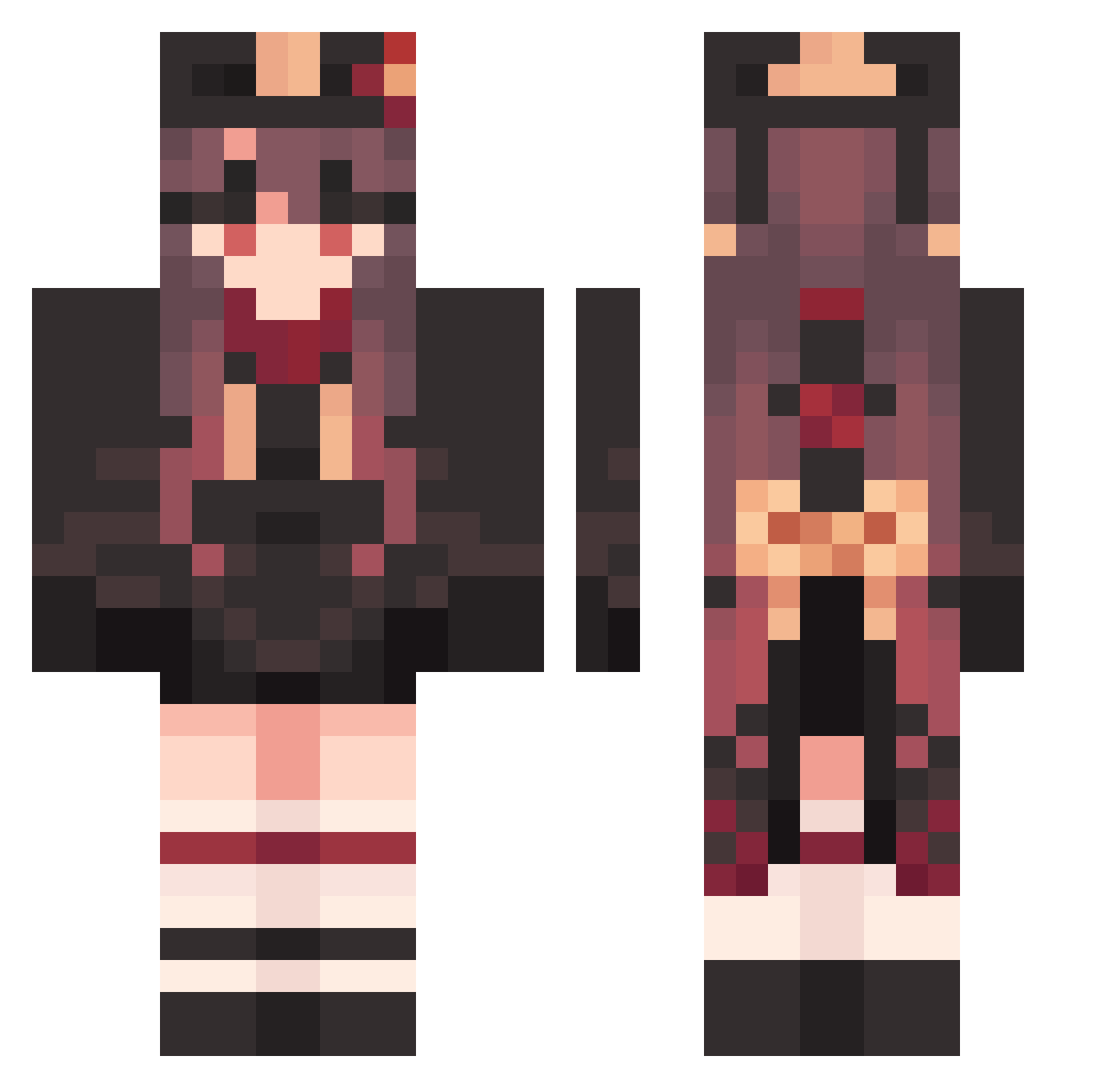
Current Minecraft skin of the player CurvedGigantic26, loaded from the official Mojang API. Rotate the 3D model with your mouse or finger, then download the skin as a PNG file and use it in Minecraft: Bedrock Edition or Java Edition for free. When CurvedGigantic26 changes their skin, this page updates automatically and the old skin stays in the history below.
Other players with this skin (1215)
CurvedGigantic26 was the 1059th player we have seen with this skin, first spotted on 08.10.2026. The same skin was seen on these players. Open a nickname to see their current skin and skin history.
 ShiveringBent229 Hutao_GNjIaxR383 Hutao_zeRhWzA651 TranquilQuick971 tla_relyt 62634 tbon2112 QinghuanD GreasyPurring733 CruelTerrific334 Diejou_ nanyin_ DisgustedBent687 BZAJ666 GYs860 MajesticBawdy858 owwo_ wwlwl Veden31 BBB169 TiAmoMING Fondant1000 Hutao_OLRckvL820 PiquantRacial273 oyasimi VigorousAhead999 NumerousStormy42 newdanger IcyNeighborly223 Hutao_oOhthjE962 Ucz860 SeasideDemon71 dfanm Hutao_YouvWVr813 KANAHAHA Wolfale CombativeShut583 DuchengRain Hutao_HoTZuWH121 VivaciousTired82 Hutao_MTJJHyv449 suysama haydeen_ Hutao_uGx355 BizarreSecond792 Hutao_GBQaLsU796 ScarceMuddled711 LongNew224 ShockingNaive627 FineAdaptable129 SuperVarious771 SSaunders RobustTedious808 BqD179 wwRAIN AEUGHG SteepBlushing951 Hutao_asnWQZI406 Hutao_NJTEOiF989 BlackAcoustic475
More Hu Tao Minecraft skins
How to install the CurvedGigantic26 skin
- Press the Download button above to save the skin as a PNG file.
- Minecraft: Bedrock Edition (PE): open the Dressing Room from the main menu (or tap your character → Edit Character), go to Classic Skins → Owned, press the + (new skin) button, choose the downloaded PNG and pick the Classic (Steve) model. Works on PC and mobile; consoles cannot import custom skins.
- Minecraft: Java Edition: open the Minecraft Launcher, go to the Skins tab, click New Skin, load the PNG, pick the Classic (Steve) model and press Save & Use. You can also upload it at minecraft.net → Profile → Change Skin.
The skin does not show up after import - what should I do?
Restart Minecraft and open the Dressing Room again - imported skins sometimes appear only after a restart. Also make sure you selected the imported skin and picked the Classic (Steve) model.
Which model should I choose, Classic or Slim?
This skin is designed for the Classic (Steve) model. If you pick the wrong model, the arms of the skin will look stretched or squeezed.
Is the skin of CurvedGigantic26 free to download?
Yes. Press Download, save the PNG file and use it in Minecraft: Bedrock Edition or Java Edition - no payment or registration needed. The skin also works on multiplayer servers and Realms.
More skins
Looking for more? Go back to all Minecraft skins and check the top skins of the week, month and all time, or find any player's skin by nickname.