
Cuculet5 - Minecraft Skins & Skin History
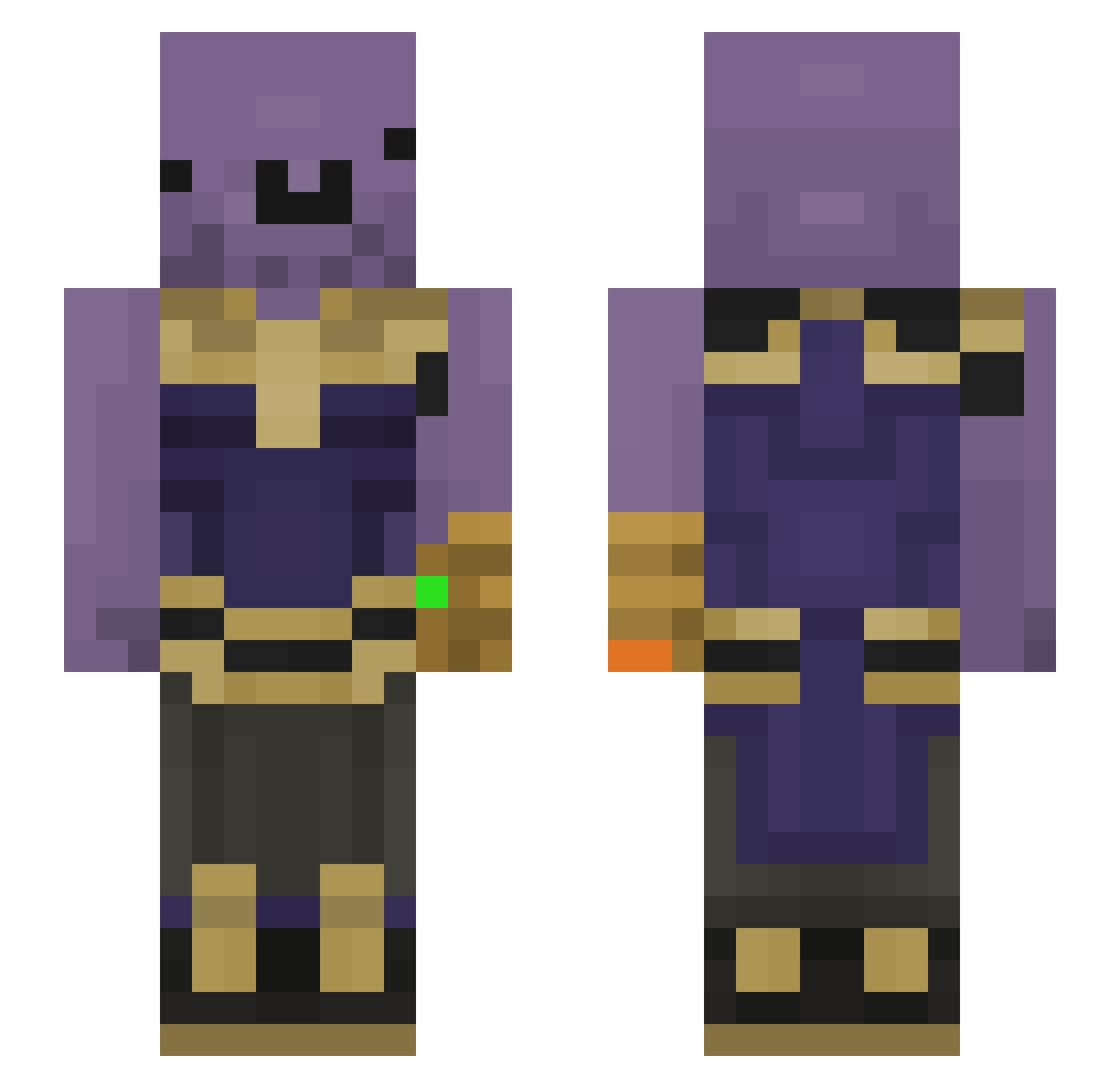
Current Minecraft skin of the player Cuculet5, loaded from the official Mojang API. Rotate the 3D model with your mouse or finger, then download the skin as a PNG file and use it in Minecraft: Bedrock Edition or Java Edition for free. When Cuculet5 changes their skin, this page updates automatically and the old skin stays in the history below.
Other players with this skin (185)
Cuculet5 was the 56th player we have seen with this skin, first spotted on 30.08.2026. The same skin was seen on these players. Open a nickname to see their current skin and skin history.
 GaseousButter QWERTYsOriginal Mustache0927 Ralsy__ AlexStark17 TurguUchiha Anzuniu HYOooooo BRXYisTaken Whitedude32 kean123456 Jabbafett LtBomb isashikomuro Sidetrack_ MetkanYLCN nhatnwen Emirc55 Daphlaf Bartobas negitiveblue Maango_ Badonkadonk1996 H3R0uu Yde1337 xluigy Zikoo2000 KURAL_IRE Alabamalover3 hamdiqwe icyfoxy1223 AshuraII E_x_i_t disgruntledwoman KL_Enderman_ DatFlangooo Zuka0130_TW Smoothlunch 00CenturyChild00 killstrike07 rodri8891 xtab ColonelMayo Wookie_Cookie_ Skvidd Saleni_ dervyboi69 sam3000h DWN2 yeetaboxx kai26 gorukken ohbleachy Mysticlxl Batuyurt yourface1233 MootMax Schmiddyyy JimbogPVP walking_mess
More Infinity Gauntlet Minecraft skins
See all 621 Infinity Gauntlet skins
How to install the Cuculet5 skin
- Press the Download button above to save the skin as a PNG file.
- Minecraft: Bedrock Edition (PE): open the Dressing Room from the main menu (or tap your character → Edit Character), go to Classic Skins → Owned, press the + (new skin) button, choose the downloaded PNG and pick the Slim (Alex) model. Works on PC and mobile; consoles cannot import custom skins.
- Minecraft: Java Edition: open the Minecraft Launcher, go to the Skins tab, click New Skin, load the PNG, pick the Slim (Alex) model and press Save & Use. You can also upload it at minecraft.net → Profile → Change Skin.
The skin does not show up after import - what should I do?
Restart Minecraft and open the Dressing Room again - imported skins sometimes appear only after a restart. Also make sure you selected the imported skin and picked the Slim (Alex) model.
Which model should I choose, Classic or Slim?
This skin is designed for the Slim (Alex) model. If you pick the wrong model, the arms of the skin will look stretched or squeezed.
Is the skin of Cuculet5 free to download?
Yes. Press Download, save the PNG file and use it in Minecraft: Bedrock Edition or Java Edition - no payment or registration needed. The skin also works on multiplayer servers and Realms.
More skins
Looking for more? Go back to all Minecraft skins and check the top skins of the week, month and all time, or find any player's skin by nickname.