
Coreiscool - Minecraft Skins & Skin History
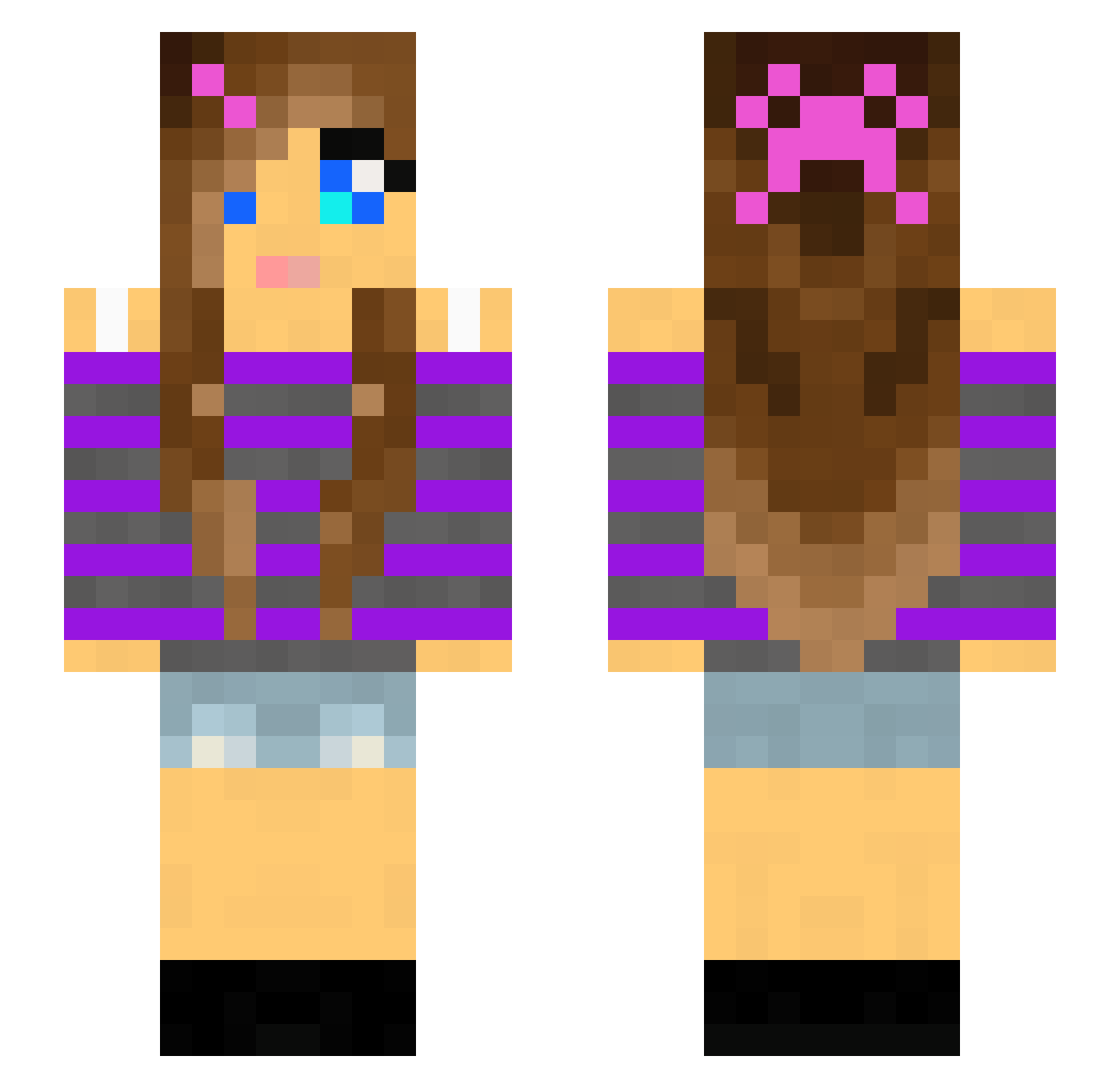
Current Minecraft skin of the player Coreiscool, loaded from the official Mojang API. Rotate the 3D model with your mouse or finger, then download the skin as a PNG file and use it in Minecraft: Bedrock Edition or Java Edition for free. When Coreiscool changes their skin, this page updates automatically and the old skin stays in the history below.
Other players with this skin (143)
Coreiscool was the 7th player we have seen with this skin, first spotted on 28.07.2026. The same skin was seen on these players. Open a nickname to see their current skin and skin history.
 Elina04 taner539 Jeke02 behrey Feenkind96 Firegirl0908 ZoeJuba231 BelinCroustilles Viviane001 babystar1 NaturallyGrassy HAHAHHHAHHAHAHHH QueenofSpawn EoinConcussion Clinger isoclover Kayteelynn NadiaBABA Kitsoe telavivlover4410 chaish Wena hockeymaster3 Nettemor ScamScamScamScam HannahDK NaturallyGassy Yfandes steindal sweetgirl1000 Mtncel LizzySweet3 lbosani
 3by3 y4r3n AyaSolari mrsfarmer Chache_Gamer gamergirl_4 Dexetivia CritterBug7 Bambi1 Hannadup 626c6f6266697368 elbowtickle Bunnygirl977 Rebeka147 johanne00 Kristastarr cosette11 ronwrocks Kiziamizia01 xoxogiannaxoxo3 Server_Owner_ PaxOrionis meganwow MAXIMTOKOX kxdnn attwoodj Camille_Tigre
More Girl Minecraft skins
How to install the Coreiscool skin
- Press the Download button above to save the skin as a PNG file.
- Minecraft: Bedrock Edition (PE): open the Dressing Room from the main menu (or tap your character → Edit Character), go to Classic Skins → Owned, press the + (new skin) button, choose the downloaded PNG and pick the Slim (Alex) model. Works on PC and mobile; consoles cannot import custom skins.
- Minecraft: Java Edition: open the Minecraft Launcher, go to the Skins tab, click New Skin, load the PNG, pick the Slim (Alex) model and press Save & Use. You can also upload it at minecraft.net → Profile → Change Skin.
The skin does not show up after import - what should I do?
Restart Minecraft and open the Dressing Room again - imported skins sometimes appear only after a restart. Also make sure you selected the imported skin and picked the Slim (Alex) model.
Which model should I choose, Classic or Slim?
This skin is designed for the Slim (Alex) model. If you pick the wrong model, the arms of the skin will look stretched or squeezed.
Is the skin of Coreiscool free to download?
Yes. Press Download, save the PNG file and use it in Minecraft: Bedrock Edition or Java Edition - no payment or registration needed. The skin also works on multiplayer servers and Realms.
More skins
Looking for more? Go back to all Minecraft skins and check the top skins of the week, month and all time, or find any player's skin by nickname.