
Christian7832 - Minecraft Skins & Skin History
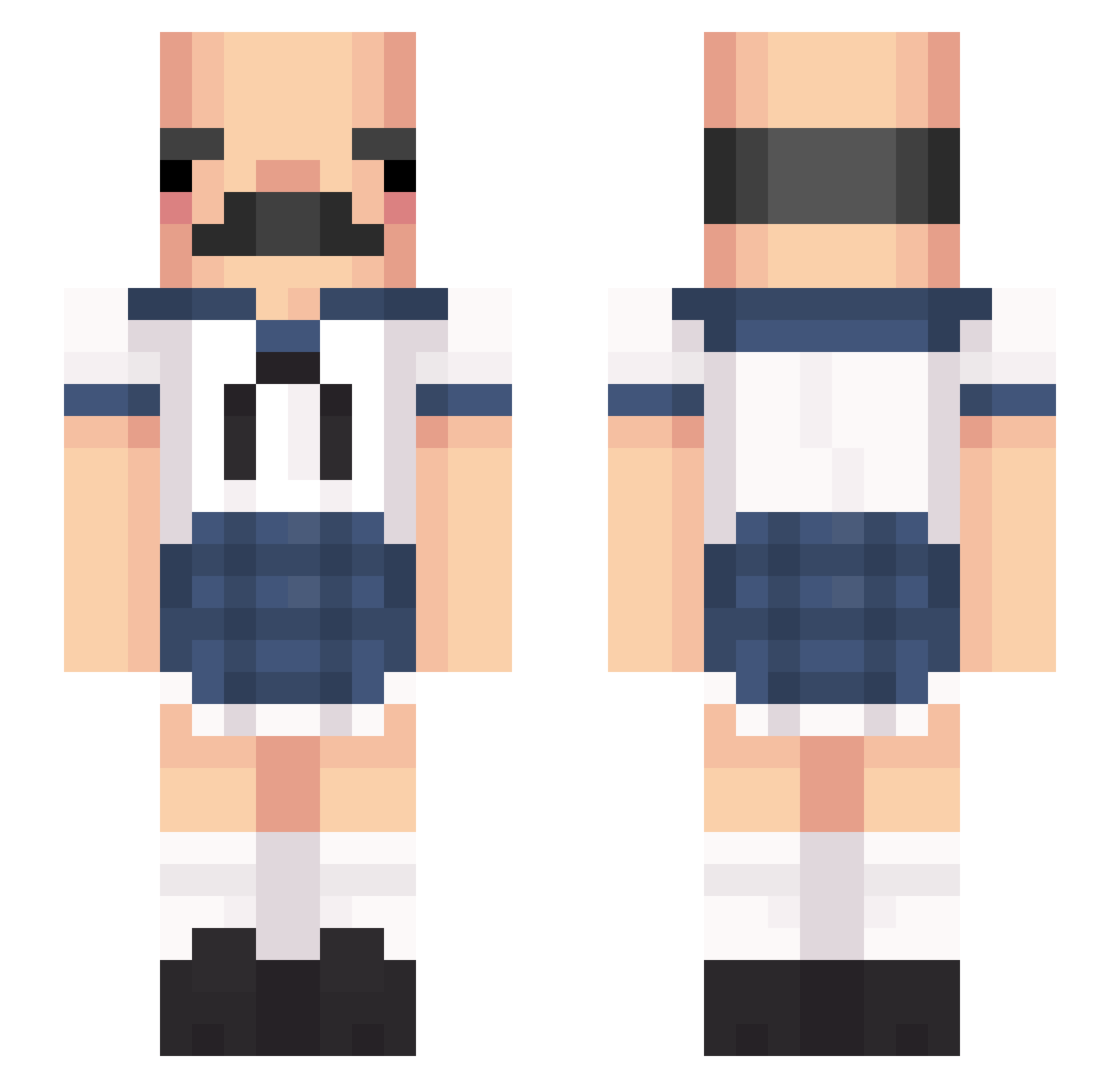
Current Minecraft skin of the player Christian7832, loaded from the official Mojang API. Rotate the 3D model with your mouse or finger, then download the skin as a PNG file and use it in Minecraft: Bedrock Edition or Java Edition for free. When Christian7832 changes their skin, this page updates automatically and the old skin stays in the history below.
Other players with this skin (429)
Christian7832 was the 283rd player we have seen with this skin, first spotted on 04.10.2026. The same skin was seen on these players. Open a nickname to see their current skin and skin history.
 omomgod LeBumClapper entronizar MakoNoke BeefJello solerpernafina Necatek Npzy_2020 _Caliban bby_eater1000 nameboi Fusinoid CofeOk lunizika FUCCCKK Weshunt13 ela_re Kyuji batsch4 Alukardd heartlet001 _kr0t Kemahu Skellomaster_360 Waylon_Playz mandoo129 OMGliang ollypops2088 okji002 BeggsnEacon ScorpionPl4y marihujana Im_Roses Eastbin xpimpachu DerSalzige01 dreyuh Rubrk KOR_T_panty jntandrsn InnoFiji Raphael_Maserati sp1tting YunChe_ Miner649er Babycurbstomper EesaEz AderPoland Rayquazamaster _y1n1 toro706 EquuL 66Perc MonsterHaus vIpexkkk zipz06 Saikoo_bQ Dankkyn0 Regentia Blumee
More Sailor Uniform Minecraft skins
See all 260 Sailor Uniform skins
How to install the Christian7832 skin
- Press the Download button above to save the skin as a PNG file.
- Minecraft: Bedrock Edition (PE): open the Dressing Room from the main menu (or tap your character → Edit Character), go to Classic Skins → Owned, press the + (new skin) button, choose the downloaded PNG and pick the Slim (Alex) model. Works on PC and mobile; consoles cannot import custom skins.
- Minecraft: Java Edition: open the Minecraft Launcher, go to the Skins tab, click New Skin, load the PNG, pick the Slim (Alex) model and press Save & Use. You can also upload it at minecraft.net → Profile → Change Skin.
The skin does not show up after import - what should I do?
Restart Minecraft and open the Dressing Room again - imported skins sometimes appear only after a restart. Also make sure you selected the imported skin and picked the Slim (Alex) model.
Which model should I choose, Classic or Slim?
This skin is designed for the Slim (Alex) model. If you pick the wrong model, the arms of the skin will look stretched or squeezed.
Is the skin of Christian7832 free to download?
Yes. Press Download, save the PNG file and use it in Minecraft: Bedrock Edition or Java Edition - no payment or registration needed. The skin also works on multiplayer servers and Realms.
More skins
Looking for more? Go back to all Minecraft skins and check the top skins of the week, month and all time, or find any player's skin by nickname.