
CellBlock013 - Minecraft Skins & Skin History
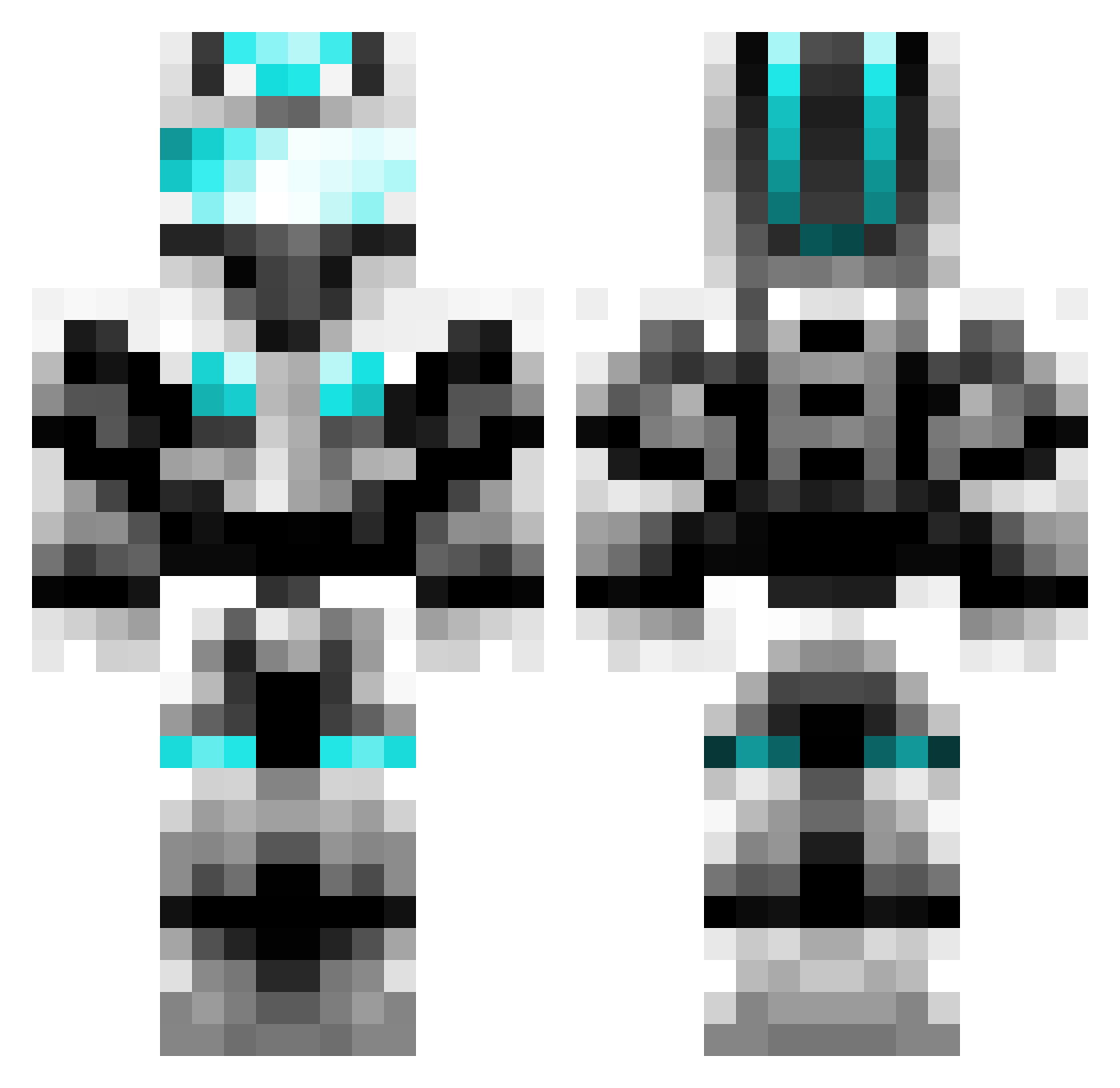
Current Minecraft skin of the player CellBlock013, loaded from the official Mojang API. Rotate the 3D model with your mouse or finger, then download the skin as a PNG file and use it in Minecraft: Bedrock Edition or Java Edition for free. When CellBlock013 changes their skin, this page updates automatically and the old skin stays in the history below.
Other players with this skin (601)
CellBlock013 was the 244th player we have seen with this skin, first spotted on 02.09.2026. The same skin was seen on these players. Open a nickname to see their current skin and skin history.
 Lampertheim babygrace PanzerCmdr75 Diamond_Jewel1 yaybacon2332 ATiChristopher Annettelittle xdx_arm Nitromanni BrennenF Krenni1 BEJLS VolTom pantech10 Bretsnev blackdeath715 joboe123456789 8BitPit123 SCSCJ minemaker9999 Kninja ops987 sorof Andi123RT joshc4231 FruityNutFlakes IIcceewizard SEBOOOO9 supergrover4 jbc388 nazgul_milano sanddaxx jusalex88 dovahkiin908 Maximus_Titan creeperlover378 Protossruler Hachidai tomcat52 Edwinrain Garnon88 NeverGP CrazyHorse44 Isyz12 distrikt7 green14106 blibobaggins bwinterton matherwell huggo2000 HeyGuys_PvP Lappen_JP upsilon24 Masterchief0228 angryN239 BBCF_Carlo _RainzyAFK20 ulterguy 03jacke solier
More Cyber Soldier Minecraft skins
See all 43 Cyber Soldier skins
How to install the CellBlock013 skin
- Press the Download button above to save the skin as a PNG file.
- Minecraft: Bedrock Edition (PE): open the Dressing Room from the main menu (or tap your character → Edit Character), go to Classic Skins → Owned, press the + (new skin) button, choose the downloaded PNG and pick the Classic (Steve) model. Works on PC and mobile; consoles cannot import custom skins.
- Minecraft: Java Edition: open the Minecraft Launcher, go to the Skins tab, click New Skin, load the PNG, pick the Classic (Steve) model and press Save & Use. You can also upload it at minecraft.net → Profile → Change Skin.
The skin does not show up after import - what should I do?
Restart Minecraft and open the Dressing Room again - imported skins sometimes appear only after a restart. Also make sure you selected the imported skin and picked the Classic (Steve) model.
Which model should I choose, Classic or Slim?
This skin is designed for the Classic (Steve) model. If you pick the wrong model, the arms of the skin will look stretched or squeezed.
Is the skin of CellBlock013 free to download?
Yes. Press Download, save the PNG file and use it in Minecraft: Bedrock Edition or Java Edition - no payment or registration needed. The skin also works on multiplayer servers and Realms.
More skins
Looking for more? Go back to all Minecraft skins and check the top skins of the week, month and all time, or find any player's skin by nickname.