
Catal9st - Minecraft Skins & Skin History
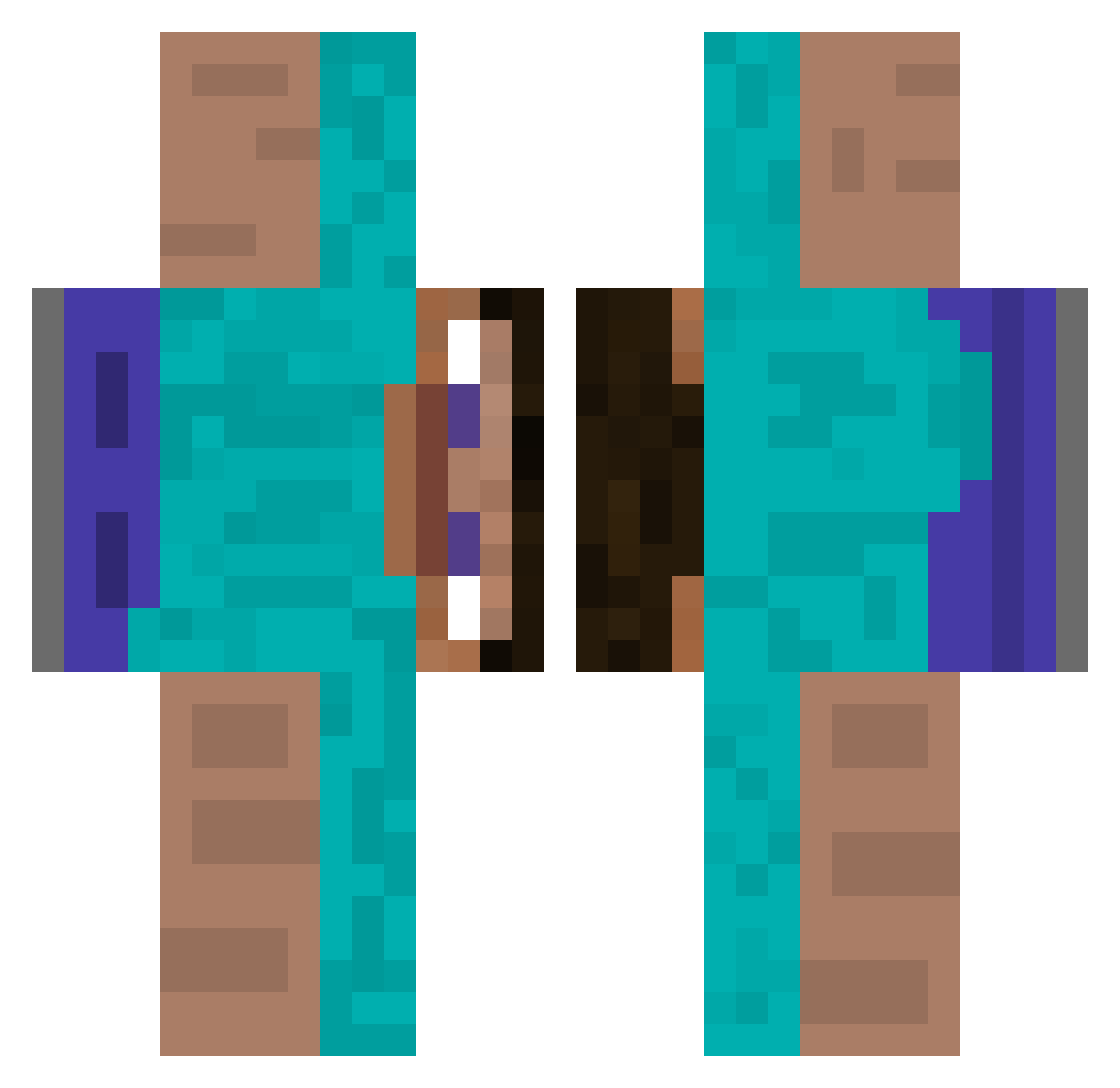
Current Minecraft skin of the player Catal9st, loaded from the official Mojang API. Rotate the 3D model with your mouse or finger, then download the skin as a PNG file and use it in Minecraft: Bedrock Edition or Java Edition for free. When Catal9st changes their skin, this page updates automatically and the old skin stays in the history below.
Other players with this skin (512)
Catal9st was the 163rd player we have seen with this skin, first spotted on 01.09.2026. The same skin was seen on these players. Open a nickname to see their current skin and skin history.
 Lipeliano AnAccountIMade_1 Nicoabz Killerbelow101 ur34 McGusty lach1423 Pixelrn daniel00210 nor_souza Blytepro TedTaylor90 MorningStar703 Gibrot kakumame Filipensikk redhot_SD ItisJesusDuck buchticky741 NICORICO123 Jmpr00 ArchieSouppp MrMeikkel beg0gla magieldowuz ZigiKrajzega YenerGG Baldo2024 Memethew flintolas GfazoBv jh_the_0waves bantanana mateus_u Byung10717 amir__s__m Winfer20 DoLynWoo miguel077 Mouwan_1234 Fewefr QuiteEpicIndeed i_eat_gravel Analtar gtv_44 ImmigrantChicken KIGGOO changnomom Loekalzzz Test_tical suzuki67 SICHAL123 SMarrrr Haxroor SlickMoves DrinkBleach69420 J1rks dealcantara BaoWanIsHere snolyzx
How to install the Catal9st skin
- Press the Download button above to save the skin as a PNG file.
- Minecraft: Bedrock Edition (PE): open the Dressing Room from the main menu (or tap your character → Edit Character), go to Classic Skins → Owned, press the + (new skin) button, choose the downloaded PNG and pick the Classic (Steve) model. Works on PC and mobile; consoles cannot import custom skins.
- Minecraft: Java Edition: open the Minecraft Launcher, go to the Skins tab, click New Skin, load the PNG, pick the Classic (Steve) model and press Save & Use. You can also upload it at minecraft.net → Profile → Change Skin.
The skin does not show up after import - what should I do?
Restart Minecraft and open the Dressing Room again - imported skins sometimes appear only after a restart. Also make sure you selected the imported skin and picked the Classic (Steve) model.
Which model should I choose, Classic or Slim?
This skin is designed for the Classic (Steve) model. If you pick the wrong model, the arms of the skin will look stretched or squeezed.
Is the skin of Catal9st free to download?
Yes. Press Download, save the PNG file and use it in Minecraft: Bedrock Edition or Java Edition - no payment or registration needed. The skin also works on multiplayer servers and Realms.
More skins
Looking for more? Go back to all Minecraft skins and check the top skins of the week, month and all time, or find any player's skin by nickname.