
Buggylimit23 - Minecraft Skins & Skin History
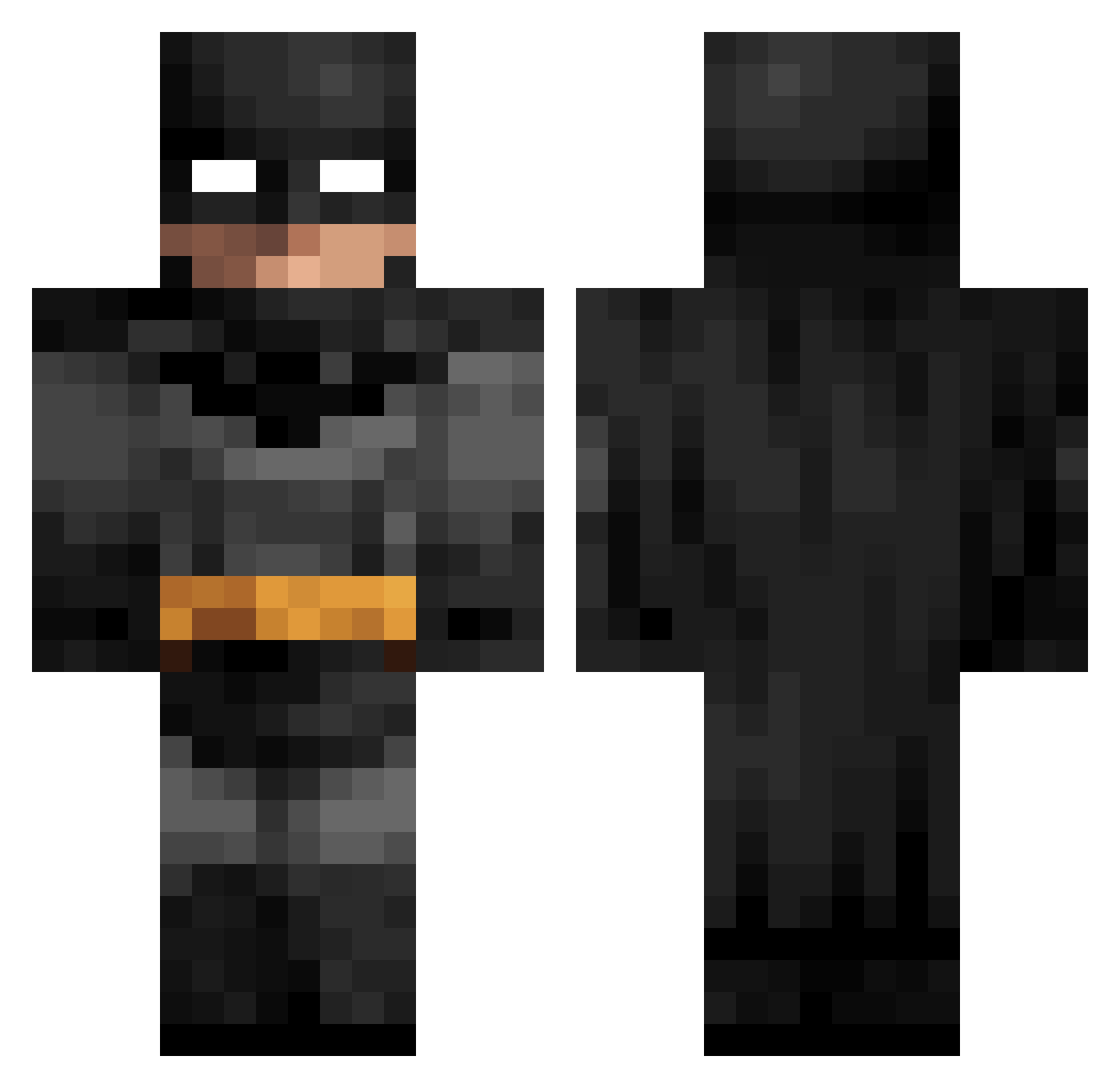
Current Minecraft skin of the player Buggylimit23, loaded from the official Mojang API. Rotate the 3D model with your mouse or finger, then download the skin as a PNG file and use it in Minecraft: Bedrock Edition or Java Edition for free. When Buggylimit23 changes their skin, this page updates automatically and the old skin stays in the history below.
Other players with this skin (104)
Buggylimit23 was the 35th player we have seen with this skin, first spotted on 03.09.2026. The same skin was seen on these players. Open a nickname to see their current skin and skin history.
 ibraschka
 Jakolor Detliss WTF69420 ItxReice comoestaslindah anakid55 Not_Boogie lucastutucas PalmtreeWhiskey JorgosThanos Balenci997 Deathstar_091 lutel_la Cesars2130 baranink MrCrimson46 jesseacarter Dormitorio 49ent MatReF Mrsy azza____ Papamike700 JJ_Ghost_26 CycloOxygenases buresmt neyzxs Nxthhhhh Mr_Rolton passatVW Fleile kamyk696 KINGGAMERSAJAL NeTZeed7 joazinho07
 Zeussek Balananas B3tman_ slpiz guitarzoom raad09 jarmoseta B4tman_Kn1ght Testicko Miguel5522 P0SEIDON_ Batman_Ant Sierco Hene _Beeboop_ Bulka524 __Akihiro__ Lystiss57
 Lluixs grasanu5678 latinamums Kiev1212 Rulxr SeawarOP
More Batman Minecraft skins
How to install the Buggylimit23 skin
- Press the Download button above to save the skin as a PNG file.
- Minecraft: Bedrock Edition (PE): open the Dressing Room from the main menu (or tap your character → Edit Character), go to Classic Skins → Owned, press the + (new skin) button, choose the downloaded PNG and pick the Classic (Steve) model. Works on PC and mobile; consoles cannot import custom skins.
- Minecraft: Java Edition: open the Minecraft Launcher, go to the Skins tab, click New Skin, load the PNG, pick the Classic (Steve) model and press Save & Use. You can also upload it at minecraft.net → Profile → Change Skin.
The skin does not show up after import - what should I do?
Restart Minecraft and open the Dressing Room again - imported skins sometimes appear only after a restart. Also make sure you selected the imported skin and picked the Classic (Steve) model.
Which model should I choose, Classic or Slim?
This skin is designed for the Classic (Steve) model. If you pick the wrong model, the arms of the skin will look stretched or squeezed.
Is the skin of Buggylimit23 free to download?
Yes. Press Download, save the PNG file and use it in Minecraft: Bedrock Edition or Java Edition - no payment or registration needed. The skin also works on multiplayer servers and Realms.
More skins
Looking for more? Go back to all Minecraft skins and check the top skins of the week, month and all time, or find any player's skin by nickname.