
Bowser8989 - Minecraft Skins & Skin History
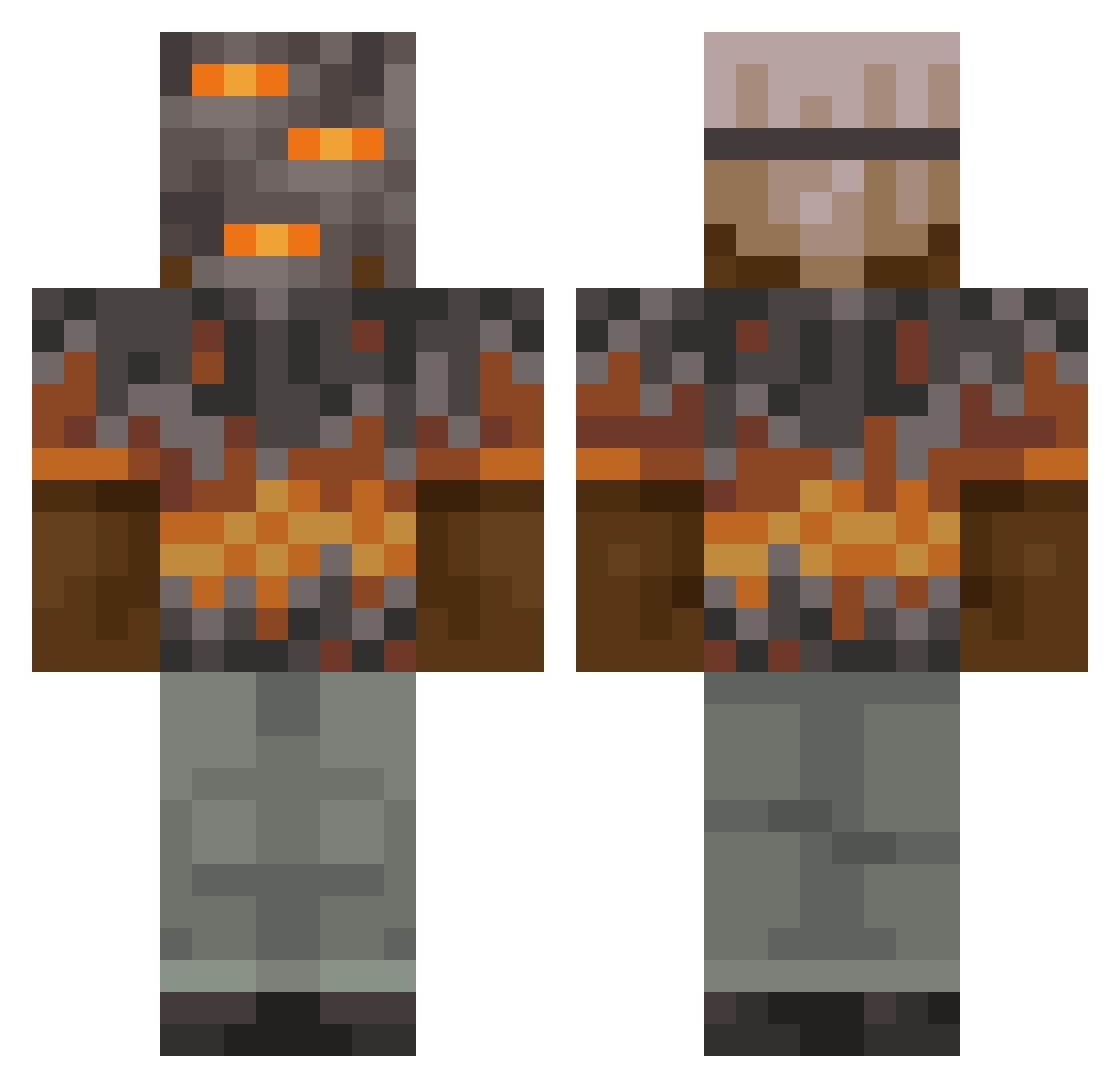
Current Minecraft skin of the player Bowser8989, loaded from the official Mojang API. Rotate the 3D model with your mouse or finger, then download the skin as a PNG file and use it in Minecraft: Bedrock Edition or Java Edition for free. When Bowser8989 changes their skin, this page updates automatically and the old skin stays in the history below.
Other players with this skin (894)
Bowser8989 was the 424th player we have seen with this skin, first spotted on 09.09.2026. The same skin was seen on these players. Open a nickname to see their current skin and skin history.
 jrbeast27 emrkwk HeraTheBeast Astemdr ostSTRUPpen Mouse1943 IrishW1130 TRICKYD6666 driveahead Dethkflat godzilla92521 Galexy01 Opwarrier MiguelMogli BIGWILL6564 yusa2761 ZOtterBrother Danielka_335 Wolfe_gang EliteDemon22 INSDELL scherpmode
 ichigoat0 pmornluv Gammer651 Kisby1 beserker1010 TheLegendMcD Speakeazyg LeonBlanco2015 BELOPES1706 jessita79 DrDark404Slayer AZROLT Lyc0nus Kaytronik xDeathReapersx BeXavier03 HrSeo Neo1337_
 pppaul28 TheRebellion3 dance_likefly Larchen1175 tyler162 YopCraft
 Fire_Man6535 rileyseymour17 zyriis Tanipro KimDDilBBang anonymoustravis LittleClothes Mr_Big1309 Mariolone Liam6140 C3lta360 Wommy44 Ganocuk Tudoriv
More Rock Minecraft skins
How to install the Bowser8989 skin
- Press the Download button above to save the skin as a PNG file.
- Minecraft: Bedrock Edition (PE): open the Dressing Room from the main menu (or tap your character → Edit Character), go to Classic Skins → Owned, press the + (new skin) button, choose the downloaded PNG and pick the Classic (Steve) model. Works on PC and mobile; consoles cannot import custom skins.
- Minecraft: Java Edition: open the Minecraft Launcher, go to the Skins tab, click New Skin, load the PNG, pick the Classic (Steve) model and press Save & Use. You can also upload it at minecraft.net → Profile → Change Skin.
The skin does not show up after import - what should I do?
Restart Minecraft and open the Dressing Room again - imported skins sometimes appear only after a restart. Also make sure you selected the imported skin and picked the Classic (Steve) model.
Which model should I choose, Classic or Slim?
This skin is designed for the Classic (Steve) model. If you pick the wrong model, the arms of the skin will look stretched or squeezed.
Is the skin of Bowser8989 free to download?
Yes. Press Download, save the PNG file and use it in Minecraft: Bedrock Edition or Java Edition - no payment or registration needed. The skin also works on multiplayer servers and Realms.
More skins
Looking for more? Go back to all Minecraft skins and check the top skins of the week, month and all time, or find any player's skin by nickname.