
BlobbyFX - Minecraft Skins & Skin History
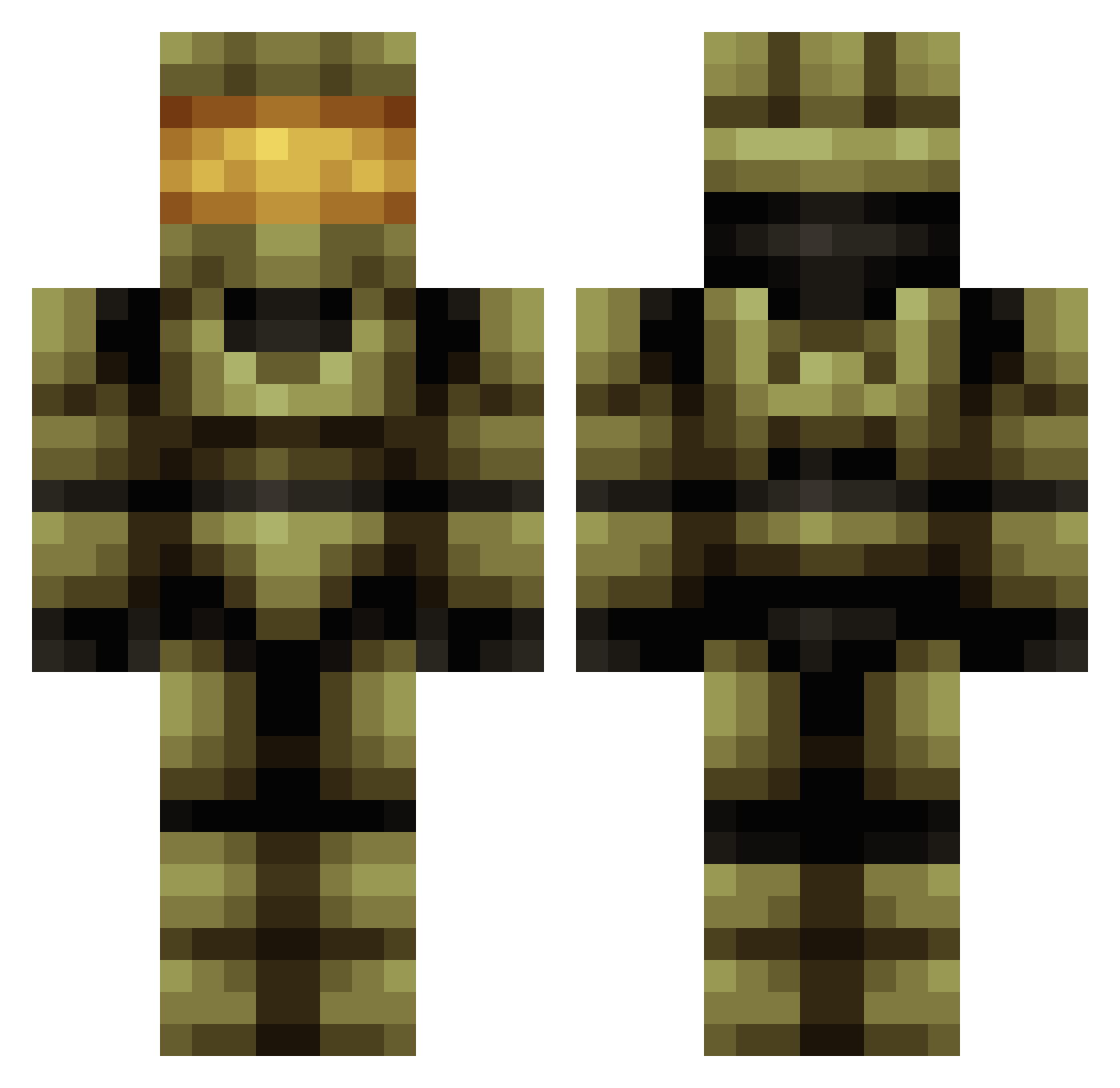
Current Minecraft skin of the player BlobbyFX, loaded from the official Mojang API. Rotate the 3D model with your mouse or finger, then download the skin as a PNG file and use it in Minecraft: Bedrock Edition or Java Edition for free. When BlobbyFX changes their skin, this page updates automatically and the old skin stays in the history below.
Other players with this skin (419)
BlobbyFX was the 158th player we have seen with this skin, first spotted on 08.09.2026. The same skin was seen on these players. Open a nickname to see their current skin and skin history.
 miniboz12 TempusWasTaken Enlude ToxicGhost102 andrewrprice CanadianMoose212 kaiworm digitalsms MyAnklesBend JennaTolls69 BTallack Dylclou Devildriver15 Shinku_ Mauro28199 Joemama89 MrRobet Donnexia Grimmbeast KEN_98 kenw37 Xuh katarinaaabluuu IWillChase JayAyWhyAy BOT_CASEY Pacco1984 battlecat141 TheDaveyGravey rokgames Habsurde Luck0q Dihdestroyer RT0901 ProfessionalDuck TheEternalFury Ohshidash carlorodriguez Bledo47 PURPLEsmurff21 Ginger__Judas PSLIME RathKo Valar27 MasterKief17 Gator1025 Lucas811 azdyx Vasiako KYEcod Bahzko RinS9 DEAD7089 FlashJee Sir_Leinad Mattmeistergamer BubbaZing Cooked_Reus JorineShaine Silence_945
More Master Chief Minecraft skins
See all 527 Master Chief skins
How to install the BlobbyFX skin
- Press the Download button above to save the skin as a PNG file.
- Minecraft: Bedrock Edition (PE): open the Dressing Room from the main menu (or tap your character → Edit Character), go to Classic Skins → Owned, press the + (new skin) button, choose the downloaded PNG and pick the Classic (Steve) model. Works on PC and mobile; consoles cannot import custom skins.
- Minecraft: Java Edition: open the Minecraft Launcher, go to the Skins tab, click New Skin, load the PNG, pick the Classic (Steve) model and press Save & Use. You can also upload it at minecraft.net → Profile → Change Skin.
The skin does not show up after import - what should I do?
Restart Minecraft and open the Dressing Room again - imported skins sometimes appear only after a restart. Also make sure you selected the imported skin and picked the Classic (Steve) model.
Which model should I choose, Classic or Slim?
This skin is designed for the Classic (Steve) model. If you pick the wrong model, the arms of the skin will look stretched or squeezed.
Is the skin of BlobbyFX free to download?
Yes. Press Download, save the PNG file and use it in Minecraft: Bedrock Edition or Java Edition - no payment or registration needed. The skin also works on multiplayer servers and Realms.
More skins
Looking for more? Go back to all Minecraft skins and check the top skins of the week, month and all time, or find any player's skin by nickname.