
BerkayRealy - Minecraft Skins & Skin History
Current Minecraft skin of the player BerkayRealy, loaded from the official Mojang API. Rotate the 3D model with your mouse or finger, then download the skin as a PNG file and use it in Minecraft: Bedrock Edition or Java Edition for free. When BerkayRealy changes their skin, this page updates automatically and the old skin stays in the history below.
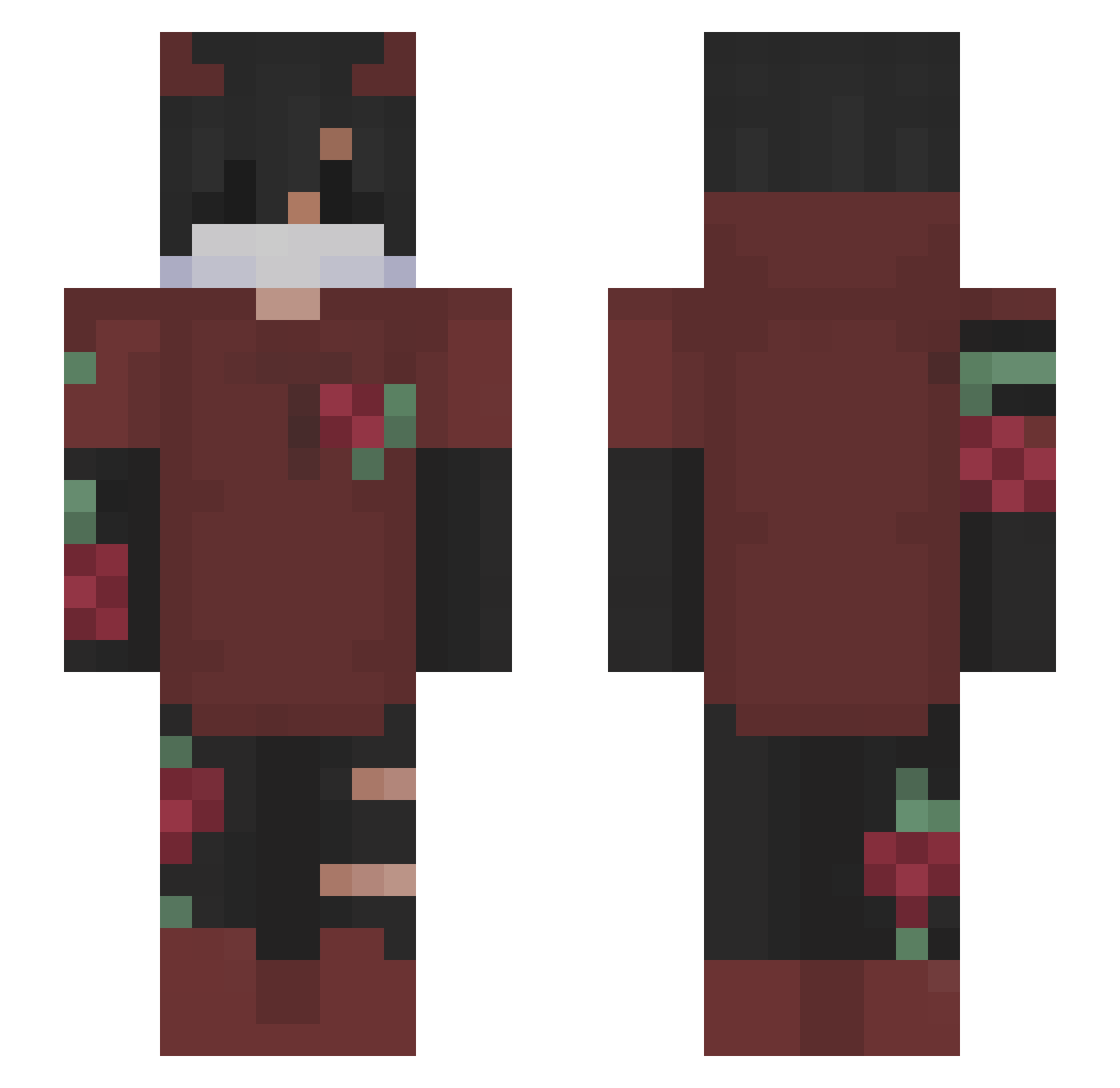
Other players with this skin (153)
BerkayRealy was the 39th player we have seen with this skin, first spotted on 19.08.2026. The same skin was seen on these players. Open a nickname to see their current skin and skin history.
 StaresAtYou TheSurrealShot89 JuSt_Codex Sky2134 kirit0a dreamf1ghter ilike2race18 IAMYY4U AnotherLove solupapi KKryptiic kHRYSTALAWW qDeca Hunt3rKaris iii_OrangeJuice ItsMoHypixel not_s0lar Anonimus_Tadzhik playforgames MestleDoCalaio
 Sirdyty Evaze xteks foteks pepiyo BaguetteBuddy ignMid Dirk7589 Parola DrMeatball25 KingKoolaid Super_Joshua_09 TsukaiimaSan MalfoyMK Xenossx Perchaa_567 Doctor_Z_Bra SrIIsaquee AngelzAyala Ravixli MelancholicBelle Marat_01 Ahmvvd b0kugo r0ckstarz mulir66 JustATypo vGast Dimasik2010 RedXFire_ TheLegendIsDied _KaLu4Ka Sensu Joppenhopp slo1985 UiDan1el Joshicus09 Kryptids_alt qbhq ouder
More Demon Horns Minecraft skins
How to install the BerkayRealy skin
- Press the Download button above to save the skin as a PNG file.
- Minecraft: Bedrock Edition (PE): open the Dressing Room from the main menu (or tap your character → Edit Character), go to Classic Skins → Owned, press the + (new skin) button, choose the downloaded PNG and pick the Slim (Alex) model. Works on PC and mobile; consoles cannot import custom skins.
- Minecraft: Java Edition: open the Minecraft Launcher, go to the Skins tab, click New Skin, load the PNG, pick the Slim (Alex) model and press Save & Use. You can also upload it at minecraft.net → Profile → Change Skin.
The skin does not show up after import - what should I do?
Restart Minecraft and open the Dressing Room again - imported skins sometimes appear only after a restart. Also make sure you selected the imported skin and picked the Slim (Alex) model.
Which model should I choose, Classic or Slim?
This skin is designed for the Slim (Alex) model. If you pick the wrong model, the arms of the skin will look stretched or squeezed.
Is the skin of BerkayRealy free to download?
Yes. Press Download, save the PNG file and use it in Minecraft: Bedrock Edition or Java Edition - no payment or registration needed. The skin also works on multiplayer servers and Realms.
More skins
Looking for more? Go back to all Minecraft skins and check the top skins of the week, month and all time, or find any player's skin by nickname.