
BatataNeko - Minecraft Skins & Skin History
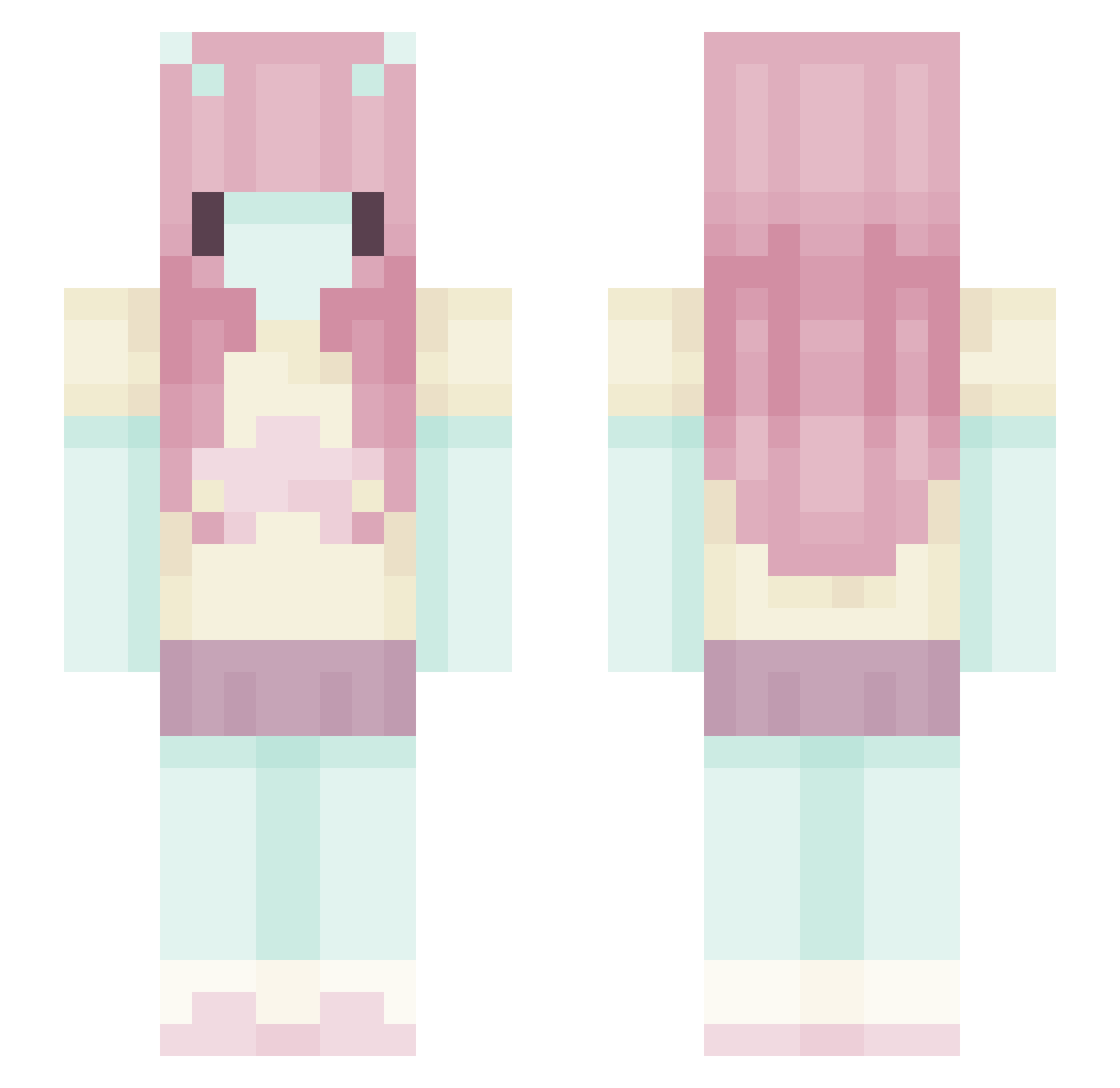
Current Minecraft skin of the player BatataNeko, loaded from the official Mojang API. Rotate the 3D model with your mouse or finger, then download the skin as a PNG file and use it in Minecraft: Bedrock Edition or Java Edition for free. When BatataNeko changes their skin, this page updates automatically and the old skin stays in the history below.
Other players with this skin (579)
BatataNeko was the 78th player we have seen with this skin, first spotted on 07.08.2026. The same skin was seen on these players. Open a nickname to see their current skin and skin history.
 justcallm3hannah
 Tillsx
 AdmiringLake58 beatboybye m5ylin mineri73 FrozenFlame1311 Kybii saod Hal0o13 M1ffyu lilicxi Anta9onist Trashiccca fertilityclinic
 rubym00n julssa 1enja nharkl seufict plantlings AlejaRosales18 Hedgex0 soursword sakmaki zomqiejay 222venus Additi frankfurtelka12
 aundd cultmisu
 AbyssBloom ItsbabyLea14 zelaous Tallulahlu AnditheBat fizzysodapanda corpseofsky Lelii_ tzi_uwgbL_02_20 er1 gothgirlihop2003 Wiggiie
 af1f buwyrgf Quinnsoulx Fawn1203
 DiNossaurr
 Anathema3103 SmolFr0g ksksksunya pausitauwu __SpookyGhost__ faivc Relapse7 awannie
 barriodown sparklehearted Danochkacohen
 Anitrixx
More Zero Two Minecraft skins
How to install the BatataNeko skin
- Press the Download button above to save the skin as a PNG file.
- Minecraft: Bedrock Edition (PE): open the Dressing Room from the main menu (or tap your character → Edit Character), go to Classic Skins → Owned, press the + (new skin) button, choose the downloaded PNG and pick the Slim (Alex) model. Works on PC and mobile; consoles cannot import custom skins.
- Minecraft: Java Edition: open the Minecraft Launcher, go to the Skins tab, click New Skin, load the PNG, pick the Slim (Alex) model and press Save & Use. You can also upload it at minecraft.net → Profile → Change Skin.
The skin does not show up after import - what should I do?
Restart Minecraft and open the Dressing Room again - imported skins sometimes appear only after a restart. Also make sure you selected the imported skin and picked the Slim (Alex) model.
Which model should I choose, Classic or Slim?
This skin is designed for the Slim (Alex) model. If you pick the wrong model, the arms of the skin will look stretched or squeezed.
Is the skin of BatataNeko free to download?
Yes. Press Download, save the PNG file and use it in Minecraft: Bedrock Edition or Java Edition - no payment or registration needed. The skin also works on multiplayer servers and Realms.
More skins
Looking for more? Go back to all Minecraft skins and check the top skins of the week, month and all time, or find any player's skin by nickname.